
|
|
| Introduction, Specs and Features | |||
A lot has happened over the past month in the world of 3D gaming graphics: NVIDIA launched the GeForce GTX 280 and GTX 260, ATI introduced us to the Radeon HD 4870 and HD 4850, and NVIDIA tried to rain on the Radeon HD 4800 Series parade by dropping the 55nm GeForce 9800 GTX+. If that weren't enough, we've already seen price drops on the GTX 280 and GTX 260 as well. The latest fight for your pixel pushing dollars is shaping up to be quite a battle, and it's just getting started.
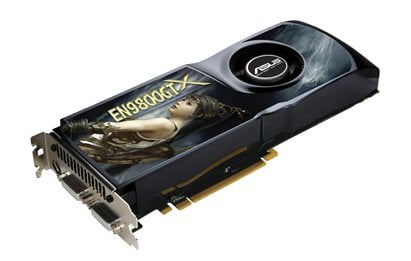
Although the latest and greatest graphics cards are always a hot topic, we're going to focus on one of the established predecessors - a GeForce 9800 GTX (without the plus sign) in this piece. Our sample comes from ASUS in the form of the EN9800GTX TOP. If you are a regular reader of HotHardware (or video card reviews in general), then you are probably already aware that "TOP" is ASUS's designation to indicate that the card comes factory overclocked. "TOP" stands for "Top Overclocking Performance." In this case, the EN9800GTX TOP is overclocked to 755 MHz for the core (reference speed is 675 MHz), 1175 MHz for the memory (reference speed is 1100 MHz), and 1840 MHz for the shader clock (reference speed is 1688 MHz). One interesting note is that this card is actually faster than the upcoming GeForce 9800 GTX+ that we mentioned above, but the EN9800GTX TOP is of course not a 55nm part like the 9800 GTX+. In the table below, you can see how the EN9800GTX TOP compares to NVIDIA's reference GeForce 9800 GTX and reference GeForce 8800 GTX.
The EN9800GTX TOP comes in the typical large ASUS box with a handle on top. Considering ASUS is trying to be more "green" by reducing the energy use of its motherboards, we'd love to see the compay take another green step and reduce the size of its video card packages. We have to admit, though, that we'd like to see ASUS use smaller boxes for another reason: so they take up less space in the lab as well.
|
| Closer Look at the EN9800GTX TOP |
|
| Test System and 3DMark06 | ||||||||||||
We are very close to transitioning away from 3DMark06 since 3DMark Vantage has arrived, but we decided to go ahead and include these results since so many of you are much more familiar with 3DMark06. The ASUS EN9800GTX TOP proves to be the top performer, but there isn't really much difference between the EN9800GTX TOP and the reference 9800 GTX. |
| 3DMark Vantage Results | ||||||
Unlike the 3DMark06 tests, the 3DMark Vantage tests actually show the power and potential of two EN9800GTX TOPs in SLI. Additionally, the EN9800GTX TOP struts its stuff in single-card mode as well and beats all of the other cards by a respectable margin. It's interesting to see that the reference 8800 GTX bested the reference 9800 GTX, but it could not defeat the overclocked EN9800GTX TOP. |
| Company of Heroes Results | ||||||
In the DirectX 9 CoH tests, the SLI configuration really doesn't get a chance to spread its legs. The single EN9800GTX TOP does make quick work of the competition, though, at 1600x1200.
Fortunately, the DirectX 10 results scale considerably better. These results show the EN9800GTX TOP SLI configuration coming out on top, followed by the single EN9800GTX TOP, which is exactly what we expected to see. |
| Enemy Territory: Quake Wars Results | ||||||
Like in our DX9 CoH tests on the previous page, the SLI configuration doesn't get to show off its power in the ETQW test. Interestingly, the reference 8800 GTX edges out the EN9800GTX TOP at 1600x1200. Higher resolutions would probably make this more interesting and maybe even change which card is the winner. |
| Half-Life 2: Episode 2 Results | ||||||
The EN9800GTX TOP comes out on top in our Half-Life 2 tests, which isn't much of a surprise considering the other results we've seen so far. |
| Crysis Results | ||||||
First thing we'd like to note is that we have yet to figure out why the EN9800GTX TOP SLI configuration performs so relatively poorly in both the DirectX 9 and 10 tests. We're still looking into it, but we wanted to show you the results in the meantime. If we ever get better results for the SLI configuration, we'll update this article. At 1280x1024 and 1600x1200, the EN9800GTX dominates all of the other cards. It's nice to see that ASUS's overclock leads to an almost 3-FPS boost at 1600x1200. How can you not love factory-overclocked cards?
Once again, at 1280x1024 and 1600x1200, the EN9800GTX TOP performs quite well in Crysis. |
| Performance Summary and Conclusion | ||||||
Performance Summary: Thanks to its factory overclock, the ASUS EN9800GTX TOP outperformed a stock GeForce 9800 GTX across the board and compared favorably with our reference systems. There are times when the reference 8800 GTX can beat out the reference 9800 GTX, but the EN9800GTX TOP's faster clock speeds give it an edge most of the time. If performance is your bag and you're in the market for a relatively affordable NVIDIA GPU, then you should definitely lean towards an overclocked version of the 9800 GTX, like the EN9800GTX TOP, in order to make sure it outperforms its predecessor.
If you already have an 8800 GTX, then it's hard to recommend a 9800 GTX to you, unless you want one or more of the new features. Otherwise, we wouldn't hesitate to recommend that you take a look at the EN9800GTX TOP if you can find it for no more than $230. With the GTX 260 scraping $300, we'd be reluctant to spend more than that on any 9800 GTX. If the EN9800GTX TOP is hard to find, as has been the case for some ASUS-made graphics cards lately, then be patient and hope that ASUS releases an EN9800GTX+ TOP, or consider one of AMD's new Radeon HD 4800 series cards.
|
||||||

