
Logo   Banner   TopRight
TopUnder
Transparent
NVIDIA GeForce 9800 GTX Round-Up: BFG, EVGA, Zogis
Transparent
Date: Apr 01, 2008
Section:Graphics/Sound
Author: Marco Chiappetta
Transparent
Introduction and Speciifcations


NVIDIA's onslaught of new graphics cards based on the company's G92 graphics processor continues today with the introduction of the GeForce 9800 GTX.  As its name suggests, the GeForce 9800 GTX is the successor to the wildly popular and unusually long-lived GeForce 8800 GTX.

We're sure you all know by now that the GeForce 8800 GTX was introduced in November of 2006 and sat unrivaled at the top of the 3D graphics food chain until the 8800 Ultra was released, which was essentially the same card with a different cooler and higher clock speeds.  From an enthusiast's standpoint, the GeForce 8800 GTX must be looked at as nothing but an overwhelming success.  Regardless of the actual sales figures (which are actually very good), the 8800 GTX's performance alone was so strong, that even 18-months later, chief rival ATI has yet to release a single-GPU as fast as the 8800 GTX.  An enthusiast who bought one way back in November 2006, still has one of the most powerful graphics cards available today.
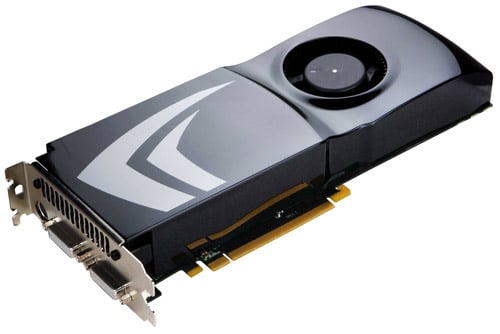
 
NVIDIA GeForce 9800 GTX


With the GeForce 8800 GTX's excellent pedigree, the new GeForce 9800 GTX certainly has some pretty big shoes to fill.  Its name alone will make many users assume the GeForce 9800 GTX is NVIDIA's new flagship single GPU powered graphics card.  And technically it is.  But we all know what happens when people assume...

Don't sweat it though.  There's no need to make any assumptions.  We've got a trio of GeForce 9800 GTX cards in-house from NVIDIA's partners BFG, EVGA, and Zogis and have put them through the wringer with some of today's more popular games running at XHD resolutions.  By the end of the article, we'll know for sure whether or not the new GeForce 9800 GTX is worthy of its lofty name.  For now though, let's see what the GeForce 9800 GTX is made of.


As you can see, on some levels the GeForce 9800 GTX is very similar to the GeForce 8800 GTX.  They both have a 10.5" PCB and are equipped with 128 stream processor cores and dual 6-pin PCI Express power connectors.  As we've already mentioned though, the GeForce 9800 GTX is based on the newer 65nm G92 GPU, as opposed to the 90nm G80.  As such, the 9800 GTX is outfitted with only a 256-bit memory interface and a 512MB frame buffer.  If you recall, the 8800 GTX has a 384-bit interface with a 768MB frame buffer.  The 9800 GTX somewhat makes up for this through the use of faster 1.1GHz memory (2.2GHz) effective, that results in over 70GB/s of peak memory bandwidth, but it doesn't quite match the 8800 GTX in this department.


According to NVIDIA's reference specifications, the GeForce 9800 GTX calls for a 675MHz core GPU clock, with 1.68GHz shader cores, and the aforementioned 1.1GHz memory.  Cards are equipped with a sleek dual-slot cooler with a variable speed fan, dual dual-link DVI outputs, and an HDTV output.  We should also note that like the GeForce 9800 GX2, the 9800 GTX has an S/PDIF audio input as well, for funneling audio into the graphics card and out of an HDMI adapter.

Unlike the older GTX, the 9800 GTX has full support for NVIDIA's PureVideo HD video engine, which is a clear advantage for the new card.  And the GeForce 9800 GTX also has dual SLI-edge connectors which give the card the ability to support 2- and 3-way SLI configurations.  The GeForce 9800 GTX also supports Hybrid SLI's Hybrid Power feature, which will allow the card to shut down completely to save power when used in conjunction with a compatible IGP.  Essentially, the GeForce 9800 GTX is an amalgam of the GeForce 8800 GTX / Ultra and new GeForce 8800 GTS 512MB, with some increased frequencies and a few more features.

Transparent
EVGA, BFG, Zogis GeForce 9800 GTX Cards


For the purposes of this article, we got our hands on a trio of GeForce 9800 GTX cards from BFG, EVGA, and Zogis.  All three of the cards are basically the same and differ slightly only in appearance and in regard to their included accessory bundles.


BFG GeForce 9800 GTX

The BFG GeForce 9800 GTX strictly adheres to NVIDIA's reference specifications.  The card's GPU is clocked at 675MHz and its 512MB of on-board memory at 1.1GHz (2.2GHz effective).  It includes an obligatory driver disc, a couple of case badges, documentation that outlines the installation process, configuration, and excellent lifetime warranty, and a few adapters - DVI-to-VGA, HD Component dongle, and a dual-Molex to 6-pin PCI Express power adapter.  As you can see, other than the decals affixed to its fan shroud, the BFG GeForce 9800 GTX looks just like the reference card pictured on the previous page.


ZOGIS GeForce 9800 GTX

This is the first time we've had the opportunity to evaluate a product from Zogis here at HotHardware.  If you are unfamiliar with Zogis, they are a U.S. based subsidiary of JV Logic, Inc. (as is PowerColor) and are an authorized board partner of NVIDIA.  Like BFG's offering, the Zogis GeForce 9800 GTX is a reference design (same clock speeds, cooler, etc.).  The only marking on the entire card to designate it as a Zogis product is the "Z" sticker on the fan; the shroud actually bares NVIDIA's markings.

The Zogis GeForce 9800 GTX includes a pair of dual-Molex to 6-pin PCI Express power adapters, an HD component output dongle, an S-Video cable, dual DVI-to-VGA adapters, a large Zogis sticker, a driver disc, and a user's manual.

In an effort to differentiate their product from other GTX cards, Zogis is giving everyone who purchases this card from NewEgg a free t-shirt during the launch event and a chance to win an additional card for some SLI action.  Details regarding the promotion should be available on NewEgg soon.


EVGA e-GeForce 9800 GTX

Finally we present to you the EVGA e-GeForce 9800 GTX.  The EVGA e-GeForce 9800 GTX pictured here also follows NVIDIA's reference design to the letter.  The e-GeForce 9800 GTX's fan and shroud are adorned with elaborate EVGA markings, but underneath the card is essentially identical to the others.  It's bundle is also much like Zogis' and includes a pair of dual-Molex to 6-pin PCI Express power adapters, an HD component output dongle, an S-Video cable, dual DVI-to-VGA adapters,  a driver disc, and a user's manual.

Transparent
Our Test System and 3DMark06


HOW WE CONFIGURED THE TEST SYSTEMS: We tested all of the graphics cards used in this article on either an Asus nForce 790i SLI Ultra based Striker II Extreme motherboard (NVIDIA GPUs) or an X48 based Asus P5E3 Premium (ATI GPUs) powered by a Core 2 Extreme QX6850 quad-core processor and 2GB of low-latency Corsair RAM. The first thing we did when configuring these test systems was enter their respective BIOSes and set all values to their "optimized" or "high performance" default settings. Then we manually configured the memory timings and disabled any integrated peripherals that wouldn't be put to use. The hard drive was then formatted, and Windows Vista Ultimate was installed. When the installation was complete we fully updated the OS, and installed the latest DX10 redist and various hotfixes, along with the necessary drivers and applications.

HotHardware's Test Systems
Intel and NVIDIA Powered


Hardware Used:
Core 2 Extreme QX6850 (3GHz)

Asus Striker II Extreme
(nForce 790i SLI Ultra chipset)

Asus P5E3 Premium
(X48 Express)

Radeon HD 3870 X2 (x2)
Radeon HD 3870
GeForce 9800 GTX (3)
GeForce 9800 GX2 (x2)
GeForce 8800 GTS 512 (x2)
GeForce 8800 GTX

2048MB Corsair DDR3-1333 C7
(2 X 1GB)

Integrated Audio
Integrated Network

Western Digital "Raptor" 74GB
(10,000RPM - SATA)


Relevant Software:

Windows Vista Ultimate

NVIDIA Forceware v174.53
ATI Catalyst v8.3

Benchmarks Used:
3DMark06 v1.0.2
Unreal Tournament 3
Crysis
Half Life 2: Episode 2
Enemy Territory: Quake Wars

Futuremark 3DMark06
Synthetic DirectX Gaming


3DMark06

3DMark06 is the most recent addition to the 3DMark franchise. This version differs from 3Dmark05 in a number of ways, and includes not only Shader Model 2.0 tests, but Shader Model 3.0 and HDR tests as well. Some of the assets from 3DMark05 have been re-used, but the scenes are now rendered with much more geometric detail and the shader complexity is vastly increased as well. Max shader length in 3DMark05 was 96 instructions, while 3DMark06 ups that number to 512. 3DMark06 also employs much more lighting and there is extensive use of soft shadows. With 3DMark06, Futuremark has also updated how the final score is tabulated. In this latest version of the benchmark, SM 2.0 and HDR / SM3.0 tests are weighted and the CPU score is factored into the final tally as well.


We've got a lot of GeForce 9800 GTX related data available in this piece.  We've tested the three GeForce 9800 GTX cards we received individually, in a 2-card SLI configuration, and in a 3-way SLI configuration.  As you can see, the new 9800 GTX puts up the best 3DMark06 score of any single-GPU based graphics card.  And in SLI-mode it outpaced all other NVIDIA-powered setups.  Three way SLI resulted in some additional CPU overhead though, hence the somewhat lower score.


3DMark06's individual shader model tests show how the GeForce 9800 GTX's scores were achieved.  The traditional 2-card SLI setup put up some strong numbers here, outperforming all other NVIDIA configurations.

Transparent
Half Life 2: Episode 2


Half Life 2: Episode 2
DirectX Gaming Performance


Half Life 2:
Episode 2

Thanks to the dedication of hardcore PC gamers and a huge mod-community, the original Half-Life became one of the most successful first person shooters of all time.  And thanks to an updated game engine, gorgeous visual, and intelligent weapon and level design, Half Life 2 became just as popular.  Episode 2 offers a number of visual enhancements including better looking transparent texture anti-aliasing. These tests were run at resolutions of 1,920 x 1,200 and 2,560 x 1,600 with 4X anti-aliasing and 16X anisotropic filtering enabled concurrently.  Color correction and HDR rendering were also enabled in the game engine as well.  We used a custom recorded timedemo file to benchmark all cards in this test.


The GeForce 9800 GTX performed very well in our custom Half Life 2: Episode 2 benchmark.  In a single-card configuration, it was the fastest single-GPU powered card, slightly outpacing the 8800 GTS 512MB.  In a 2-card SLI setup, scaling was very good and it once again and it came close to catching the Quad-SLI configuration.  And while running in 3-Way SLI mode, the GeForce 9800 GTX card put up the best numbers of all of the configurations we tested.

Transparent
Unreal Tournament 3


Unreal Tournament 3
DirectX Gaming Performance


Unreal Tournament 3

If you're a long-time PC gamer, the Unreal Tournament franchise should need no introduction.  UT's fast paced action and over the top weapons have been popular for as long as Epic has been making the games.  For these tests, we used the latest addition to the franchise, Unreal Tournament 3.  The game doesn't have a built-in benchmarking tool, however, so we enlisted the help of FRAPS here.  These tests were run at resolutions of 1,920 x 1,200 and 2,560 x 1,600 with no anti-aliasing or anisotropic filtering enabled, but with the UT3's in game graphical option set to their maximum, with color correction enabled.


The GeForce 9800 GTX finished a few frames per second ahead of the GeForce 8800 GTS 512MB and 8800 GTX cards in Unreal Tournament 3 at both resolutions.  Its lead increases somewhat when running in an SLI configurations, but even at these high resolutions, UT3 becomes mostly CPU bound when you've got that much graphics horsepower backing the game.

Transparent
Enemy Territory: Quake Wars


Enemy Territory: Quake Wars
OpenGL Gaming Performance


Enemy Territory:
Quake Wars

Enemy Territory: Quake Wars is Based on id's radically enhanced Doom 3 engine and viewed by many as Battlefield 2 meets the Strogg, and then some.  In fact, we'd venture to say that id took EA's team-based warfare genre up a notch or two.  ET: Quake Wars also marks the introduction of John Carmack's "Megatexture" technology that employs extremely large environment and terrain textures that cover vast areas of maps without the need to repeat and tile many small textures.  The beauty of megatexture technology is that each unit only takes up a maximum of 8MB of frame buffer memory.  Add to that HDR-like bloom lighting and leading edge shadowing effects and Enemy Territory: Quake Wars looks great, plays well and works high end graphics cards vigorously.  The game was tested with all of its in-game options set to their maximum values with soft particles enabled in addition to 4X anti-aliasing and 16x anisotropic filtering.


We saw more of the same with our custom Enemy Territory: Quake Wars benchmark.  In this game, the GeForce 9800 GTX was once again slightly faster then the GeForce 8800 GTS 512MB and 8800 GTX at both resolution.  It's also worth pointing out that 2- and 3-way GeForce 9800 GTX SLI showed very good scaling in this OpenGL application, and would have been the fastest overall had we not also tested a dual-GeForce 9800 GX2 quad-SLI configuration.

Transparent
Crysis


Crysis v1.2
DirectX 10 Gaming Performance


Crysis

If you're at all into enthusiast computing, the highly anticipated single player, FPS smash-hit Crysis, should require no introduction. Crytek's game engine visuals are easily the most impressive real-time 3D renderings we've seen on the computer screen to date.  The engine employs some of the latest techniques in 3D rendering like Parallax Occlusion Mapping, Subsurface Scattering, Motion Blur and Depth-of-Field effects, as well as some of the most impressive use of Shader technology we've seen yet.  In short, for those of you that want to skip the technical jib-jab, Crysis is HOT.  We ran the full game patched to v1.2 with all of the game's visual options set to 'High' to put a significant load on the graphics cards being tested.


The various GeForce 9800 GTX configurations performed as expected in Crysis.  In a single-card setup, the 9800 GTX finished just ahead of the 8800 GTS 512MB and 8800 GTX.  A 2-card 9800 GTX SLI configurations showed good performance scaling, finishing just ahead of the GTS SLI setup.  And 3-way SLI scaled as well, but to a much smaller degree.  We suspect NVIDIA will be working more of their magic with future driver releases to wring more performance from the three and four GPU configurations.

Transparent
Power Consumption


Before we bring this article to a close, we'd like to cover a few final data points. Throughout all of our benchmarking and testing, we monitored how much power our test systems were consuming using a power meter. Our goal was to give you all an idea as to how much power each configuration used while idling and under a heavy workload. Please keep in mind that we were testing total system power consumption at the outlet here, not just the power being drawn by the motherboards alone.

Total System Power Consumption
Tested at the Outlet


Our power consumption measurements yielded some interesting results.  In a single-card confugration, the GeForce 9800 GTX consumed less power than the GTS 512MB under both idle and load conditions, which is a surprise considering it essentially a higher clocked version of the card.  In an SLI configuration, power was right on-par with the GTS setup, and in a three-way configuration the new GTXes consumed a bit more power than the Quad-SLI setup.

Transparent
Our Summary and Conclusion


Performance Summary:  Considering all we knew of the GeForce 9800 GTX going into this article, its performance was right in-line with our expectations.  The GeForce 9800 GTX is marginally more powerful than the GeForce 8800 GTS 512MB and was faster than the GTS in every game we tested to some degree.  The new GeForce 9800 GTX was also faster than the older GeForce 8800 GTX most of the time, but the battle was very close in UT3 and the 8800 GTX  pulled ahead in ET: Quake Wars.  And the dual-GPU powered Radeon HD 38070 X2 and GeForce 9800 GTX traded victories in our tests, but the X2 was the faster card more often than not.  Traditional two card and 3-way GeForce 9800 GTX SLI configurations also showed good scaling in the games we used for testing, typically finishing at, or near the top of the charts.


As you saw throughout our benchmarks, the new GeForce 9800 GTX does not blow its competition out of the water, like the GeForce 8800 GTX did when it was introduced.  Based on the GeForce 9800 GTX's performance alone, we're sure a many of you with 8800 series cards aren't going to be itching to upgrade just yet.  That's not to say the GeForce 9800 GTX isn't superior to every other single-GPU powered NVIDIA built graphics card, however.  Keep in mind, the new GeForce 9800 GTX offers full support for PureVideo HD, which the G80 based 8800 GTX does not.  It also offers HDMI with audio through the use of an S/PDIF pass-through and adapter.  And its power consumption is lower than the older GTX, while offering similar or better performance.  Although it doesn't annihilate its predecessors like the GeForce 8800 GTX did upon its introduction, the GeForce 9800 GTX is definitely a solid offering.  Owners of previous generation mid-range cards would be well served by a GeForce 9800 GTX.

The GeForce 9800 GTX only gets better when running in an SLI configuration, where it showed good performance scaling across the board.  And 3-way SLI is obviously an uber-powerful graphics setup, although if you're going to play at the ultra high-end, we'd steer you toward a Quad-SLI setup over three 9800 GTXes.  Pricing is similar at the moment, but you won't have to sacrifice all of your expansion slots with a pair of GX2 cards installed in a single system.


Just in case you were wondering, the GeForce 9800 GTX finally does away with a couple of its predecessors in NVIDIA's product stack.  As you can see in the slide above, the GeForce 8800 GTX and Ultra are going EOL and are being replaced by the 9800 GX2 and GTX.  NVIDIA is positioning the new GTX alongside the Radeon HD 3870 X2, but the GTX is far more affordable.  GeForce 9800 GTX cards should be available immediately with prices ranging from $299 to $349 according to NVIDIA.  NewEgg actually has all of the cards we tested here already
listed for $329 at the moment, but over time as overclocked variants arrive, we expect the prices of reference models to drop a bit as has historically been the case.


  • Fastest Single-GPU Card
  • PureVideo HD
  • Good Power Consumption
  • Hybrid Power Support
  • Competitive Price
  • Quiet Cooler
  • Doesn't Smoke its Predecessors


Content Property of HotHardware.com

