|
|
| Intro, Specifications, and Bundle | ||||
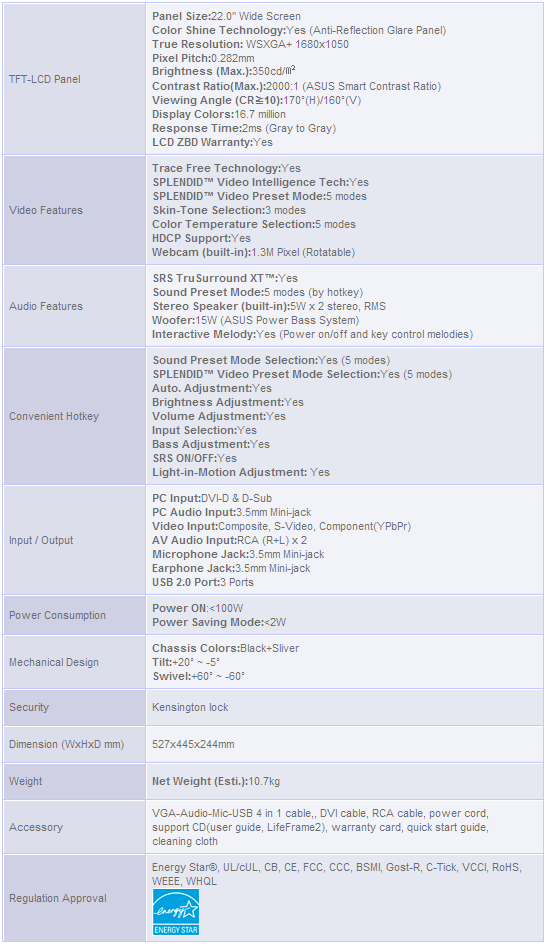
Whether you’re a hardcore power user or a casual tinkerer who knows just enough to get into trouble, Asus is a company that you’re no doubt familiar with. The company is held in high regard in the PC enthusiast community thanks in no small part to their consistent track record and seemingly never-ending flow of innovative products. Over the years, we’ve poked and prodded many of Asus’ motherboards, graphics cards, optical drives, LCD monitors and notebooks here at HotHardware. And save for a few missteps along the way, we’ve generally come away impressed. In this article, we’re going to take a look (no pun intended) at yet another LCD from Asus, the PG221, that the company has branded a ‘Hardcore Gamer’s Dream Monitor’. As its name suggests, the PG221 is a 22.1” monitor. It has a widescreen 16:10 aspect ratio, a built-in 1.3MP webcam and speakers – including a subwoofer – and a bevy of input options. The PG221 has a high contrast glare-type panel coating as well, for better saturation and color density. If you look at its individual features, the PG221 seems like a winner. But what do you say we did a little deeper and see if the PG221’s overall performance equals the sum of its parts?
Unlike many other LCD monitors, the Asus PG221 ships in an ornate box adorned with many of the products standout features. Once cracked open, along with the monitor itself, we found a single DVI cable, a standard power cord, composite RCA video and audio cables, and a unique 4-in-1 VGA-Audio-Microphone-USB cable. The 4-in-1 cable is designed to make wiring the PG221’s video input, audio, and webcam easier, but we feel this particular configuration was a mistake. Most of the users in the market for a high-end display such as the PG221 are likely to use the DVI cable for video input. But because the audio and USB connections are coupled to the analog VGA connector cable, that bulky cable will have to be used as well. |
| First Impressions and Construction |
The Asus PG221 has a somewhat unique aesthetic thanks to its glare-type screen coating, glossy bezel, and integrated speakers. Upon first glance, the monitor’s piano-black finish and machined metal base are immediate eye catchers, but as you dig a little deeper you’ll find quite a few other unique touches.
At the top of the screen the PG221’s built-in 1.3MP webcam is visible. The webcam is mounted in a rectangular housing that can be rotated with the touch of a finger. With its webcam and earphone / microphone jacks, the PG221 can provide real-time online communications while gaming or instant messaging.
|
| The On-Screen Display Tools | ||||
|
Upon entering the PG221's on-screen control panel, users are greeted by a simple menu that's clearly labeled throughout the various sub-sections.
As you can see, there are a number of menus where users can tweak all of the settings that relate to image quality. There are a number of pre-set modes available that affect the overall color temperature, brightness and contrast of the images being displayed on screen. The names of each of these pre-sets explains what they are best suited for - Scenery Mode, Standard Mode, Theater Mode, Game Mode, and Night Vision Mode. These modes are what Asus calls their Splendid Video Intelligence technology. Personally, we found standard mode to offer acceptable performance for almost any scenario, but users who like to fine-tune their display will be pleased by the number of options offered by the PG221. Also note, that if none of the pre-set modes produce images to your liking, a custom user defined mode is also available, and each of the pre-sets can be altered manually as well. The aptly named "Input Select" screen gives users the ability to do just that: select which input is active. And on the System Setup menu, users can alter things like speaker volume, OSD (on-screen display) position, and language. There is also an option to reset the PG221 back to the manufacturer's defaults. The 'Light in Motion' option us used to alter the PG221's built-in lighting. There are five different options available that each result in a different colored light-bar - Standard, Theater, Strategic, Fightin, and Music. This is a unique way to visually cue users in to what mode is selected, but there is a drawback we'll talk about in the subjective analysis section of the article. |
| LCD Performance |
|
We ran a number of diagnostic tests on the Asus PG221 to assess its image quality and performance. The pictures you see below are but a sampling of the tests built-into Lavalys' Everest Ultimate Edition. Everest Ultimate Edition in particular displays over 40 patterns to test a monitor's capabilities. Some are designed with CRTs in mind, but many of the patterns and screens are useful to gauge an LCD's ability to reproduce even colors across the entire panel to see how it handles a wide range of colors with a myriad of gradients.
To our eyes, the Asus PG221 made it through all of tests without any major issues. In all of the calibration screens and grid tests, the PG221 produced distinct gradients and sharp, perfectly straight grids in every section of the screen. In all of the text reproduction tests, the PG221 also did well, producing clear, sharp text regardless of the color combinations used. Gradient fills, various gamma levels, and HSL color palettes were all reproduced very well. We also found that in the solid color tests, the PG221 produced even brightness from edge-to-edge. Some LCDs suffer from uneven distribution of their back-lighting, but this was not the case with our PG221 sample. We should also note, however, that this issue is barely perceptible during "real-world" use and is only a problem when a single, relatively dark color is being displayed across the entire surface of the panel. |
| Subjective Analysis | ||||
|
As we continued our assessment of the Asus PG221's performance, we also performed a couple of subjective tests during HD movie playback, gaming, and general everyday use. We set the panel to Theater mode for movie playback, Game mode while gaming, and Standard mode during general use.
General Usage: During a few weeks of general use, browsing, editing text, etc., the Asus PG221 performed very well. Once we had the color temperature, brightness, and contrast adjusted to our liking, we found the PG221 to be an excellent everyday display. The panel's high-contrast ratio and vibrant colors made it a pleasure to work with. Audio Performance: We should also talk a bit about the performance of the PG221's built-in speakers. Without a doubt, the 10W satellites / 15W subwoofer combination built-into the PG211 are the best integrated speakers we have come across. Unlike the weak, tinny, speakers common to some monitors, the PG221’s speakers have a good range and produce solid bass. We do not see them as a replacement for a good set of standalone speakers, but they are quite good. We’d put them on the same level as a mid-range 2.1 speaker set. We experimented with the different audio presets and SRS audio options and found that the PG221’s speakers were able to product a pseudo-surround effect, and that the different EQ presets did have an impact on sound reproduction. |
| Our Summary and Conclusion | ||||
|
Performance Summary: In general, we found the Asus PG221 to be a solid display. Image quality was very good overall and there were no dead or stuck pixels on the screen. We should note, however, that even if there were problem pixels, Asus' ZBD (Zero Bright Dot) warranty implies that the company will replace any PG221 that suffers from pixel defects. Colors were well-saturated, and the panel had good brightness and contrast. There were some instanced where images were somewhat dark, however, as they tend to be with LCDs equipped with a glare-type screen coatings. Watching movies was enjoyable, once we adjusted the panel to compensate for the darkness and fast-paced game tests revealed very little or no ghosting whatsoever thanks to the panel’s 2ms response time. The lighted color bar on the screen may be distracting to some users, however, especially if they tend to sit back at a distance when watching movies. Up close, the lighted color bar is not an issue.
We think the Asus PG211 is a top-notch LCD monitor with a couple of problems. Image quality is generally very good, the pixel response time is fast and ghosting is basically nonexistent, and aesthetically the PG221 is sure to please. The screen's glare-type coating is neither a benefit nor a detriment depending on your particular preference (we like it), and the speakers are far superior to any other integrated solution we've heard to date. And the built-in webcam is a definite plus as well for those inclined to use it. A couple of niggling issues prevent the PG221 from stealing the show, however. They may look great, but the occasional unresponsiveness of the touch-sensitive controls was annoying. The PG221’s stand only offers minimal adjustment and at approximately $580, the PG221 is at the upper-end of the price scale for 22” displays. If you’re looking for a display with all of the PG221’s integrated peripherals (speakers, webcam, etc.) we would recommend it as we enjoyed working with this monitor over the course of our evaluation, and we think many of you would too. But be aware of its issues before taking the plunge. The PG221 is great on the eyes if you don’t mind its shortcomings.
|