|
|
| Introduction, Features and Specs | ||||||||||
|
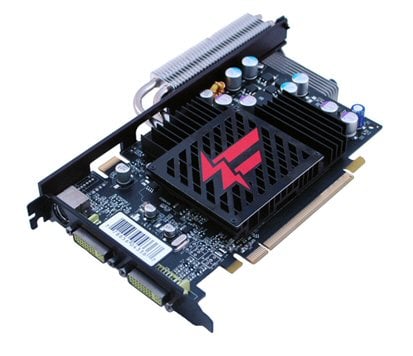
If silence is golden, then silence plus overclocking is platinum. Hardware enthusiasts have loved squeezing every last drop of performance out of their hardware for quite some time. Noise levels are not a concern for many of these enthusiasts, but over the last several years, more and more of them have become not only performance enthusiasts but also silence enthusiasts. So, finding a silent, overclocked product is like winning a mini lottery. For this article, we have such a product: the XFX GeForce 8600 GT Fatal1ty. Not only is the XFX GeForce 8600 GT Fatal1ty silently cooled, but it is also overclocked. While a reference NVIDIA GeForce 8600 GT has a 540 MHz core clock and a 700 MHz (1.4 GHz effective) memory clock, the XFX GeForce 8600 GT Fatal1ty sports a 620 MHz core clock and an 850 MHz (1.7 GHz effective) memory clock. In addition to being silent and overclocked, the 8600 GT Fatal1ty features 256MB of DDR3 and a 128-bit memory interface. Looking at its specifications, the 8600 GT Fatal1ty looks great, but we'll have to run it through some tests to see if it is both silent and deadly.
Not surprisingly, the 8600 GT Fatal1ty box features the typical black and red Fatal1ty theme, and it also features the visage of Johnathan “Fatal1ty” Wendel, who we are sure you all know is the most well known professional gamer in the world. The back of the box features a window that lets you take a peek at what the box holds inside. When we opened the box, we were happy to see that the card was protected by Styrofoam and an anti-static bag. Underneath the card, we found the bundle, including a quick install guide, a connector guide, a VGA-to-DVI adapter, an S-video cable, a driver CD, and the full version of the highly-rated game Company of Heroes. Although the game is around a year old, we stil consider it a great inclusion in this bundle. |

||||||||||
| Closer Look at the XFX 8600 GT Fatal1ty | ||||
|
If you are familiar with other Fatal1ty-branded products on the market, then the styling of this card won't surprise you. XFX achieved the typical Fatal1ty color scheme by using an all black PCB and a black heatsink adorned with a red Fatal1ty logo on top. When you look at the two images above, you can see how XFX is achieving the silent cooling on its 8600 GT Fatal1ty. The company employs a basic heatsink on the GPU itself and draws the heat away with a set of heatpipes that have another heatsink with over 30 fins attached to them. As you can see, all of this metal is basically stored above and behind the card. The extra height added to the card due to this design may be an issue with some horizontal cases (like HTPC cases). So, make sure you have clearance in your system before purchasing this card. As we turn the card around to get a better look at the cooler and the rest of the PCB, you can see that there is no power connector. Unlike the GeForce 8800s and 8600 GTS, the 8600 GT does not require supplimental power, which we see as a good thing. Overall, the cooler makes the card's footprint a bit more awkward than a standard 8600 GT, but we don't foresee most users having any issues with the size and shape of the card. The 8600 GT Fatal1ty's outputs include two dual-link DVI connectors and an S-video connector. Additionally, the card features an SLI connector.
|
| Test System and 3DMark06 Performance | ||||||||||||||
|
For testing the 8600 GT Fatal1ty, we used an Intel Core 2 Duo E6400 (2.13GHz) on an Abit Fatal1ty FP-IN9 SLI motherboard. We also used 1GB of Corsair DDR2 (TWIN2X1024A-5400UL) and a 120GB Maxtor SATA hard drive. The 8600 GT Fatal1ty was compared to an NVIDIA GeForce 8600 GT, NVIDIA GeForce 7950 GT and an ATI Radeon X1950 Pro.
In 3DMark06, the 8600 GT Fatal1ty impressed us by almost keeping up with the best performer in this test, the 7950 GT. The 8600 GT Fatal1ty easily outperforms the standard 8600 GT and even beats the X1950 Pro in two of the scores. These results made us eager to see how the 8600 GT Fatal1ty would perform in real-world tests. |
| Company of Heroes Performance | ||||||
|
Once again, the 8600 GT Fatal1ty outperformed the reference 8600 GT by over 25% at 1280x1024, but it only barely pulled ahead at 1600x1200. On the other hand, the 8600 GT Fatal1ty couldn't quite keep up with the 7950 GT or X1950 Pro. |
| F.E.A.R. Performance | ||||||
|
In the F.E.A.R. benchmark, the 8600 GT Fatal1ty performs quite well when anti-aliasing and anisotropic filtering are disabled, but it takes a considerable hit when 4x AA and 8x AF are turned on. When playing F.E.A.R. with this card, you probably should play at 1024x768 if you want high levels of eye candy turned on. |
| Half-Life 2: Episode 1 Performance | ||||||
|
The Half-Life 2: Episode 1 results didn't really surprise us after what we had seen so far. At 1280x1024, the 8600 GT Fatal1ty kept up with all the other cards until HDR was turned on, at which point it slipped a bit behind both the 7950 GT and X1950 Pro. Once the resolution is bumped up to 1600x1200, the 8600 GT Fatal1ty surpassed the regular 8600 GT at all settings, but it could no longer keep up with the 7950 GT and X1950 Pro once AA, AF and HDR were enabled. |
| Quake 4 Performance | ||||||
|
The story follows a similar trend with the Quake 4 tests. We were most impressed by how much the 8600 GT Fatal1ty outperformed the reference 8600 GT. |
| Prey Performance | ||||||
|
In Prey, the 8600 GT Fatal1ty outperforms the standard 8600 GT by a considerable margin at both resolutions. Unfortunately, it can't keep up at all with the 7950 GT or the X1950 Pro, due in no small part to these two cards having twice the memory bus width of the 8600 GT (256-bit versus the 8600 GT's 128-bit). |
| Overclocking the 8600 GT Fatal1ty | ||||
|
Although the 8600 GT Fatal1ty comes factory overclocked, we still had to check for extra headroom. Recall that the clocks come set at 620MHz for the core and 850MHz (1.7GHz effective) for the memory. We loaded NVIDIA's nTune software and started bumping up the GPU and memory clocks. We tested for stability along the way and finally settled on 740MHz and 950MHz (1.9GHz effective), respectively. We were quite pleased with these results, especially considering that the card has a passive cooler. As always, don't expect every 8600 GT to overclock the same. Your mileage will vary, and overclocking can void your warranty. With the cranked up clocks, we put the XFX 8600 GT Fatal1ty back through the ringer for some more testing. It remained stable and put up some solid numbers. Check out some of the results below.
As you can see, we saw significant gains across the board with the card overclocked. It's definitely worth the extra effort to squeeze this kind of extra performance out of a graphics card. |
| Performance Summary and Conclusion | ||||
|
Performance Summary: Thanks to its factory overclock, the XFX 8600 GT Fatal1ty outperforms the standard 8600 GT by a considerable margin. The only benchmark that the 8600 GT Fatal1ty didn't really dominate the standard 8600 GT was the Company of Heroes test at 1600x1200. We were actually hoping (but not necessarily expecting) the 8600 GT Fatal1ty to hang with the 7950 GT and X1950 Pro a little more closely, but the smaller memory bandwidth held the 8600 GT Fatal1ty back. Regardless, you can definitely color us impressed in regards to the 8600 GT Fatal1t's performance.
It seems that every time new NVIDIA GPU-based graphics cards are introduced, XFX does something special with them. XFX is definitely known as a company to check on if you want a warrantied, factory overclocked video card. Many of the companies that offer overclocked cards only offer one option, but XFX often has several overclocked options for each type of card. In the case of the company's 8600 GT Fatal1y, we think XFX did a great job. Not only is it silent, thanks to its passive cooling, but it also has a great factory overclock (a rare and welcome combination). What's more, the cooler was good enough to provide excellent overclocking headroom with our sample. While the design of the card is quite effective at delivering excellent performance, it also potentially poses a problem for some lower profile cases, such as an HTPC case. As we mentioned before, you should make sure the extra height added to the card by the cooler isn't a problem for your case before you buy it. Although the design may be a concern for a small group of potential users, the bundle should make everyone happy. Overall, it's a simple bundle, but XFX made the great decision to include the highly-rated Company of Heroes game. The biggest downside to this card is probably its price (around $160). It is one of the most expensive 8600 GTs currently available, but if you want top mid-range performance, DirectX 10 support, and silence, it will most likely be worth the money to you. If you don't care at all about DirectX 10 support at this time and don't think you will any time soon, then it may be worth your time to research last generation's high-end cards before you buy.
Discuss This Article and Share Your Thoughts With Others!
|