
|
|
| Introduction, Features & Specifications | ||||||
|
Most of you probably already know that 2.5" notebook hard drives typically aren't as big or fast as hard drives found in desktop machines. In case you aren't aware, most laptops are sold with 5400RPM hard drives that range from 60GB to 100GB. In contrast, most desktops are currently sold with 7200RPM hard drives with capacities of up to 1TB. Just like desktop hard drives, though, laptop hard drives have gotten quite a bit bigger and faster over the last couple years. While desktop hard drives hit 1TB (1,000GB) a while ago, laptop hard drives recently reached 250GB. At least one manufacturer will have a 320GB laptop hard drive available soon, but that still doesn't get us anywhere near 1TB in our laptops. Thankfully, though, if performance is your main concern, you can get a 7200RPM laptop hard drive now if you chose to do so. Today, we have one of the largest laptop hard drives on the market in our labs, the 250GB Western Digital Scorpio WD2500BEVS. At 5400RPM, it may not be the mobile speed king, but this 2.5" SATA hard drive offers a plethora of nice features, like an 8MB cache and WD's WhisperDrive and ShockGuard technology. Plus, the benchmarks might just surprise you about how well a 5400RPM drive can perform. Read on to see how well the Scorpio WD2500BEVS performs compared to a 100GB 5400RPM 2.5" hard drive and a 500GB 7200RPM 3.5" drive.
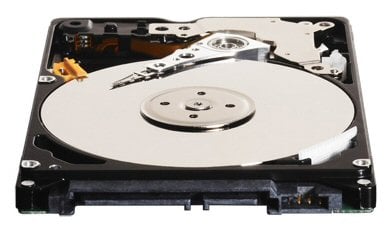
If you are already familiar with desktop hard drives, not much (other than the physical size) will surprise you about the appearance of the Scorpio WD2500BEVS. As you can see in the images above, the drive has a white label with black informational text on the top and green PCB on the bottom. The Scorpio WD2500BEVS is a SATA drive, and as such, it features the same SATA power and data connectors that you are used to seeing on desktop SATA drives. For those of you wondering, yes, that does mean you could install this drive in your main desktop rig at home if you so desired. The benefits of installing a drive like this in a desktop system are that it requires considerably less power than a 3.5" drive, it is relatively quiet, and it is physically small, which means it doesn't take up much room. The Scorpio WD2500BEVS achieves its quiet acoustic profile by way of Western Digital's exclusive WhisperDrive technology, which is essentially a set of seeking algorithms optimized to yield a low noise level. These algorithms will also help extend your laptop's battery life since they also affect the way the drive seeks for data, improving (lowering) power consumption. In addition to WhisperDrive, the Scorpio WD2500BEVS also boasts two technologies, ShockGuard and SecurePark, to keep your data safe. |
| Inspecting the Drive and Test System | ||||||||
|
Normally, we don't go too much into detail about the physical appearance of a hard drive or how to install one, since that is not what you came here to read about most likely. With a 2.5" laptop drive, though, we think readers who have never seen or installed a laptop drive may be interested in seeing what they look like and how to install one. 2.5" hard drives are quite impressive and make the geek in us grin every time we see one (for an even bigger geeky thrill, check out a 1.8" hard drive). Check out the pics below to see just how much smaller a 2.5" drive is than a 3.5" drive. The downside to storage in laptops is that almost all laptops on the market, save for some high end DTR models, only allow for one hard drive to be installed. This means that you will most likely have to remove your current drive if you want to switch to the Scorpio WD2500BEVS. With many laptops, this should be a relatively simple task. For our test machine, the Toshiba Portege M400, it was about as simple as it gets. We just had to flip the laptop over, unscrew two screws, remove the hard drive panel, pull up on a release tab, and disconnect the drive. After removing the drive from its small installation cage, we simply reversed the steps below, and we were all done. It is as simple as installing a 3.5" drive into an ATX case.
In the image above, you can see the SATA power and data ports that we mentioned earlier. These ports are exactly the same (size and shape-wise) as those found on 3.5" desktop hard drives. When testing the Western Digital Scorpio WD2500BEVS SATA hard drive, we used a Toshiba Portege M400 for all testing except the HD Tach write tests. The M400 sports an Intel Core Duo 2.0GHz processor, 2GB 667MHz DDR2, and a 100GB 5400RPM SATA hard drive. For the HD Tach write tests, we used a desktop PC because that test requires an unformatted, unpartitioned drive. The Scorpio WD2500BEVS was compared to the Toshiba 100GB MK1032GSX found in the Portege M400 and to a 3.5" 7200RPM 500GB Western Digital Caviar SE16 SATA hard drive. We decided to include the performance of the latter simply to provide you with a reference point since many of you are probably more familiar with desktop hard drive performance than laptop hard drive performance.
|
| SiSoft SANDRA Results | ||||
|
We began our testing with SiSoftware's SANDRA File System benchmark module. This test's method of hard disk performance analysis it what we would consider a "light duty" consumer-level evaluation tool. The folks in IT would have your head for recommending a drive based solely on SANDRA File System test results. However, the benchmark is a popular utility within the performance PC enthusiast community, and it does provide a decent quick glance at high-level throughput characteristics of the total storage subsystem, which of course includes HDD controllers and other associated system components.
The Scorpio WD2500BEVS manages to impress us right away. As you can see in this first set of results, the Scorpio WD2500BEVS offers considerably better performance than the Toshiba MK1032GSX. Additionally, it performs quite admirably even when compared to its 3.5" 7200RPM bigger brother, the WD5000KS.
Not surprisingly, the Sandra write scores echo those found above in the read tests. The Scorpio WD2500BEVS surpasses the Toshiba MK1032GSX by more than a respectable margin, and it doesn't lag too far behind the more powerful desktop drive.
Most of you are probably familiar with Sandra's Drive Index rating, and this graph basically does a nice job of summarizing what we saw above in the read and write tests. |
| PCMark05 Results | ||||
|
Next up is PCMark05 from FutureMark Corp. We specifically used only the HDD Test module of this benchmark suite to evaluate all the drives we tested versus the Scorpio WD2500BEVS. We consulted Futuremark's white paper on PCMark05 for an understanding of what this test component entails and how it calculates its measurements.
Courtesy, Futuremark Corp. -
General Hard Disk Drive Usage:
This trace contains disk activities from using several common applications. Virus Scanning: Virus scanning is a critical task in today's PC usage. As the major bottleneck of scanning viruses is in hard disk activity, it is reasonable to include virus scanning as a HDD test. The test consists of HDD activity of scanning 600MB of files for viruses. The Virus Scanning test is mostly disk reading (99.5%).
The PCMark05 tests reveal results similar to those in Sandra for the most part. What surprised us the most here was how high the Scorpio WD2500BEVS scored in the Virus Scan test. Not only does it absolutely obliterate the Toshiba MK1032GSX's performance, but it also manages to fall only about 5MB/s short of the WD5000KS's score.
PCMark05's overall Hard Disk Drive test score is representative of a weighting of two other tests in addition to the tests we've given detail for above, specifically File Write and Application Loading. No doubt, the Scorpio WD2500BEVS's high Virus Scan score helps it achieve an excellent overall PCMark05 HDD score. |
| HD Tach Results | ||||
|
The four HD Tach metrics that we sampled for each drive are Random Access, which is largely dependent on spindle speed of the drive, Read Average, Write Average and Burst Read throughput. Read and Write Average scores are what we would consider the most meaningful to the end user. On the other hand, Burst Read is typically tied to a drive's on-board caching and SATA interface speed.
On paper, the Toshiba MK1032GSX is only really bested by the Scorpio WD2500BEVS in the capacity department. The Scorpio WD2500BEVS is a much newer drive, but we are still surprised to see just how much better it performs than the Toshiba MK1032GSX, which is made more evident by the HD Tach results. In addition, we are glad and impressed to see that the Scorpio WD2500BEVS doesn't get a serious beatdown from the WD5000KS, which has a big advantage over the Scorpio WD2500BEVS. |
| Performance Summary and Conclusion | ||||
|
Performance Summary: The Scorpio WD2500BEVS performed quite well. We were very happy with its performance compared to the Toshiba 5400RPM 2.5" drive. And we were pleasantly surprised with how its performance still looked pretty good in comparison to a 7200RPM 3.5" desktop hard drive. Considering the Scorpio WD2500BEVS is a 5400RPM 2.5"drive, we were left with a very good impression overall.
If you want one of the largest capacities available in a 2.5" hard drive, then you will have to consider the Western Digital Scorpio WD2500BEVS. And that is a good thing, based on how well the drive performed. We would use the Scorpio WD2500BEVS to replace the drive in our Toshiba Portege M400 without hesitation, more so for the performance gain than the capacity increase in our case. Without testing more mobile hard drives, we can't definitively say the Scorpio WD2500BEVS is a top performer, but we do know that if maximizing storage space without sacrificing performance is your concern, then the Scorpio WD2500BEVS should suit your needs quite well. Plus, it will do so quietly. We barely heard a peep out of the drive during all of our testing. Another factor we always like to note is the length of a product's warranty, and in this case, we are happy to report that Western Digital backs its Scorpio line with 3 years of coverage. The WD2500BEVS is currently the largest Scorpio drive offered by Western Digital, and as we mentioned earlier, it is one of the highest capacity 2.5" hard drives on the market. Unfortunately, that means that you need to have a big budget to afford one. The high-end of 2.5" drive pricing hovers around $220. This drive costs around $190. For about $90-100 less, however, you can get a 160GB version of this drive. With that said, we can easily recommend the Western Digital Scorpio line based on our experience. If you know you need the large capacity offered by the Scorpio WD2500BEVS specifically, go for it - this is a great drive. If you don't need all that storage space in your laptop though, save a bundle by going with the 160GB version.
Discuss This Article and Share Your Thoughts With Others!
|

