|
|
| Introduction | |||||||
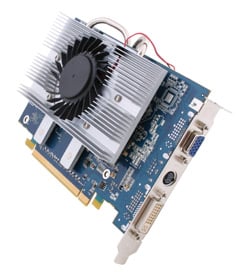
Selecting the right video card when you're on a budget can be difficult. The major deciding factor for many gamers out there is price. As mouthwatering as it is to think about getting a top-notch SLI or CrossFire setup, it's a luxury that most simply cannot afford. Fear not though, as both Nvidia and ATI have some quality entry-level and mid-range graphics cards in their respective line-ups. Today we have two such cards with us, Sapphire's Ultimate X1600 Pro and X1600 XT. Aimed towards consumers looking for a silent video card at a budget price, Sapphire's Ultimate X1600s will appeal to those looking to build up an HTPC or a PC for casual gaming. Both cards are based on ATI's RV530 GPU. The X1600 Pro and X1600 XT have 12 parallel pixel pipelines, 5 vertex shaders, 4 texture units, and 4 render backends (ROPs). Both cards also support DirectX 9.0c, OpenGL 2.0, are able to render cutting edge features such as HDR lighting with AA, and they are both CrossFire ready. The only real differences between the Pro and XT are clock speeds.
|
| Test System and 3DMark06 | ||||||||||||||
HOW WE CONFIGURED THE TEST SYSTEMS: We tested our cards on an DFI LanParty UT CFX3200-DR chipset based motherboard, powered by an AMD Athlon 64 3200+ (Venice Core) processor and 1GB of low-latency Mushkin Redline RAM. The first thing we did when configuring the test system was enter the BIOS and load the "High Performance Defaults." The hard drive was then formatted, and Windows XP Professional with SP2 was installed. When the installation was complete, we installed the latest chipset drivers available, installed all of the other necessary drivers for the rest of our components, and removed Windows Messenger from the system. Auto-Updating and System Restore were also disabled, the hard drive was defragmented, and a 768MB permanent page file was created on the same partition as the Windows installation. Lastly, we set Windows XP's Visual Effects to "best performance," installed all of the benchmarking software, and ran the tests. We tested at the two most popular resolutions according to a recent poll of our readers, using a mid-range gaming system.
3DMark06 provides us with an overall performance score based on the results from a few different tests, but also provides individual Shader Model 2.0 and 3.0 performance numbers. Both X1600 cards seem to fare well in this benchmark, with the X1600 XT on top in all categories. |
| Far Cry | ||||||
Far Cry will be our first indication of the performance we can expect out of these two cards in a gaming scenario. The X1600 XT comes in slightly ahead of Nvidia's GeForce 6600GT, however that's without any degree of Anti-Aliasing or Anisotropic filtering enabled. Once we up the image quality using 4x AA and 8x AF, the X1600 XT still manages to hold the top spot. The X1600 Pro puts up a respectable score, but our levels of AA and AF are a bit to much for the card, as an average of 45FPS can be a bit slow to some gamers.
Going to a higher resolution yields similar results. The X1600 XT remains at the top, and an average framerate of 58.37FPS will provide a decent experience for a card in the X1600 XT's price range. The 6600 GT falls behind a considerable amount when AA and AF are applied. As you can see from the X1600 Pro's numbers, high resolution gaming isn't its strong point. |
| Half-Life 2: Lost Coast | ||||||
Using the Lost Coast add-on to Half-Life 2 allows us to take advantage of the Source engine's HDR lighting, which all three cards are capable of. Though ATI usually dominates Nvidia in Half-Life 2, the 6600 GT manages to gain a few FPS over the X1600 XT. Even when AA and AF are applied, the GeForce 6600 GT keeps the lead. Don't be to discouraged by the scores here though. The Lost Coast add-on is somewhat of a technology demo from Valve made to showcase HDR lighting, so the performance demands of the Lost Coast are higher than Half-Life 2, or Half-Life 2: Episode One.
Raising the resolution brings all three cards to their knees. As we mentioned, the Lost Coast is a bit of a technology demo, and the actual Half-Life 2 games will perform better. We like using this technology demo when benchmarking graphics cards though, as a graphically stressful demo such as this will help remove any CPU limitation. |
| F.E.A.R. | ||||||
The X1600 XT enjoys an 4FPS (average) lead over the 6600 GT here. Using AA and AF increases the lead to 9FPS, though an average framerate of 35FPS is a bit hard to game with. The Sapphire X1600 Pro is able to remain above 40FPS, and while it's not the smoothest ride, it is playable.
F.E.A.R. becomes a little difficult to play at a resolution of 1280x1024. You can forget about having a good time when AA and AF are used, as 24 FPS average is hard to enjoy. |
| Quake 4 | ||||||
Nvidia has traditionally held the upper hand when it comes to OpenGL games, and id software's Doom 3 engine is no different. With Quake being based on the Doom 3 engine, it's no surprise the 6600 GT manages an almost 13FPS lead on the X1600 XT. However, when AA and AF are applied, the playing field becomes a bit more even, and the X1600 XT even gains a few FPS on the 6600 GT. The X1600 Pro is where it's been the whole time, stuck right in the middle.
With the resolution raised, Nvidia's GeForce 6600 GT still puts out a somewhat tolerable framerate at the default image quality settings, however Quake 4 becomes a bit sluggish when run on either of our X1600 cards. |
| Prey | ||||||
As with Quake 4, Prey is an OpenGL title based on the Doom 3 engine. While the GeForce 6600 GT quickly claims the lead without AA or AF being used, the X1600 XT starts to shine once the graphics are turned up. The X1600 XT seems to handle higher resolutions and AA/AF better due to its increased memory bandwidth over the 6600 GT.
As we mentioned, the increased memory bandwidth really helps the X1600 XT shine. The 6600 GT's lead over the X1600 XT starts to fade with no extra pixel processong, and once we turn up the AA and AF, the X1600 XT manages to squeeze ahead by 1FPS. If you're planning on playing a lot of Doom 3 engine based titles, and are shopping for a mid-range card, we'd still have to recommend Nvidia because of its superior OpenGL performance. |
| Overclocking Results | ||||||||
Overclocking Procedure: For our overclocking adventure, we decided to use version 0.25 Beta of ATI Tool. We used ATI Tool's artifact tester to test for visual anomalies as we slowly raised the clock speeds on the core and memory. Once we were able to pass 20 minutes of ATI Tool's artifact tester without a single error, we used those clock speeds to test our timedemo of Human Head's Prey. We ran Prey at a resolution of 1024x768, and used no AA and allowed the game to use it's default AF setting.
By overclocking the X1600 Pro to 596MHz core and 423MHz(846MHz DDR) memory, we managed to squeeze an extra 3.3FPS out of the card. We were rather impressed with the overclock we received on the core, however we feel our scores were held back a little by the 18MHz overclock we achieved on the memory.
Our Sapphire Ultimate X1600 XT was able to reach 630MHz on the core and 760MHz(1.52GHz) on the memory. The X1600 XT turned out to be a decent overclocker. We were able to attain a moderate 40MHz overclock on the core, however we managed a 70MHz overclock on the memory, which isn't too shabby. In our Prey test, the overclock only amounted to a 2.3FPS increase, however results will vary depending on the game being played, game resolution, and levels of AA and AF applied. |
| CrossFire Performance | ||||
Multi-GPU technology has advanced to the point where we can now not only mix different card vendors, but also mix different cards in some configurations. While higher end ATI products still require a master and slave card, the X1600 series and below needs only the proper driver support. Catalyst version 6.7 has recently been released, and we decided to use it as we wanted to take advantage of any extra CrossFire improvements. The way these two cards work in CrossFire, is the X1600 XT will run at the speed of the X1600 Pro. Basically we're benchmarking two X1600 Pros in CrossFire mode.
Two cards won't give you exactly double the performance, however we do see very noticeable performance gain. Two X1600 Pros have no problem overtaking the GeForce 6600 GT in this test. The CrossFire solution also holds onto the lead when AA and AF are applied.
Even when gaming with 1280x1024, the two cards manage to obtain a playable framerate. Despite the power of two, AA and AF still manage to drag the performance down enough to make the demo a bit unplayable. |
| Final Thoughts and Conclusion | ||||||||
Sapphire has been a popular brand for some time now, which is in part due to their innovative products. From the lowest card in the 3D graphics food chain, to the their flagship products, Sapphire has something for almost any price range. While they've produced X1600 cards before, their Ultimate series boasts a much improved heatsink design. Both the X1600 Pro and X1600 XT kept under 65oC during our testing (with an ambient temp of 28oC), and the design is small enough that it should fit in most cases without much of a hassle. While there are certainly better buys out there from a price / performance perspective, like the $140 EVGA e-GeForce 7600 GT for example, if you're in the market for an X1600 Pro or X1600 XT, the Sapphire Ultimate series is a good choice.
We have mixed feelings towards Sapphire's Ultimate X1600 Pro and Ultimate X1600 XT cards, however. Though the cards are moderately priced at about $100 to $140, respectively, and they do come with a decent selection of cables and adapters, they aren't the best performers in their respective price ranges. Overclocking results were mixed, but no one should rely solely on overclocking results when purchasing hardware anyway. Each card is unique, and may not overclock to the same levels at what we've shown you here. All things considered though, we prefer Sapphire's Ultimate X1600 Pro and Ultimate X1600 XT to just about any other Radeon X1600 out there. With Sapphire's Ultimate cards you get the same or better performance than other X1600 Pro and X1600 XT cards, but with a superior cooling solution and a good bundle. HotHardware gives both the Sapphire Ultimate X1600 Pro and X1600 XT 7.5s on our Heat Meter.
|