|
|
| Introduction and Specifications | ||||||
We have been talking about NVIDIA's Ion since late last year when news first broke of the ultra small form factor platform. At the time, NVIDIA's tiny Atom-powered prototype system wasn't even called Ion yet, but images of the miniscule motherboard that would eventually be used in the reference platform had already surfaced and the community was buzzing with interest. One of the major concerns with most netbooks and nettops was their relatively weak integrated graphics solutions, and Ion would potentially address that concern.
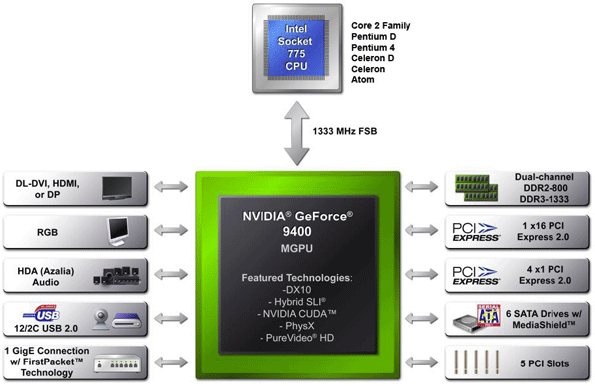
We have already discussed Ion in a previous article here at HotHardware, so we'll paraphrase a bit for an explanation as to what you're seeing in the block diagram above. With the exception of things like I/O port connectors, power and passive components on the PCB, and physical layer chips for network and video connectivity, NVIDIA's Ion is essentially a one chip solution. Supporting Intel's processor families from Core 2 to low power Atom solutions, NVIDIA's Ion MCP offers a multitude of various subsystem functionality. The chipset supports both DDR2 and DDR3 system memory and offers a single x16 PCI Express 2.0 link, as well as 4 x1 links and up to five standard PCI slots. In addition, support for dual link DVI, HDMI, Display Port and analog RGB video output is built in, along with up to 12 USB 2.0 ports, 6 SATA ports and a single Gigabit Ethernet port. |
| Acer Aspire Revo Exterior |
The NVIDIA Ion-based Acer Aspire Revo has a streamlined appearance, with somewhat of a wedge shape. The exterior enclosure is comprised of two white plastic panels with dark blue textured inserts, that snap together to encase the system's internals. If we take a tour around the Acer Aspire Revo, you can see the white frame and blue inserts. Along what we consider the top edge of the system, you can see the machine's sloped power button, two of its USB ports (one is under a rubber cover, just below the power button), and an array of ventilation holes that line up with the sole active cooler within the system. Along the front face of the Acer Aspire Revo, the system's integrated flash card reader is visible, adjacent to color coded headphone and microphone jacks, and an eSATA port. On the opposite side of the unit, from left to right in the image above, you can see the Revo's power receptacle (the machine uses a small power brick, like most notebooks), VGA and HDMI outputs, RJ45 LAN jack, and four more USB 2.0 ports. The underside of the Revo doesn't house any more ports, but there is another array of ventilation holes, and a slot for the system's stand. The stand consists of nothing more than an oval-shaped, piece of acrylic, with an anti-skid rubber pad. The stand simply snaps into the bottom of the system should you want to keep it standing upright. While it did its job just fine, and the Revo never tipped over during use, we did find the stand to fit rather loosely in its slot, which resulted in a somewhat wobbly system. The Revo is so lightweight though, we doubt this will be an issue. The rigidity of a VGA or HDMI cable is almost enough to keep the Revo upright, even without the stand. |
| Acer Aspire Revo Interior |
Opening up the Acer Aspire Revo is nice and easy. There is a single screw on the bottom of the unit, beneath a warranty sticker in the slot where the stand slides in. Remove that screw and the side of the Revo can literally be snapped off by disengaging a few plastic clips around the system's perimeter. Once opened, the system's motherboard and other components are readily accessible. In one corner you can see the Revo's standard 2.5" Seagate hard drive, right next to the system's wireless networking controller, which itself is connected a small metal antenna that resides in the same corner of the system. The black wire coming from the WiFi controller, however, runs under the motherboard to another antenna, which sits on the opposite side of the Revo. There is a single fan in the Acer Aspire Revo, mounted right to the sole heatsink in the system, which sits atop the Intel Atom CPU and NVIDIA Ion platform processor. When the system is first powered up, this fan spins up to its maximum speed briefly, which produces a relatively loud high-pitched whine reminiscent of some notebooks, but it quickly spins down to almost inaudible levels. We should also note that during heavy use, the fan in the Revo never spun back up to its maximum level. At most it kicked in just slightly and was still very quiet. Also visible within the Revo is a small, secondary PCB which houses a pair of the system's USB ports, which is just below the second WiFi antenna in the image on the left. The top-side of the Revo's flash card reader, its backup battery, and its piezo speaker can also be seen, in addition to a few of the system's various ports. |
| High Level Synthetics - SANDRA | ||||
We began our benchmark testing with SiSoftware's SANDRA XII, the System ANalyzer, Diagnostic and Reporting Assistant. We ran four of the built-in subsystem tests that partially comprise the SANDRA 2009 test suite with the Ion-based Acer Aspire Revo (CPU Arithmetic, CPU Multimedia, Memory Bandwidth, and the Disk Storage tests). All of the scores reported below were taken with the Revo's Atom processor running at its default clock speed of 1.6GHz, with 2GB of DDR2-800 system memory and HyperThreading enabled.
The Acer Aspire Revo's performance fell right in-line with expectations. In the purely CPU bound tests, the system performed right on par with the similarly equipped Ion reference platform and netbooks. The Revo performed somewhat lower in the memory bandwidth test than NVIDIA's reference platform, however, we somewhat expected this result considering the system was equipped with lower-clocked DDR2 memory as opposed to the reference system's DDR3-1066. |
| PCMark Vantage Performance | ||||
We also ran the Acer Aspire Revo through Futuremark’s latest system performance metric built specifically for Windows Vista,
Despite being equipped with somewhat slower memory than NVIDIA's Ion reference platform, the Acer Aspire Revo hung right alongside the reference system in our PCMak Vantage testing. Notice, however, the large disparity between the Intel Atom system and the Revo in the Gaming test, where the Revo's Ion graphics processor allows it to surge ahead of Intel's offering. |
| Cinebench R10 Software Rendering | ||||
Cinebench R10 is an OpenGL
This is a multi-threaded, multi-processor aware benchmark that renders a single 3D scene and tracks the length of the entire process. The rate at which each test system was able to render the entire scene is represented in the graph below.
Admittedly, the Ion-based Acer Aspire Revo will not likely be used for any heavy-duty rendering tasks, but we wanted to run Cinebench anyway to gauge the Revo's performance versus its similarly equipped peers. As you can see, the Revo's performance was right were it should be. |
| Gaming: Left 4 Dead and ET: Quake Wars | ||||||||||||
We didn't really expect the Acer Aspire Revo to tear through today's hot gaming titles, but with an NVIDIA GeForce 9400 under its hood, the system should be able to provide some level of game play, whereas a competing Intel solution would be a non-starter.
The Acer Aspire Revo finished a hair behind the NVIDIA Ion reference platform in our Left 4 Dead tests, when the two systems are equipped with the same processor. As you can see though, with a dual-core Atom powering the Ion reference platform, L4D performance jumps much higher. It seems the single-core Atom just doesn't have enough oomph to let the Ion graphics processor spread its wings here.
The Acer Aspire Revo also finished behind the NVIDIA Ion reference platform in our ETQW test. Once again, however, with an Atom 330 at the heart of the Ion reference platform, ETQW performance goes up. |
| Power Consumption | ||||
Throughout all of our benchmarking and testing with the NVIDIA Ion-based Acer Aspire Revo, we monitored how much power our test systems were consuming using a power meter. Our goal was to give you an idea as to how much power a few of our systems consumed while idling and under a heavy workload.
Please keep in mind that we were testing total system power consumption at the outlet here, not just the power being drawn by the motherboards or processors alone. For this test, we loaded up both Cinebench and our 1080p Dark Night video clip to stress the CPU and GPU cores in the Ion system.
According to our tests, the Acer Aspire Revo consumed slightly less power than the NVIDIA Ion reference platform at idle, and slightly more under load. The differences were only about 1 watt, however. To put a little perspective on these numbers, the Acer Aspire Revo consumes a bit less than 1/3 the power of a 100W light bulb under load and less than a quarter of the power of that same light bulb while idling. |
| Our Summary and Conclusion | ||||
Performance Summary: The Ion-based Acer Aspire Revo performed right in-line with other systems built around Intel's low-power Atom processor. In our more CPU-bound benchmarks, the Aspire Revo's performance was right on par with a number of other Atom-based systems we tested. The Revo also performed similarly to the NVIDIA Ion reference platform, when both were outfitted with the same processor. The Aspire Revo's power consumption came within 1 watt of the Ion reference platform as well, but total power consumption was markedly higher than a couple of Atom-based netbooks. Where the Revo excelled was in regard to video related tasks, where the system's Ion graphics processor came into play.
The Acer Aspire Revo is a lot of things. It's a sexy ultra small form factor system. It's a low power nettop. And it's a potential HTPC candidate. What the Acer Aspire Revo is not, however, is a replacement for a full-sized desktop PC--at least not for discerning HotHardware readers who might prefer a more powerful PC. While the additional capabilities and performance afforded by the NVIDIA Ion platform and its integrated graphics processor are an obvious improvement over other platform solutions for Atom, the fact of the matter is, the Atom processor doesn't have the kind of oomph to compete with powerful desktop processors no matter what GPU it's paired with. As the saying goes, "it is what it is," and should be considered as such versus products in a similar class. Atom may be just fine for a secondary PC, that will be used for more basic computing tasks like web browesing or office-type apps. But it is not a desktop CPU replacement and was never meant to be. Couple Atom to NVIDIA's Ion platform processor though and more things become possible, like full 1080p resolution HD video playback and casual gaming. Heck, some games that won't even launch or render properly on the Intel integrated graphics solutions typically coupled to Atom work very well on Ion.
|