
|
|
| Introduction & Specifications | ||||||||
The latest socket AM3 compatible Phenom II processors have been available for several weeks now and they had proven in our initial coverage to be excellent chips, a notable improvement over their predecessors in several respects, including overclocking and in their support for higher clocked DDR3 memory. Thanks to the Phenom II's ability to use both DDR2 and DDR3 memory types, they can be used in existing AM2+ boards, which is an excellent solution for many current AMD users. The AMD 790GX chipset offers an excellent low cost DDR2 solution for Phenom II owners but currently available implementations lack some of the higher-end bells and whistles that many enthusiasts and gamers want. The 790GX chipset technically supports Hybrid CrossFireX, allowing two or more discrete graphics cards to team up with the IGP, but many currently available boards generally only offer a single physical PCI-E x16 slot, there are exceptions of course but only a few. While AMD's new Phenom II chips can also support DDR2 and are compatible with existing AM2+ boards, their full potential is only realized when equipped with a few sticks of fast DDR3. Unfortunately, so far, the pool of available DDR3-enabled AM3 boards has been rather small with only a few choices. The majority of available DDR3 equipped AM3 boards also lack the multiple PCI-E x16 slots necessary to support CrossFireX. One of the few boards with both DDR3 and full CrossFireX support is ASUS' M4A79T Deluxe, which we briefly checked out in our initial look at the AM3 Phenom IIs. Today, we'll be examining the second DDR3 full CrossFireX capable AM3 board to hit our labs, the MSI 790FX-GD70, and we'll be putting it up against the M4A79T, head-to-head to see how it stacks up.
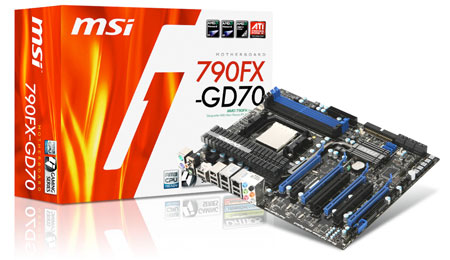
At first glance, the 790FX-GD70 appears to be a very well equipped board. With four full-length PCI-E x16 slots, the 790FX-GD70 is quad-CrossFireX ready. The GD70 also packs a lot in the storage department with 8 internal SATA ports and an additional eSATA port which can also be used for USB 2.0. Speaking of USB, there are 8 ports on the rear IO panel if you count the shared eSATA/USB port. The GD70 also gets the benefit of an all solid capacitor design and all the chokes are also shielded, which helps with overall stability. MSI has equipped the 790FX-GD70 with a full suite of additional special features, most notably the DrMOS chip, which was first introduced with MSI's P45 boards. The DrMOS chip takes the traditional MOSFET configuration of several discrete chips and combines them into a single IC. The result, according to MSI, is lower temperatures, lower power consumption and better response speed. The GD70 is also equipped with MSI's Active Phase Switching tech, which is a hardware-based phase switching solution.
In terms of the bundle, the 790FX-GD70 comes well equipped with a plethora of cabling, as well as a high quality user manual and driver CD. The bundle includes four SATA cables, IDE and floppy cables and a pair of SATA power cables. Also included are two CrossFire bridges in case your video cards didn't come with any, a USB rear I/O panel and a M-Connector set. The M-Connector set is essentially MSI's version of ASUS' Q-connectors. They are just convenient connector stubs which let you hook up your chassis' front-panel connectors to the M-connector, then the whole stub connects to the motherboard's front-panel I/O pins in one go, saving you the hassle of muddling with individual connectors and cables on the traditionally cramped I/O pins. Overall, the 790FX-GD70's bundle includes everything you need to get started with most system configurations. |
| Layout & Features | ||||
![]()
The MSI 790FX-GD70 is a good looking board with its uniform blue on black theme and understated dull-silver cooling arrangement. Unlike a lot of other gamer oriented boards on the market these days, the GD70 isn't flashy, its components aren't randomly colored in a hundred hues and it doesn't sport an over-sized ornamental northbridge heatsink. What the GD70 does have is a clean, stealthy look that could easily pass as a serious workstation board. Looks aside, the 790FX-GD70 is also a very well laid out board. Most of the connectors are where you would expect them, which is a good thing as many gamer and modder oriented chassis these days offer built-in cable routing features that cater to the typical layout. The ATX 24-pin connector is on the edge of the board near the middle, and the 8-pin ATX12V connector is at the top corner near the rear I/O; both typical positions that will work well in most chassis. The USB, IEEE1394, front I/O and floppy connectors are arranged smartly along the bottom edge of the board while the single IDE channel connector is placed just under the ATX 24-pin connector. MSI has rightly chosen to arrange the IDE connector at a 90 degree angle which will prevent the IDE cable from interfering with extra long expansion cards such as many modern PCI-E video cards. The 6 SATA ports offered by the SB750 southbridge are located right next to the IDE connector and they are also oriented at a 90 degree angle for the same reason. Two additional internal SATA ports offered by the onboard JMicron JMB322 chip are located further in on the board, next to the southbridge. They are oriented in the traditional upright position. Component positioning and clearance on the board is generally quite good. The four DIMM slots are positioned a fair distance away from the CPU socket to allow for large heatsinks and they also don't interfere with the first PCI-E x16 slot. The GD70 doesn't have a massive decorative heatsink arrangement, instead using a purely functional design. The cooling consists of two passively cooled heatinks connected by a single large heatpipe. The northbridge headsink also cools the power regulation chips like the DrMOS MOSFET chip. The entire cooling arrangement is very low profile and doesn't present any obstacles for expansion cards. The CPU socket is relatively clear of obstructions and the DIMM slots, as well as the northbridge heatsink, are offset enough to allow all but the most massive of CPU heatsinks. Located around the edges of the board are four chassis fan connectors; two connectors for the rear exhaust fan and/or power supply near the rear I/O panel and two more connectors for intake fans located on the opposite edge, near the bottom of the board. ![]() Overall the 790FX-GD70 is well laid out and all the connectors seem to be logically placed except for one glaring issue. The front panel audio connector on the GD70 is placed at the bottom left corner of the board, or in other words, just about the furthest possible distance from the front/top of the chassis where the front audio panel would be. The front audio connector cable in many chassis configurations may not be long enough to even reach the connector, especially with multiple expansion cards in place. Take this into consideration if you plan on loading the GD70 with expansion cards and also require front panel audio. We wish MSI had included a front panel audio extension cable for those chassis configurations where the supplied cable wouldn't reach. While the 790FX-GD70 doesn't have the typical visual flash of many gamer boards, it does have plenty of little extras that will please many enthusiasts. Located at the bottom-right edge of the board is a row of buttons which control basic functions like power, reset, and clear CMOS. There is also a button that toggles the board's Green Power adaptive phase system and another button that enables the GD70's OC Dial feature. The OC Dial is literally a small physical dial located on the board that can be used for overclocking. When the system is enabled, the dial can be used to increase and decrease the board's FSB on the fly, much like one would change the volume. Even better, the OC Dial feature doesn't require special software or drivers; you simply need to be booted. This is a neat little feature, but one that should be used with caution, as with all overclocking efforts. The 790FX-GD70 also features a large number of ultra-bright blue LEDs placed all over the board to indicate a variety of things. There are LEDs to indicate each of the board's CPU power phase modes, there are LEDs for memory phase, system phase, HDD status and a LED to let you know if OC Dial is enabled. The LED clusters are mostly located near the top of the board around the DIMM slots with the exception of the OC Dial indicator LED and the HDD status LED which are positioned next to the onboard buttons. Each one of these LEDs are fairly bright individually and together they can almost illuminate the interior of a chassis all on their own. However, if you'd rather not have your motherboard glow blue, you can disable the power phase indicator LEDs in the BIOS. Overall, the MSI 790FX-GD70 is a well designed board with several neat features and a good layout. With the possible exception of the front panel audio connector placement, everything on the board just makes sense. The onboard buttons and OC Dial feature definitely make the 790FX-GD70 an attractive choice if you have plans to overclock, or are running a system in an open-air chassis like the Antec Skeleton. However, with the exception of the clear CMOS button, which is always welcome, these features probably won't see much use if you plan on using a traditional enclosed chassis. |
| Test Setup & SiSoft SANDRA | ||||||||||
How We Configured Our Test Systems: When configuring our test systems for this article, we first entered their respective system BIOSes and set each board to its "Optimized" or "High performance Defaults". We then saved the settings, re-entered the BIOS and set memory timings for either DDR2-1066 with 5,5,5,15 timings or DDR3-1333 with 7,7,7,20 timings. The hard drives were then formatted, and Windows Vista Ultimate was installed. When the Windows installation was complete, we updated the OS, and installed the drivers necessary for our components. Auto-Updating and Windows Defender were then disabled and we installed all of our benchmarking software, defragged the hard drives, and ran all of the tests.
We began our testing with SiSoftware's SANDRA XII, the System ANalyzer, Diagnostic and Reporting Assistant. We ran three of the built-in subsystem tests that partially comprise the SANDRA 2009 suite with AMD's new Phenom II X3 720 processor (CPU Arithmetic, CPU Multimedia, and Memory Bandwidth). All of the scores reported below were taken with the processor running at the default clock speed of 2.8GHz, with 4GB DDR3-1333 RAM running in unganged mode.
All of the various SANDRA CPU benchmarks we ran reported scores in line with expectations. The MSI 790FX-GD70 performs similarly to the ASUS M4A79T Deluxe, which is based on the same 790FX chipset. We can see in the processor benchmarks that there isn't much to seperate these two higher-end AMD boards in terms of performance according to SANDRA. Things are a little bit more interesting in the memory bandwidth test where we can see the advantage that DDR3 brings over the 790GX based DDR2 reference system. Both of the 790FX based systems running DDR3 came out ahead of the 790GX based reference system running DDR2. |
| PCMark Vantage | ||||
Next, we ran our test motherboards through PCMark Vantage, Futuremark’s latest system performance metric built especially for Windows Vista. PCMark Vantage runs through a host of different usage scenarios to simulate different types of workloads, including High Definition TV and movie playback and manipulation, gaming, image editing and manipulation, music compression, communications, and productivity. Most of the tests are multi-threaded as well, so they can exploit the additional resources offered by multi-core CPUs.
The 790FX-GD70 came out ahead of the pack in the PCMark Vantage test. It had the highest overall score, and it also came in first for Productivity, Gaming and Communications, but it fell behind in the TV/Movie, Music and Memory test modules. Overall the 790FX-GD70 is very competitive with the ASUS M4A79T Deluxe and clearly has an advantage over the 790GX based DKA790GX. |
| LAME MT & Kribibench | ||||||||
In our custom LAME MT MP3 encoding test, we convert a large WAV file to the MP3 format, which is a popular scenario that many end users work with on a day-to-day basis to provide portability and storage of their digital audio content. LAME is an open-source mid to high bit-rate and VBR (variable bit rate) MP3 audio encoder that is used widely around the world in a multitude of third party applications.
In this test, we created our own 223MB WAV file (a hallucinogenically-induced Grateful Dead jam) and converted it to the MP3 format using the multi-thread capable LAME MT application in single and multi-thread modes. Processing times are recorded below, listed in seconds. Once again, shorter times equate to better performance.
All three boards are deadlocked in the LAME MT benchmark. They all post identical results in the multi-core test. The single-core test was similarly deadlocked, but the GD70 just barely edges out the rest by 1 second.
For this next batch of tests, we ran Kribibench v1.1, a 3D rendering benchmark produced by the folks at Adept Development. Kribibench is an SSE aware software renderer in which a 3D model is rendered and animated by the host CPU and the average frame rate is reported. We used two of the included models with this benchmark: a "Sponge Explode" model consisting of over 19.2 million polygons and the test suite's "Ultra" model that is comprised of over 16 billion polys.
|
| Cinebench & 3DMark06 CPU | ||||||||
|
Cinebench R10 is an OpenGL 3D rendering performance test based on Cinema 4D from Maxon. Cinema 4D is a 3D rendering and animation tool suite used by 3D animation houses and producers like Sony Animation and many others. It's very demanding of system processor resources and is an excellent gauge of pure computational throughput.
This is a multi-threaded, multi-processor aware benchmark that renders a single 3D scene and tracks the length of the entire process. The rate at which each test system was able to render the entire scene is represented in the graph below.
Cinebench tells a similar story as Kribibench. We see the same pattern of the two 790FX based boards equipped with DDR3 coming out on top, though only barely. Single-threaded scores are deadlocked across the board, but the GD70 edges ahead in the multi-threaded test to take a tiny lead over the M4A79T.
3DMark06's built-in CPU test is a multi-threaded DirectX gaming metric that's useful for comparing relative performance between similarly equipped systems. This test consists of two different 3D scenes that are processed with a software renderer that is dependent on the host CPU's performance. Calculations that are normally reserved for your 3D accelerator are instead sent to the CPU for processing and rendering. The frame-rate generated in each test is used to determine the final score.
The 3DMark 06 CPU performance module results break from the trend of the previous tests. Here we see the M4A79T Deluxe taking a slight lead over the GD70 which has fallen back closer to the DKA790GX Platinum. |
| Gaming Performance: Crysis | ||||
For our next set of tests, we moved on to some in-game benchmarking with Crysis. When testing processors or motherboards with Crysis, we drop the resolution to 800x600, and reduce all of the in-game graphical options to their minimum values to isolate CPU and memory performance as much as possible. However, the in-game effects, which control the level of detail for the games' physics engines and particle systems, are left at their maximum values, since these actually do place some load on the CPU rather than GPU.
While the 3DMark 06 CPU performance module results broke from the previous trends, it seems they did not represent a weakness in the GD70's gaming ability. Our Crysis result shows that the 790FX-GD70 is very competitive with the M4A79T, taking the lead in this case and resuming the original trend seen in earlier test results. |
| Performance Summary & Conclusion | ||||
Performance Summary: The MSI 790FX-GD70 performed well in all of our benchmarks and kept in line with the similar 790FX based ASUS M4A79T Deluxe board we used as a reference. The GD70 was configured identically to the M4A79T in all tests and it generally performed just as well, taking small leads in several tests. We also saw that the DDR3 equipped 790FX-GD70 has a slight but noticeable performance advantage over DDR2 equipped boards like many based on the 790GX chipset. Overall, the 790FX-GD70 is a great performer and hangs with the upper echelon of currently available AM2+/AM3 motherboards.
If you are after the highest-end chipset from AMD for gaming and overclocking, you need to look no further than the AM3 790FX. It promises the best performance, most overclocking headroom and full CrossFireX support, putting it well above other AMD chipsets if you are looking to build a top-end gaming rig. Unfortunately there aren't exactly a plethora of retail options available at the moment. At the time of this writing, we only counted four available AM3 790FX boards and half of them didn't implement the FX's full set of features, missing things like four PCI-E x16 slots for quad-CrossFireX support. One of the two available AM3 790FX boards implementing the full FX feature set is the ASUS M4A79T Deluxe, the other is the MSI 790FX-GD70. Judging from our initial impressions from this evaluation, the 790FX-GD70 looks extremely promising. The 790FX-GD70 not only performed just as well, if not slightly better than the M4A79T out of the box, but our overclocking trial suggests it's very overclockable as well. The MSI board also comes at a slightly lower price than the ASUS board, as the 790FX-GD70 is currently offered for around $175, about $15 less than the M4A79T Deluxe. Despite the lower price, the 790FX-GD70 misses nothing in terms of features. It comes with all the juicy extras you expect from a high-end board, like automatic phase switching, all solid capacitors, shielded chokes, competitive power saving features and full CrossFireX support with four physical PCI-E x16 slots, not to mention a decent bundle of accessories. The only area where the 790FX-GD70 doesn't quite stack up to the competition is in the number of power phases available to the processor. While it is standard these days for most enthusiast motherboards to feature 8-phase power designs, with some sporting as many as 16, the 790FX-GD70 only gets 5. Ultimately though, the number of power phases available doesn't have a particularly notable effect on performance so it's not of crucial importance in the big picture and pales to insignificance next to the GD70's many strengths. Overall MSI has created a very competitive board with the 790FX-GD70. It features an excellent layout, well designed functional cooling system, CrossFireX support with four PCI-E x16 slots, excellent overclocking ability and useful features like the innovative OC Dial. While many users may be better served by cheaper 790GX based solutions like MSI's DKA790GX, those of you looking for a high-end enthusiast board to pair up with your brand new AM3 Phenom II processor should definitely consider the MSI 790FX-GD70.
|

