|
|
| Introduction and Specifications | |||||||||||||||||||||||||||||||||||||||||||||||||||||||||||
We'll get into specific design details of the Studio Hybrid next but the detailed spec list above shows you the base configuration of the machine. All systems start with at least 2GB of DDR2-667 system memory, a standard 5400RPM SATA hard drive, onboard integrated Intel graphics, integrated Gigabit Ethernet and HD Audio. The system weighs in at less than 5 lbs and comes standard with a slot load DVD player with Blu-ray as an upgrade option. With its tiny 8" x 8" size, Dell decided to use an entirely mobile chipset design and Intel's Core 2 Duo T series of notebook chips powers this machine. |
|||||||||||||||||||||||||||||||||||||||||||||||||||||||||||
| Components, Design and Features |
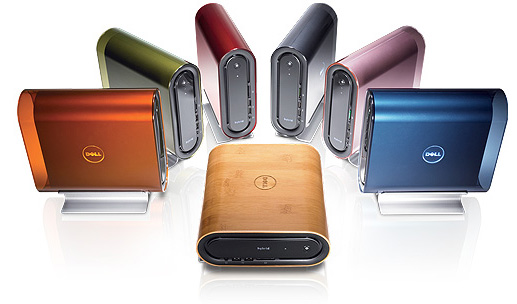
From a design and esthetics standpoint, we really can't help but admire the sleek appearance of the Studio Hybrid, though that's clearly a subjective sort of thing. Pictured here, if midnight blue isn't your bag, there are a myriad of other color options to chose from, including a bamboo finish, if you're the eco-friendly type that's still into killing trees and the like.
On the backside of the system, is a surprising multitude of I/O options, including both DVI and HDMI out, which clearly spells Home Theater PC in our book. Also on the back I/O plate are three more USB2.0 ports, line in/out audio jacks, the Gig-E port, and optical S/P DIF audio port and the AC adapter power plug. Speaking of which, the included power brick with the Studio Hybrid is surprisingly small and comes with a built-in rubber strap that allows you to easily bundle any extra cabling to keep it neatly tucked away in your install area. In addition, the power cable itself has a nice right angle molded plug on the end of it which allow it to wrap right up against the backside of the brick, again for easy securing with the integrated strap. Dell clearly was focused on design elegance with the Studio Hybrid and we were impressed with the system's over all build quality in general. Even working inside the system is a pleasure (especially considering its size), for the advanced end user that might have a need to upgrade primary components like the hard drive or system memory. With the removal of just two screws, your inside the machine and from there, you've got one more screw to go, to remove the hard drive/optical drive cage (top right) to gain access to the motherboard area. Once inside you can see there are standard notebooks SODIMMs memory sticks installed, as well as a standard 2.5" spinning hard drive mounted in the drive cage. A few more screws mount the heatsink assembly on top of the processor socket, though these are removed relatively easily, should you want to upgrade the CPU. Just remember you might need a BIOS update if you don't upgrade to a processor that isn't currently an option on Dell's site for the machine. A note on multimedia performance and digital video playback - In that vein, we should note that you'll want to disable DirectX processing in Windows Media center, or another 3rd party player of your choice, if you're going to be playing back full 1080p video. Intel's integrated graphics drivers simply are still not up to par with the X3100 core in the 965 chipset. Since the chipset doesn't offload many HD video decode functions in hardware, playback with DirectX processing enabled is pretty spotty. We turned this off and with the machine relying on the host CPU entirely, 1080p content played smoothly. Dell also bundles their Media Direct multimedia player in with the OS installation of the Hybrid and at its default setting, the machine had no problem playing back 1080p content. Incidentally, with a 1080p clip running, we observed around 40% CPU utilization and the machine was still very much responsive. That said, we feel strongly that Dell would do well to upgrade the Studio Hybrid line with Intel's latest G45 mobile chipset with GMA X4500 integrated graphics and the Centrino 2 platform. The G45 has full offload of the HD video decode stack and a bit more 3D graphics horsepower as well. |
| Test System Setup and PCMark Vantage | |||||||||||
|
How We Configured Our Test Systems: When configuring our test systems for this article, we first entered their respective system BIOSes and set each board to its "Optimized" or "High performance Defaults". We then saved the settings, re-entered the BIOS and set memory timings for either DDR2-1066 (AMD) with 5,5,5,15 timings or DDR3-1333 with 7,7,7,20 timings (Intel). The hard drives were then formatted, and Windows Vista Ultimate was installed. When the Windows installation was complete, we updated the OS, and installed the drivers necessary for our components. Auto-Updating and Windows Defender were then disabled and we installed all of our benchmarking software, defragged the hard drives, and ran all of the tests.
First we should offer a few caveats with respect to our PCMark Vantage testing. In many of these tests, hard drive performance significantly weighs on scoring and with the Studio Hybrid's 2.5" 5400RPM notebook class hard drive, versus a 10K RPM WD Raptor in our other test systems, the playing field simply isn't all that level. Essentially, the Studio Hybrid is an ultra-small desktop with virtually all notebook components inside; from its SODIMM system memory to its Core 2 Duo T5850 mobile dual-core CPU and 2.5" hard drive. If we were to compare it to a similarly specified machine, a good reference point might be the Vantage scores for the Asus U6 and Toshiba A305 machines in this recent HH notebook review. |
| Lame MT MP3 Encoding Test | ||||
In our custom LAME MT MP3 encoding test, we convert a large WAV file to the MP3 format, which is a popular scenario that many end users work with on a day-to-day basis to provide portability and storage of their digital audio content. LAME is an open-source mid to high bit-rate and VBR (variable bit rate) MP3 audio encoder that is used widely around the world in a multitude of third party applications as a core audio encoding engine.
In this test, we created our own 223MB WAV file (a hallucinogenically-induced Grateful Dead jam) and converted it to the MP3 format using the multi-thread capable LAME MT application in single and multi-thread modes. Processing times are recorded below, listed in seconds. Once again, shorter times equate to better performance. Here the Dell Studio Hybrid shows that its newer, more advance Core 2 Duo T5850 mobile chip, though its clock speed is nearly 300MHz slower, offers a bit more performance than the AMD Athlon 64 X2 dual-core desktop processor. In fact, the Hybrid even offers competitive performance to the Core 2 Duo E6600 full sized desktop test system. When it comes to audio encoding, processor horsepower is the gating item and the Hybrid has more than enough for this everyday task. |
| Cinebench R10 Rendering Performance | ||||
|
Cinebench R10 is an OpenGL 3D rendering performance test based on Cinema 4D. Cinema 4D from Maxon is a 3D rendering and animation tool suite used by 3D animation houses and producers like Sony Animation and many others. It's very demanding of system processor resources and is an excellent gauge of pure computational throughput.
This is a multi-threaded, multi-processor aware benchmark that renders a single 3D scene and tracks the length of the entire process. The time it took each test system to render the entire scene is represented in the graph below, listed in seconds. In this CPU intensive test, once again the Studio Hybrid puts up better numbers than the Athlon 64 X2 test system and is within striking distance of the 2.4GHz Core 2 Duo desktop system. All told, especially with its power consumption profile that we'll look at in the pages ahead, the Hybrid offers respectable performance for its size. |
| 3DMark 06 CPU Test | ||||
3DMark06's built-in CPU test is a multi-threaded DirectX gaming metric that's useful for comparing relative performance between similarly equipped systems. This test consists of two different 3D scenes that are processed with a software renderer that is dependent on the host CPU's performance. Calculations that are normally reserved for your 3D accelerator are instead sent to the CPU for processing and rendering. The frame-rate generated in each test is used to determine the final score. Don't let the title of the benchmark graph fool you. There is very little about this specific 3DMark06 test that has to do with the graphics subsystem. In fact, we're not even going to provide specific gaming benchmarks with the Studio Hybrid because it simply isn't up to the task for even mainstream 3D gaming. You'd likely be able play something like SIMs or perhaps an MMORPG turned down to its lower settings but that's about it. Intel's integrated X3100 graphics core in the Hybrid isn't up to the task for much more than that. However, in this software-based rendering test, the Hybrid's mobile dual-core chip once again provides a strong showing versus our two comparison full-sized test machines. |
| Power Consumption | ||||
Before we bring this article to a close, we'd like to cover an important datapoint for the feature product we're testing here. Dell's Studio Hybrid small form-factor desktop is engineered to provide all the basic functionalities of a business-class desktop or Home Theater PC, in a very low power envelope. Throughout all of our benchmarking and testing, we monitored how much power each of our test systems were consuming using a power meter between it and the wall plug. Our goal was to give you an idea as to how much power each configuration consumed while idling and under a heavy workload.
Please keep in mind that we were testing total system power consumption at the outlet here and the test is representative of an entire system's consumption, minus the keyboard, mouse and monitor.
If you recall from our test system specs list, the Athlon 64 X2 and Core 2 Duo E6600 systems have discrete graphics cards (GeForce 8800 GTX), 10K RPM desktop hard drives, and either DDR3-1333 or DDR2-1066 system memory. In addition the full sized desktop test systems also have full power desktop dual-core processors under their hoods as well. Again, with the Studio Hybrid's low power, notebook-based components and architecture, it consumes dramatically less power than these standard desktop systems. As you'll recall, the full sized systems have some advantages in disk performance and in addition, have high powered 3D graphics engines, so they can do more with respect to high end gaming, that's for sure. However, at less than half the power of mid-range desktop, the Hybrid's performance-per-watt value proposition is pretty impressive. |
| Performance Analysis and Video Spotlight | ||||
Performance Summary: In the final analysis, Dell's Studio Hybrid mini desktop system succeeds on a number of levels. It's stylish, extremely low profile, quiet and absolutely miserly on power. These traits, coupled with all the features and baseline performance of a mainstream desktop machine, add up to a quality product that, with a base price of $499 ($834 as tested with wireless keyboard and mouse), is also a decent value. If you keep in perspective the Hybrid's target end user scenario as a small form-factor, mainstream desktop or perhaps even a Home Theater PC, the Hybrid delivers on just about any metric that it can be justifiably measured too. Sure we would have liked to see Dell step out first with a Centrino 2-based machine with a G45 chipset but we're hopeful that's coming (no promises from Dell yet...). Regardless, even in our quick high definition video testing, clearly the machine was up to task of 1080p playback. So we can't complain too much on that front, especially with the Hybrid's HDMI output.
|