
|
|
| Intel's X48 Chipset |
Stop us if you've heard this one before: In this article we will be looking at the latest high-end desktop chipset from Intel, featuring support for DDR2 and DDR3 memory, support for 45nm dual- and quad-core processors, and PCI Express 2.0 connectivity with 16 lanes devoted to each PEG slot and compatibility with ATI's CrossFire technology. If it all sounds familiar, it's because the Intel X48 Express Chipset that's used on the three boards we'll be looking at here is almost exactly the same as the X38 Express that preceded it a few months back. In fact, if we take a gander at the chipset block diagram below, the only glaring addition would be official support for a 1600 MHz FSB - something that some X38 boards were hitting already, but without that "official" tag.
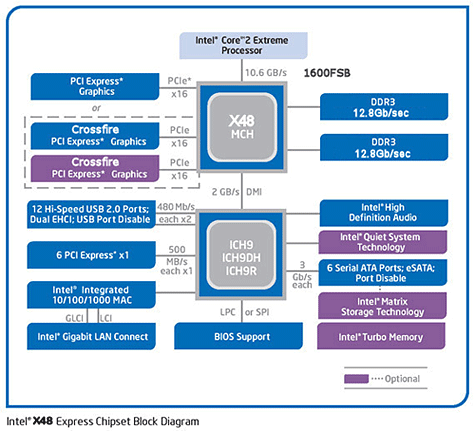
One might also stop and point out that DDR3 is the only memory technology listed in the diagram (twice, to be exact). Initial reports stated as much, but we obviously know that wasn't to be the case, which is a good thing for a variety of reasons. For sure, hitting the highest supported memory frequencies will only be possible using DDR3; with some manufacturers already offering >2.1GHz modules. It's the price and availability of DDR2, though, that makes it a quite an attractive option. Although DDR3 prices have begun to fall somewhat, 4 GB of DDR2 can be bought on the cheap these days. Upgrade paths are also made easier as there's one less component to buy when building a new system, if you already own some DDR2 that is. Thus, having X48 boards that support either standard is a win-win for just about everybody. |
| ASUS Rampage Formula Features | ||||||
|
ASUS' Rampage Formula is backed by a dark black PCB with brown elements, making this the first of three darker hued boards - indeed, black is the new "green". As with all of ASUS' Republic of Gamers motherboards, great attention has been paid to not only the aesthetics, but to improved cooling as well. Hence, the Rampage Formula benefits from massive copper coolers over the Northbridge and around the CPU socket, and a series of heatpipes that connect them. The Rampage Formula's bundle consists of 6 SATA cables, three of which are angled, one SATA power cable, an extra USB and Firewire port bracket, black IDE and floppy cables, ties, and the SupremeFX II audio riser card. A drivers and applications DVD provides the necessary software, although as its a DVD you've got to make sure the correct drive type is installed (although the likelihood of anyone buying a new board like this and not using a newer DVD drive is quite unlikely). We also found an ASUS case badge, full version of S.T.A.L.K.E.R., and a multi-language user guide.
Mostly blue and white connectors are spread out nicely around the board. leaving a mostly clean layout. Two blue PCI-E x16 slots with ample space between them populate the upper area, interspersed with 2 white PCI and 2 white PCI Express x1 slots. The SupremeFX II audio riser card is parked in its own black colored PCI Express x1 slot with a fan header close by, nestled in tightly inside a bend in the heatpipes. LEDs are placed strategically around the board, and are used to display the voltage status for CPU, Northbridge, Southbridge and memory in an intuitive color-coded fashion (read: green = good, red = bad). The smaller Southbridge heatsink is branded as a member of the RoG, and has a heatpipes extending from it and leading to the large copper heatsink over the Northbridge. This, in turn, leads to another heatpipe whisking away heat to an aluminum radiator and out the back of the board. Two additional copper heatsinks line the outer edge of the voltage regulation circuitry surrounding the CPU are also connected by heatpipes and then out towards the rear. An 8-pin power connection is found in the upper corner nearby the LED poster header with the cable going through an opening in the I/O shield, allowing the little display to be placed on the desk or another exterior location. For anyone with a dream of running a plethora of fans, ASUS has placed 7 fan headers about teh board - six 3-pin types and a 4-pin for the CPU cooler. |
| ECS X48T-A Features | ||||||
|
Front panel and three bright orange USB headers are found near the front, with a handy schematic placed nearby for quick reference. Touches like these are always welcome, because no one wants to go searching for their manual anytime a cable comes loose. SATA Ports 1-4 wind up just under the tip of a larger video card, but ECS has anticipated this by throwing in a set of SATA cables that are bent 90 degrees. The IDE port is inexplicably placed on the far edge of the board, furthest from the drives it would connect to. I guess ECS assumed that most users won't be using it, so placement wasn't an issue, but anyone still using IDE devices will have to run cables up and over their other components. Front panel audio or CD-In cables, will also need to run to the far corner as well. The X48T-A also lacks in another area - it only offers a single 3-pin fan header in addition to the 4-pin CPU fan. Placement of that one fan header was also less than optimal, snuggled in between the 8-pin ATX power (which itself is in the crook of a heatpipe) and the CPU heatsink/fan. Another gripe we had concerned the retention clip for the graphics adapter. The clip itself doesn't present a large problem, although we've become accustomed to not seeing them anymore; it's the placement of three capacitors immediately next to the clip that bothers us. Trying to reach in and push down the clip with fat fingers is one thing, worrying about knocking a cap off the board is another. Rear I/O features PS/2 mouse and keyboard ports, COM, eSATA and S/PDIF-In and Out, 6 USB 2.0 ports, 2 LAN (one each from Intel and Realtek chips), and 5 audio jacks with TOSLINK thrown in as well. Overall it's a really good-looking board from ECS that's sure to catch the eye, but it still has a few issues that we would like to see ECS iron out. |
| ECS BIOS & Overclocking Options | ||||||
|
Many users will feel right at home with the American Megatrends, Inc. (AMI) BIOS that ECS uses for the X48T-A. With the usual headings of Standard CMOS, Advanced Chipset, and PC Health Status we won't spend a huge amount of time going over areas that we've covered numerous times in the past. However, we will take a bit longer peek into the M.I.B. which stands for the Motherboard Intelligent BIOS where we found the user options for tweaking system performance as well as a few overclocking tools. The standard blue screens ECS uses are all so familiar. 'Standard CMOS Setup' gave us a vertical representation of all kinds of drives installed, including SATA and eSATA, IDE, and even the mode of floppy drive we have connected. 'Advanced Setup' offers a few more, well, advanced topics typically involving CPU-related features, such as Intel Speedstep, a power-saving method that can be applied, or the boot order of our drives. Unbefitting an enthusiast-marked board, the 'Advanced Chipset Setup' offers very little in the way of options.
Entering the M.I.B. part of the BIOS, we were immediately struck by the sheer number of options not present. By enabling the CPU Overclocking function we expected that more options might become available, and it does, but only by adding CPU and PCIe Frequency inputs. Voltage options are almost nil: CPU Voltage can be set between 1.1V and 1.6V in 0.05V steps and memory voltage between 1.5V and 2.1V in 0.10V steps. That's basically it.
|
| Intel DX48BT2 Features | ||||||
|
As one of Intel's Extreme Series of Desktop Boards, the DX48BT2 natively supports 1600MHz front side bus and memory speeds. Informally known as Bonetrail2, the DX48BT2 is yet again another motherboard steeped in black, made even more menacing by the Bonetrail skulls found drawn here and there. Blue and white components provide a direct contrast to the darker board, as shown.
Package contents included a relatively odd assortment of a clear blue rounded IDE cable, a clear blue (yet not the same color) SATA cable, non-marked I/O shield, door knob hanger, board layout decal, fan bracket, drivers and applications CD, quick reference guide, a Dolby HD Theater badge for our case and a cute Skull Logo for the Southbridge heatsink. No formal written guide is included, however. An optional 40mm active cooler can be also be installed using the included bracket. Bonus software on the disc were Intel's own Desktop Control Center, Diskeeper 9 Home Edition, DivX, Dolby Control Center, and a 90-day trial version of Norton 360. Trying to woo over the gaming crowd, our set should have included a copy of Ghost Recon Advanced Warfighter 2, but, alas, it was missing in action.
Both main coolers are completely passive and unlinked in any way, which resulted in the Northbridge cooler getting a bit hot during our testing. As you can see, it is quite thick and hefty, even requiring a plate underneath the board to keep it mounted properly. In comparison, the Southbridge heatsink is a very small aluminum chunk that one would ostensibly want to cover with the Skull Logo cover, but would hinder cooling in the process. The sheer size of the NB heatsink may wind up conflicting with certain graphics cards with reverse mounted heatsinks (we're looking at you, Sapphire Ultimate cards). There are also two sets of large Voltage Regulator heatsinks surrounding the capacitors in the CPU socket area. Three PCI-E x16 slots take up the majority of open space with not much room separating them, making CrossFire a riskier option in terms of heat than on some other boards. The blue-colored slots are PCI Express 2.0 compliant, while the black one is not. Two PCI slots are also interspersed here as well. Latches on the slots are there to lock down graphics cards - something of which we have seen less and less on newer boards. In practice, we found that the DIMM retention latches almost abutted the end of our lengthy 8800 GTS 512 card, requiring that it be removed to successfully switch out modules. Six SATA ports lie along the front edge, along with the 20-pin power plug and IDE port. As with other legacy devices, Intel is intent on helping us evolve, and has done away with floppy support as well, so no ports are to be found here. Back I/O ports consist of two red eSATA ports in lieu of legacy PS/2 ports, eight USB 2.0 ports, a single FireWire connection, one RJ45 LAN jack, five audio jacks, and an optical line out. A nice mix of five strategically placed fan headers are on the DX48BT2; three 3-pin and two of the 4-pin variety, such as for the CPU fan. One is unfortunately surrounded by larger capacitors, but can be avoided if necessary. The 8-pin ATX power connector is far up in the corner, and closer to the I/O shield. The location might cause an issue with cases such as the Antec Nine Hundred, which mount the power supply unit on the bottom of the chassis rather than the top. Front Panel and Audio headers are mid-back along the left side of the board, with two additional USB headers placed closer to the front. Like ASUS' successful Republic of Gamers boards, a power button was placed directly on-board for quick testing. A reset button also should have been added, as we can see the tracing on the board, but it didn't make the final cut. |
| Intel BIOS & Overclocking Options | ||||||||
Getting to the BIOS for the DX48BT2 requires pressing 'F2', and of the three BIOSes it seems the most straightforward--but first impressions can be deceiving. Across the top are sections labeled Main, Advanced, Performance, etc. And all seems to be in proper order... Main, at the very least, offers little surprises as it displays information regarding the CPU, Bus Speed, and memory characteristics. Advanced goes a step further, with configuration options galore regarding boot order, peripherals enabled, even configuring which PCI-e slot to use first. The first item down, however, is labeled Boot Configuration, which one might immediately connect to boot drive order but actually has more to do with fan control and numlock key status instead. The order of your drives is handled later, under the less imaginative but more direct 'Boot' tab from the main menu. Strangely, "Floppy Drive" appears as one of the device types, even though Intel has done away with floppy drive support on this board.
Under the Performance menu, users will find all of the overclocking-related options. By default, everything is disabled which basically means the system is running at its default speeds. Each override needs to be enabled in order to unlock the tools and the user has to accept a long winded warning about the dangers of "altering clock frequency and/or voltages".
Memory timings and speeds also come into play when overclocking the DX48BT2, and memory configuration allowed us to change the frequency using dividers based on the FSB. Thus, entering in a value for the frequency here will not necessarily be the true value after rebooting, and this time there is no dynamic update on screen to give you a helping hand.
|
| Test Systems and PCMark Vantage | |||||||||||
|
How we configured our test systems: When configuring our test systems for this article, we first entered their respective system BIOSes and set each board to its "Optimized" or "High performance Defaults". We then saved the settings, re-entered the BIOS and set memory timings for DDR2-1066 with 5-5-5-18 or DDR3-1066 with 7-7-7-20 timings. The hard drive was then formatted, and Windows Vista Ultimate was installed. When the Windows installation was complete, we updated the OS, and installed the drivers necessary for our components. Auto-Updating and Windows Defender were then disabled and we installed all of our benchmarking software, defragged the hard drives, and ran all of the tests.
For our first round of benchmarks, we ran all of the modules built into Futuremark's PCMark Vantage test suite which was updated using the November 2007 Hotfix. Vantage is a new Windows Vista-only benchmarking tool that we've incorporated into our arsenal of tests here at HotHardware. Here's how Futuremark positions their new benchmarking tool:
Looking at the large picture, there's really one board that stood out from the others in the total number of PCMarks: the ASUS Rampage Formula. As we go on, you'll notice that it didn't necessarily blow away the competition in each and every module, even coming in last at least one time, but at the end of the day it won out. Memories 1 - Two simultaneous threads, CPU image manipulation and HDD picture import The Memories suite was a very close affair for all of our boards. The Rampage Formula just squeezes ahead of the pack at 3486 PCMarks, while the other four all hover around 3430 to 3450. It calculates to less than a percent difference, but it's a good start for ASUS. "High definition TV broadcasts and movies have arrived. Playing an HD DVD with additional HD content, a Blu-ray movie, or watching HDTV smoothly (while making a backup of an HD DVD by transcoding to a media server or transcoding from a media server archive to a portable media player) requires lots of computing and graphical power. Windows Media Center with a high performance HDD can handle simultaneous video recording, time-shifting, and streaming to an Extender for Windows Media Center, such as Xbox 360™." TV and Movies 1 - Two simultaneous threads, Video transcoding: HD DVD to media server archive, Video playback: HD DVD w/ additional lower bitrate HD content from HDD, as downloaded from the net The TV and Movies test also has the Rampage Formula on top with about the same range separating the boards as before. Interestingly, other than the Rampage's meager leads in these first two modules, we don't see the X48 boards really raising the bar above the 780i or P35 based boards. |
| PCMark Vantage (continued) | ||||
|
We continue our test coverage with the remaining modules from the comprehensive PCMark Vantage suite of benchmarks.
Courtesy, Futuremark: "Gaming is one of the most popular forms of entertainment for all ages. Today’s games demand high performance graphics cards and CPUs to avoid delays and sluggish performance while playing. Loading screens in games are yesterday’s news. Streaming data from an HDD in games – such as Alan Wake™ – allows for massive worlds and riveting non-stop action. CPUs with many cores give a performance advantage to gamers in real-time strategy and massively multiplayer games. Gaming Suite includes the following tests: " Gaming 1 - GPU game test
Vantage's gaming benchmark also has the boards closely grouped, with two of the three X48 boards pulling just slightly away from the rest. Our overall leader was Intel's Bonetrail 2 board at 3969 PCMarks followed closely behind by the ECS X48T-A. Oddly, ASUS' Rampage Formula not only fell behind the other two X48 boards, but ultimately wound up behind the older P35 and 780i boards as well. "Online music shops have changed the way we purchase music, letting us buy exactly the tracks we want, right from home. Cataloguing your music library is a breeze for fast and powerful HDDs. The most common audio file formats decrease your music’s audio quality which is undesirable. Luckily, lossless audio file formats are becoming more popular. Transcoding from non-compressed audio to a lossless format is heavily taxing on the CPU. Transcoding your audio files from one format to another is much quicker and easier using high performance CPUs." Vantage Music suite includes the following tests:
Music 1 - Three simultaneous threads, Web page rendering – w/ music shop content, Audio transcoding: WAV -> WMA lossless, HDD: Adding music to Windows Media Player
When it came to the music module within PCMark Vantage, the newer boards found themselves at a complete disadvantage. The highest scores were achieved by the tandem of ASUS boards not using the X48 chipset. In fact, it was the ASUS Rampage Formula that once again placed last. ECS had the best performance of the newer boards at 3680 PCMarks - 20-25 points behind the leaders. "To compress and encrypt all personal information is vital for safe computing. Emails are the most important type of communication, whether it is personal or business. To keep the workflow smooth and enjoyable, high performance CPUs and HDDs are recommended. Reading news online while having your cup of coffee is quality-time. Often one site isn’t enough, so tabbed browsing is a perfect solution for news-hungry people. Spyware is very common on systems without protection against it, letting Windows Defender scan & protect your system is recommended. Voice over IP – with Skype™ or Windows Live Messenger – is very popular these days. Encrypted messaging for home and workplace gives additional security." Communications 1 - Three simultaneous threads, Data encryption: CNG AES CBC, Data compression, Web page rendering: graphics content, 1024x768, windowed
Performance in the Communications test was all over the place, but in general the x48 boards reasserted their position at the top. Our Intel board came out on top, followed by the Rampage Formula and then a close match between the ECS X48T-A and Blitz Formula. The sole NVIDIA board in our round-up, the Striker II Formula, was well off of the mark. "Starting various applications can take a long time – unless you have a high performance HDD. Editing text with WordPad is a breeze when done with fast CPUs and graphics cards. Often one site isn’t enough, so tabbed browsing is a perfect solution for highly productive people. Spyware is very common on systems without protection against it, letting Windows Defender scan & protect your system is recommended. Starting Windows Vista is a rather demanding task for the storage device, but a fast HDD will notably decrease the loading time. Our busy lives find us hard at work, balancing multiple tasks; with little time for breaks. It’s the same for our computers. Multiple tasks, running simultaneously, put your system under a lot of stress. Having a modern, up-to-date CPU, HDD, graphics card and board full of system memory increases your computer’s productivity and reduces your stress." Productivity 1 - Two simultaneous threads, Text editing, HDD: application loading
Finally, the Productivity Suite also had its ups and downs with no real rhyme or reason as to board placement. X48-based boards ran from first to middle to last, with ECS garnering the top spot this time around. The Intel DX48BT2 ran into a rare spot, placing last amongst the five boards, 10 PCMarks behind the ASUS Striker II Formula.
|
| POV-Ray & Cinebench Testing | ||||||||
POV-Ray, or the Persistence of Vision Ray-Tracer, is an open source tool for creating realistically lit 3D graphics artwork. We tested with POV-Ray's standard included benchmarking model on all of our test machines and recorded the scores reported for each. Results are measured in pixels-per-second (PPS) throughput.
POV-Ray benchmark performance varied from a low of 747.91 PPS to a high mark of 755.85 PPS, resulting in a mere 1 percent difference between the best and worst performers. The x48-based boards didn't seem to fare all that well with this application, with the ASUS Rampage Formula producing the lowest score overall.
Cinebench R10 is an OpenGL 3D rendering performance test based on Cinema 4D. Cinema 4D from Maxon is a 3D rendering and animation tool suite used by 3D animation houses and producers like Sony Animation and many others. It's very demanding of system processor resources and is an excellent gauge of pure computational throughput. This is a multi-threaded, multi-processor aware benchmark that renders a single 3D scene and tracks the length of the entire process. The time it took each test system to render the entire scene is represented in the graph below, listed in seconds.
|
| 3DMark06 and LAME MT MP3 Encoding | ||||||||
LAME-MT is an open-source mid to high bit-rate and VBR (variable bit rate) MP3 audio encoder that is used widely around the world in a multitude of third party applications. In this test, we created our own 223MB WAV file and converted it to the MP3 format using this multi-thread capable application in single and multi-thread modes. Processing times are recorded below, listed in seconds. Here, shorter times equate to better performance.
There's really not much that can be said regarding the Lame Multi-Threaded encoding times: they're all too similar to make any kind of judgment. If there's anything that does stand out, it would be that the two blips in the single-threaded testing both came when using ASUS boards.
|
| Crysis & ET: Quake Wars Framerates | ||||
|
For our next set of tests, we moved on to some in-game benchmarking with Crysis and Enemy Territory: Quake Wars. When testing processors with Crysis or ET:QW, we drop the resolution to 800x600, and reduce all of the in-game graphical options to their minimum values to isolate CPU and memory performance as much as possible. However, the in-game effects, which control the level of detail for the games' physics engines and particle systems, are left at their maximum values, since these actually do place some load on the CPU rather than GPU.
Although the ASUS Rampage Formula seemed to lag behind in much of the previous benchmarks, it shines where a "Republic of Gamers" board should: in the straight-forward testing of gaming frame rates. Its 119.3 frames per second in ET: Quake Wars were nearly a frame or more faster than the other two X48 boards, which came in at exactly 118.6 fps each. The performance delta was even a bit better during the Crysis CPU benchmark routine. All three boards saw an improvement over the other two RoG boards from ASUS in both game engines. |
| Performance Summary & Conclusion | ||||||||||||
Performance Summary: Each of the three motherboards we tested performed similarly in our benchmarks, and we don't think we could pick a winner outright based on performance alone. The ASUS Rampage Formula seemed to do a little better in the game tests, ECS' X48T-A typically did well in the rendering tests, and the Intel DX48BT2 fell somewhere in between. And in comparison the the two boards running on NVIDIA's 780i or Intel's older P35 chipsets, the three X48-based motherboards didn't offer much in terms of additional performance.
We managed to hit a 520 MHz FSB while overclocking the Rampage Formula, and while that might not be the highest speed attainable due to the memory we chose, it was clearly faster than the competition. The bundle is first rate, even going so far as to include a retail copy of S.T.A.L.K.E.R., the aforementioned LCD poster, and a branded and labeled I/O shield, for people who like those kinds of things. Pricewise, the Rampage Formula is the highest of the three and will set you back almost $300 dollars, but it's money well spent if you're in need of a high-end Intel-based motherboard.
BIOS options were also lacking by comparison, and were probably the reason we couldn't overclock the baord very far. Gaining an additional 50MHz on the FSB isn't terribly exciting, and won't garner the X48T-A any performance enthusiast fans. The X48T-A's redeeming quality was that it's an capable performer at default speeds, and at $200 it comes in as the lowest priced of these three models by far. It's actually one of the cheapest X48 boards out there. If overclocking is not your bag, and you want all of the features offered by the X48 chipset, then the ECS X48T-A might be a good place to start.
INTEL DX48BT2: Which brings us to the Intel DX48BT2. Of the three boards tested here, Intel was perhaps the most forward-looking, killing off legacy components and adding in things like a third PCI-Express x16 slot for CrossFireX and eSATA. As it was with the ECS X48T-A, however, we found that Intel's board had some of the same issues: curious placement of some onboard components, less robust cooling, and the least inspiring overclocking experience of the three. The package contents were also a bit questionable; we'd prefer a manual and more than a single SATA cable, over the doorknob hanger any day. While the DX48BT2 did manage to reach a higher FSB than the ECS board, the process of getting there was somewhat difficult, and the instability afterwards was cause for concern. The DX48BT2's BIOS options were fairly complete, so we had hoped for a better outcome. Heat may have been an issue here as well, as the passive standalone heatsinks were quite hot to the touch. To sum it up, the DX48BT2 is a decent follow-up to the original Bonetrail, but just doesn't measure up to what other companies such as ASUS are putting out there in the high-end enthusiast market.
|

