



Asus Eee PC 900 Ultra Mobile PC

Soon after we began posting images and information regarding the original Asus Eee PC from the Computex show in Taipei in June of last year, we knew Asus had a hot product on their hands. In fact, our initial hands-on preview of the Eee PC was so popular, it has actually been one of the most heavily trafficked articles we've ever posted here on HotHardware. The combination of the Eee PC's ultra small form factor, features, and affordable price made it attractive to such a broad range of technology consumers, that readers from around the globe poured in to check out Asus' slick, Linux-based, mini-machine.

A few months later, we followed up with our full evaluation of the Eee PC 701 4G. By the time early Eee PCs were ready for the retail market, Asus had morphed the machine from a competitor of the OLPC XO to a UMPC for the masses. In the move, pricing increased from initial reports, but that didn't stop the Eee PC from being wildly popular. The Eee PC was still priced low enough to allow budget conscious consumers to own a UMPC, and to allow power users to pick one up as somewhat of an accessory for their main PC or full-sized notebooks. Fan sites and numerous Eee PC mods would eventually hit the web too; Asus really did strike a chord and consumers (and competitors) listened.
Due to the success of the originals, Asus of course followed up with numerous accessories and multi-colored Eee PCs in the months after the initial release. The follow-up units were essentially identical to the originals though, save for the different colored enclosures. The first really major change to the Eee PC line-up would be the Eee PC 900, which was just introduced about two weeks ago.
Although the new Eee PC 900 and Eee PC 700 series machines have similar hardware foundations, Asus has tweaked the 900 in a number of meaningful ways. Below are the official specifications, but they don't tell the whole story...
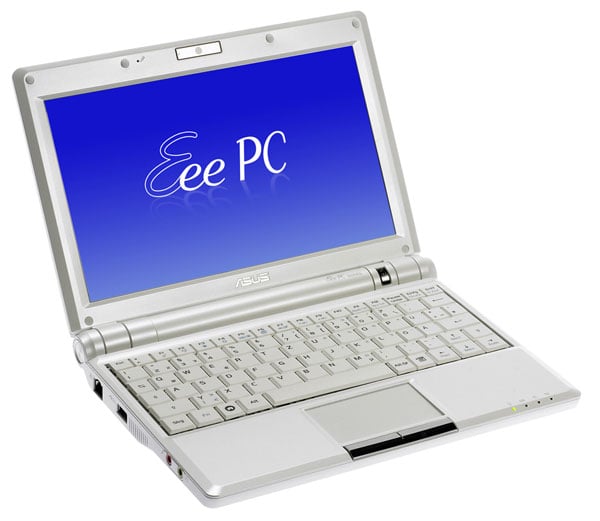

Asus Eee PC 900
Features and Specifications

The specifications above hint at some of the more significant differences between the Eee PC 900 and Eee PC 700. First, the 900 series is outfitted with a larger, higher resolution 8.9" screen. Solid state storage capacity has been increased as well, as has the amount of factory installed RAM. A 900MHz Intel mobile Celeron CPU and 910 chipset still lie at the heart of the machine, and audio and LAN connectivity options are also similar. Asus did more than just attach a larger screen and add more storage though, as we'll show you on the pages ahead.
;)
;)
;)
;)
Asus ships the Eee PC 900 in an unassuming box adorned with the likeness of the system. Inside, we found a detailed User's Manual, a Quick Start Guide, a warranty card, and a couple of DVDs - one with the Linux recovery image and the other a Support CD that contains a number of useful tools for reconfiguring or restoring the Eee PC, including a utility to create a bootable thumb drive with the factory OS image. In addition to the aforementioned items, Asus also included a 36W power adapter and a simple, padded pouch. If you're familiar with the Eee PC 700 series, you'll notice the newer 900 series machine includes a more traditional power adapter with a cord and not a wall brick like the 700 series.





