|
|
| Asus P5E3 Deluxe: Features | ||||||
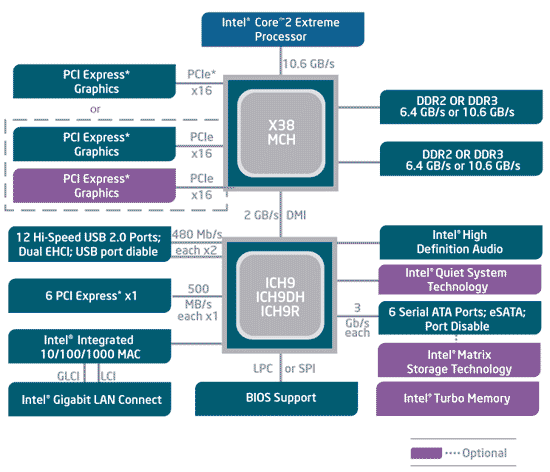
To coincide with the launch of the Intel X38 Express chipset, we received a pair of enthusiast class motherboards, the Asus P5E3 Deluxe and the Gigabyte X38-DQ6. The Asus P5E3 Deluxe is an ultra high-end motherboard that supports DDR3 memory, 802.11n wireless networking, and it even features an embedded Linux-based operating system that can be loaded in a matter of seconds. The Gigabyte X38-DQ6 is also a high-end offering, but it supports more affordable DDR2 memory.
|
| Asus P5E3 Deluxe: Layout |
The Asus P5E3 Deluxe was designed with power users in mind, and as such the board is loaded with integrated peripherals and sports an oversized cooling solution comprised of multiple copper heatsinks linked together via a complex heat-pipe system. The area around the CPU socket on the P5E3 Deluxe is surrounded by copper heatsinks on all four sides. One of the heatsinks is mounted atop the Northbridge, while the other three are mounted to various components in the board’s voltage regulation circuitry and power array. This heatsink arrangement may pose a problem for some oversized aftermarket CPU coolers, so take note. There is also a fourth heatsink affixed to the ICH9R Southbridge on the P5E3 Deluxe. It, however, is a low-profile design that won’t interfere with any expansion cards.
As you can see, the P5E3 Deluxe has a trio of PCI Express x16 slots, a pair of PCI Express x1 slots, and a single standard PCI slot. The blue PEG slots on the board both have a full 16 lanes of PCI Express connectivity, while the black slot is powered by only 4 lanes. Thanks to the P5E3 Deluxe’s ICH9R Southbridge, the board supports multiple RAID modes and it had six internal SATA ports. There are another two eSATA ports in the board’s external I/O cluster, along with six USB 2.0 ports, analog and digital audio jacks, a PS/2 keyboard port, dual GigE LAN jacks, dual WiFi antenna jacks, and a single Firewire port. The P5E3 Deluxe’s audio support comes by way of an ADI1988 HD coded and Firewire by way of an Agere controller. Finally, an Ralink RT2770F chip powers the integrated 802.11n WiFi controller. |
| Asus P5E3 Deluxe: Express Gate, BIOS and OC | ||||||||
As we mentioned earlier, the Asus P5E3 Deluxe features an embedded Linux-based operating system that’s available upon initial power-up. The feature is dubbed “Express Gate”, but it is based on the SplashTop platform technology developed by San Jose-based company DeviceVM. When the P5E3 is first powered up, a menu is displayed that gives users the option to boot the OS, enter the system BIOS, power down the system, or launch the Express Gate applications. If you choose to boot the OS, enter the BIOS, or recycle power, the P5E3 Deluxe behaves just like any other motherboard. If you launch the Express Gate applications, which are comprised of a web browser and Skype at this time, the embedded Linux-based OS is launched from a ROM and seconds later it’s available for use. We found the Express Gate technology easy to use and quite handy. Say, for example, you need to download a driver or BIOS file and the hard drive-based OS isn’t functioning properly. With Express Gate you can now access the web and integrated peripherals even if the system’s full blown OS has a problem.
Overall, other than the color scheme, they are very similar to the BIOS derivatives used on most other high-end motherboards today, but navigating through Asus' BIOS menus does take some getting used to if you've never experienced them before.
Asus P5E3 Deluxe - Overclocking As Good As They Get It's within the "Extreme Tweaker" section of the Asus P5E3 Deluxe's BIOS that most of the board's performance tuning options lie. From within the "Extreme Tweaker" section of the BIOS, users have the ability to alter clock frequencies and voltages for virtually every major on-board component. The CPU and PCI Express frequencies can be altered in 1MHz increments, and the CPU multiplier and memory ratio can also be manipulated manually. There are also extensive voltage options for the CPU, Memory, chipset, and PLL. And what's interesting is that the BIOS is designed to allow users to key in voltages and frequencies without having to tunnel into a menu option - simply highlight the CPU voltage, for example, punch in your desired voltage and you're done.
|
| Gigabyte X38-DQ6: Features | ||||||
The second Intel X38 Express based motherboard we’ll be featuring in this article came by way of Gigabyte. Like the Asus P5E3 Deluxe, the X38-DQ6 is a high-end motherboard targeted at enthusiasts, but the Gigabyte board is configured to support more affordable DDR2 memory, as opposed to the DDR3 required for the P5E3 Deluxe.
|
| Gigabyte X38-DQ6: Layout |
The Gigabyte X38-DQ6 has a wide array of integrated peripherals, so the board is packed with a number of additional controllers and connectors. Despite the relative complexity of the board, however, Gigabyte did a nice job with its layout and overall design.
All of the X38 Express chipset's inherent features are exploited on this board, so there is a wealth of USB and SATA connectors available (which support various RAID modes), but not all of the SATA ports are linked via a single controller. The 6 main ports are powered by the ICH9R chipset and support multiple RAID modes, but the purple ports along the bottom edge come by way of a pair of individual controllers. We should not that arrays can't be built across them; individually they do support RAID, however.
As we continue our tour around the X38-DQ6, you may notice that this board is equipped with nothing but solid capacitors; no electrolytic caps are to be found. This should help with the board's longevity as there no chance of a leaky cap. The I/O backplane is home it a great assortment of connectors. Along with PS/2 mouse and keyboard ports you'll find, optical and analog audio ports, a single mini-Firewire port and a standard Firewire port, an excellent 8 USB 2.0 ports, and dual Gigabit Ethernet LAN jacks. The Firewire ports come courtesy of a TI controller, the two GigE LAN ports are powered by a Realtek controller, and audio functionality come by way of Realtek's ALC889 HD codec. |
| Gigabyte X38-DQ6: BIOS and Overclocking | ||||||||
Gigabyte has outfitted the X38-DQ6 with a customized Award / Phoenix BIOS derivative that resembles many of the other high-end, enthusiast class motherboards currently on the market. Gigabyte does, however, put their own spin on the BIOS.
The main BIOS menu screens should look familiar to most of you. Using these menus, users can configure any of the board's integrated peripherals, set the boot order, or tweak memory timings, etc. We'd also like to note that thankfully, Gigabyte has listened to the community and have eliminated the need to press CTRL-F1 to access the X38-DQ6's more advanced BIOS features. The need to press CTRL-F1 to gain full access to the BIOS on older Gigabyte boards was a minor annoyance that we're glad to be without.
Gigabyte X38-DQ6 - Overclocking To Be Continued The MB Intelligent Tweaker, or M.I.T., menu is where experienced users will find all of the X38-DQ6's voltage and memory options, and overclocking tools. From within the M.I.T. menu, users have access to an array option that offer control over voltages and frequencies for the CPU, chipset, and memory. There is fine granularity with all of the voltage controls (which are extensive) and all frequencies can be adjusted in 1MHz increments. We spent some time overclocking our Core 2 Duo E6750 processor with the X38-DQ6 motherboard and had mixed results. Before we began, we bumped the CPU and chipset voltages up by a tenth of a volt, configured our memory to operate at only 667MHz, and dropped the CPU's multiplier to 6. Then we raised the FSB until the machine was no longer stable. We were able to hit upwards of 490MHz and successfully booted into Windows, but further attempts to break the 500MHz mark resulted in a non-functional board. We have been in contact with Gigabyte over the issue and a replacement board is en route to us, however. We should be able to update this section of the article over the course of the next day or so. Update 10/15/2007: We completed our testing of the replacement X38-DQ6 with much better results. After following the same procedure outlined above, we were able to take the board to a 500MHz front side bus without any problems. |
| Test Systems and SANDRA | |||||||||||||||||||
How we configured our test systems: When configuring our test systems for this article, we first entered their respective system BIOSes and set each board to its "Optimized" or "High performance Defaults". We then saved the settings, re-entered the BIOS and set memory timings for either DDR2-1066 with 5-5-5-15 timings or DDR3-1333 with 7-7-7-18 timings. The hard drives were then formatted, and Windows XP Professional (SP2) was installed. When the Windows installation was complete, we installed the drivers necessary for our components, and removed Windows Messenger from the system. Auto-Updating and System Restore were then disabled and we set up a 1024MB permanent page file on the same partition as the Windows installation. Lastly, we set Windows XP's Visual Effects to "best performance," installed all of our benchmarking software, defragged the hard drives, and ran all of the tests.
Unfortunately, we don't have any SANDRA scores from the DDR2-equipped Gigabyte X38-DQ6 at the moment due to the failure we mentioned on the previous page. We did complete the rest of our benchmark suite with the board, however. |
| Futuremark PCMark05: CPU and Memory | |||||
For our first round of synthetic benchmarks, we ran the CPU and memory performance modules built into Futuremark's PCMark05 suite.
According to PCMark05's CPU performance module, there is very little difference between the four platforms we tested. The slight variations in performance seen here all fall within the margin of error in this test.
"The Memory test suite is a collection of tests that isolate the performance of the memory subsystem. The memory subsystem consists of various devices on the PC. This includes the main memory, the CPU internal cache (known as the L1 cache) and the external cache (known as the L2 cache). As it is difficult to find applications that only stress the memory, we explicitly developed a set of tests geared for this purpose. The tests are written in C++ and assembly. They include: Reading data blocks from memory, Writing data blocks to memory performing copy operations on data blocks, random access to data items and latency testing." - Courtesy FutureMark Corp.
|
| Office XP SP1 and Photoshop | ||||
PC World Magazine's Worldbench 5.0 is a Business and Professional application benchmark. The tests consist of a number of performance modules that each utilize one, or a group of popular applications to gauge performance.
All of the motherboards we tested performed similarly in the Worldbench 5.0 Office XP and Photoshop tests. Technically the DDR2 equipped machines put up the best scores by a few seconds in each test, but overall performance was similar. Contrary to the PCMark05 memory results on the previous page, these results were affected more by latency than bandwidth. |
| LAME MT and Sony Vegas | ||||||||
Nothing to see here. LAME MT didn't show any variation from platform to platform.
Once again the DDR2 systems put up the best overall scores in our Sony Vegas video rendering benchmark. The 5 to 14 second deltas shown here, however, are still quite small in the grand scheme of things. |
| Cinebench R9.5 and 3DMark06 | ||||||||
The Cinebench 9.5 benchmark is an OpenGL 3D rendering performance test, based on the commercially available Cinema 4D application. Cinema 4D from Maxon is a 3D rendering and animation tool suite used by 3D animation houses and producers like Sony Animation and many others. And of course it's very demanding of system processor resources.
Talk about a non-event. Like the LAME MT results from a few pages back, Cinebench R9.5 didn't report any differences in performance between the four motherboards tested.
|
| Gaming Test: Q4 and F.E.A.R. | ||||
The results from our custom Quake 4 benchmark were pretty cut and dried. Overall the DDR3-equipped systems were slightly faster, but the deltas were nothing to get excited over. This same performance trend played out in the F.E.A.R. benchmark as well, but in F.E.A.R. the delta were much more pronounced. |
| Power Consumption | ||||
Before we bring this article to a close, we'd like to cover a few final data points. Throughout all of our benchmarking and testing, we monitored how much power our test system was consuming using a power meter. Our goal was to give you all an idea as to how much power each configuration used while idling and under load. Please keep in mind that we were testing total system power consumption at the outlet here, not just the power being drawn by the motherboards alone.
|
| Our Summary and Conclusion | ||||||||
Performance Summary: Based on the benchmark results we’ve obtained over the course of our testing, we’d have to say the new Intel X38 Express chipset performs on par with, and perhaps ever so-slightly higher, than similarly equipped P35s - which is to say performance is quite good. Throughout our testing the DDR3-equipped Asus P5E3 Deluxe performed just a bit better than a P35 using similar memory, and for the most part the same held true for the DDR2-equipped Gigabyte X38-DQ6. Asus P5E3 Deluxe:
The Asus P5E3 Deluxe is a power user’s motherboard if there ever was one. This board sports a number of features not found on any other motherboard currently, including an embedded Linux-based mini-OS and integrated 802.11n WiFi. The P5E3 Deluxe also has a well appointed BIOS and it turned out to be an excellent overclocker. The only issues we had with the board had to do with its oversized cooling apparatus which crowds the CPU socket area somewhat and what will undoubtedly be a high price. We don’t have street pricing yet, but expect the P5E3 Deluxe to hover in the neighborhood of $320. However, enthusiast class chipsets like the X38 and high-end motherboards always command a high price; early adopters are familiar with this trend we’re sure. In the end though, we’d have no trouble recommending the Asus P5E3 Deluxe. If there’s a feature you want, this board probably has it.
Gigabyte X38-DQ6: We’re a little more apprehensive about the Gigabyte X38-DQ6. Throughout most of our testing, the board was rock-solid stable and gave us no trouble whatsoever. It also performed well throughout all of our benchmarks and its feature set is top notch. We also liked the X38-DQ6’s accessory bundle (specifically the slick eSATA brackets) and system BIOS, which is about as well appointed as they come. Plus, the board works with DDR2 memory, which will save potential consumers a fortune without sacrificing much, if anything, in terms of performance. Unfortunately, our particular sample couldn’t recover from an aggressive overclock and we’re waiting for a replacement. Once we’re done testing the new board, we’ll update this conclusion. But we’ll have to reserve final judgment for now.
Update 10/15/2007: We have completed our testing of the replacement X38-DQ6 with much better results. We acheived a peak front side bus frequency of 500MHz while overclocking with the board, and as our benchmarks have shown its performance is very good, even with more affordable DDR2 memory. It's too early to pass judgement on the X38 due to the fact that we have only worked with two motherboards at this point in time, but it is shaping up to be a solid solution. And the Gigabyte X38-DQ6 should serve users well if they're not inclined to also purchase DDR3 memory for an upgrade.
|