|
|
| Introduction and Specifications | |||||||
|
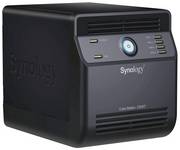
End user demand for storage capacity is expanding exponentially year after year, as multimedia content, email, and document and file generation show explosive growth in this age of new media. In addition, protecting that data is becoming increasingly more critical, with investments in digital music and video collections, as well as those all important family photos and business-critical documents in both the Consumer and SOHO markets. As such we've been looking at an array of NAS (Network Attached Storage) devices here at HotHardware over the past few months, many of them designed for do-it-yourself end users. In the following pages we're going to take a look at the Synology CubeStation CS407 NAS Server. This system comes configured "bare-bones", ready for installation of up to four SATA hard disks with RAID 0,1 and 5 capabilities. With a max total capacity of up to three terabytes of storage, this unit ought to handle plenty of those cute baby-covered-in-mashed-green-peas shots that the family holds near and dear to their hearts. And with this type of multi-drive product, you can "RAID it up" and rest easy, knowing your backside is covered with at least some level of data storage redundancy.
In addition to its compact form-factor and clean lines, Synology's CS407 provides product differentiation through support for a multitude of cross-platform features like UPnP MultiMedia support, iTunes server functionality, a Web Server with PHP and MySQL support and even an integrated photo management system called PhotoStation2 that has a decidedly "flickr-like" look and feel to it. The kit itself comes with an external power supply, as you can see above. This is a good approach we feel, to keeping thermals in check inside the unit, especially in a four drive installation. Beyond that, you get assorted SATA and power cabling, an RJ45 Ethernet cable, installation hardware with zip-ties, and an installation CD. The kit does not come with any third-party software for backup processing and scheduling but instead Synology provides back-up functionality with their Data Replicator II utility. We'll cover that in the pages ahead here shortly. |
| CubeStation CS407 Features and Setup | ||||
|
We set out to configure the CubeStation CS407 with a pair of Western Digital SE16 WD7500 750Gb hard drives in a RAID 1 array. Our hardware installation was straight-forward and easy enough for even the novice to understand with just the included installation guide for reference.
The CS407 features a compact design, no bigger than the form-factor of a two slice toaster. The chassis hood slides off with the removal of four simple thumb screws. Inside is a drive rack for housing four standard 3.5" hard drives. We were a bit disappointed in the CS407's build quality, and fit and finish in this area. The drive rack of the unit is made of thin grade sheet metal an though the edges are rounded, the feel of the drive cage is a bit flimsy. We also would have liked to see Synology provide a hot-swappable hard disk cage design with the CS407, especially considering its price range ($649 or so street price currently) but unfortunately it's just a standard drive rack enclosure.
The CS407's motherboard is a compact, low-power design that is devoid of heatsinks. The design is based on Marvell's 5281/500 SoC (System On a Chip) reference design. We're fairly certain this is a member of Marvell's Orion family of processors for "Media Vault" platforms. Together with Marvell's Gigibit Ethernet MAC/Phy combination, 128MB of Hynix DDR2 DRAM and 64B of flash memory, the system is capable of serving as a complete storage management and server platform with its embedded, configurable OS. Physical installation, though a bit cramped for obvious reasons, took a total of about 5 - 10 minutes to complete. We slid in our WD drives, installed side-rail screws, plugged in the included SATA power and data cables, and then slid the chassis skins back together and re-installed the backside thumb screws. It was then time to power up and configure the CS407 Storage Server software and other features. |
| System Software Configuration and Setup | ||||||||||
|
Upon power-up, we dropped the Synology setup disk into a workstation that was connected to our Gig-E network. Synology's system discovery and configuration wizard found the CS407 NAS unit and proceeded with setting it up, flawlessly we might add.
Setup, Volume Creation, Status, Priviledges and Power Management From there we setup our admin rights for the volume. There is a fair amount of granularity in this menu area and you can configure users and groups with various access levels (read-only or read/write etc.) to the volume or specific directories on the volume. We then hit the Power Management menu which allows you to configure power recovery functions in the event of an outage, as well as hard disk idle spin-down time and power cycling of the entire unit itself. Other configuration options of the CS407, include LAN setup configuration, either automatically (DHCP) or manually, and the ability to enable Jumbo Frame support and its associated MTU size. We would caution, however, that Jumbo Frames needs to be something that is supported by the client-side NIC as well. It's great that Synology provides this feature but if other devices on your network aren't capable or configured (this means clients as well as switches and routers) to support Jumbo Frames, using this setting may provide no benefit and could possibly even limit performance. Netgrear has a good article on the topic here for your reference. We specifically performed all our testing with Jumbo Frame support disabled. Lastly, the unit also has the ability to send email notifications via an SMTP mail server to any address, for notification of error events and volume failure. This is a great feature to have, especially in support of other features like the unit's integrated web server application. |
| Synology Assistant, Data Replicator II, and Download Re-Director |
|
The CS407 is driven by the all-mighty "wizard" approach for a number of its feature and to put it simply, it just works. Synology Assistant is a wizard utility for configuring and auto-mapping network drives from the unit's available volumes, as well as a host of other features. The software runs via an installation on a network client and the interface provides network discovery of the system as well as managerial functions for things like print server functionality.
Synology's Data Replicator II software is extremely easy to setup, again with auto-discovery of the system on the network, as well as its available network shares.
Users can choose from three options of backup for any system the software is installed on that is on the network; Immediate Backup, Synchronization and scheduled backup. We were very pleased to see the synchronization option for incremental backup functionality and of course scheduled backup as a bare minimum requirement is available as well. All told, Data Replicator II offers all the backup functionality a SOHO or Home user could want in a backup package and it worked flawlessly for us. Synology's Download Redirector provides easily configurable automatic download and file management functions to direct the CS407 to connect to an external server or site and fetch any file of your choice. You can even drag and drop a download link to the target area of Download Redirector's window and it will automatically fetch the target file(s) from that link. This functionality is limited to Windows users only but it sure was slick to see it in action.
Download Redirector saves bandwidth for your client machines as well, since the CS407 is actually performing the download with this service, rather than having to download a file to a client and then dumping it to the NAS volume. |
| Services And Enhanced Functionality | ||||||||||||
|
Synology positions the CS407 as a multi-purpose NAS Server, rather than a simple storage end-point. In fact, with the CS407's embedded OS and applications, it can perform a multitude of functions beyond just data storage and sharing. It's obvious that Synology understood that it's what a NAS server can do with the data that adds value and differentiates a product.
The Synology CubeStation CS407 can provide the following functionality:
We'll take you through some of the unit's more interesting features, next...
|
| Test Systems, Performance, Power Consumption And Acoustics | ||||||
|
Evaluating the performance of a device like the Synology CS407 can be difficult. There are a number of variables to consider such as the hard drives used, the hard drive configuration, network speed, the router, switch, the size of network - we think you get the picture. Nonetheless, we wanted to quantify performance in some way that would be relevant to you. In this case, we kept network performance testing to a few basic tests, considering the multitude of variables in each environment that can pose a major influence on results.
For our first test, we transfered a large 1.75GB file - the World in Conflict beta to be exact - to and from the Synology CS407 in addition to a high-end workstation and a generic PC equipped with a 100Mb LAN connection that's setup as a basic storage server on our internal network.
Despite having much less memory and a comparatively slower processor, the Synology CS407 completed our large file test significantly faster than our simple storage server with its 100Mb connection. The CS407 couldn't quite keep up with our high-end workstation, but we weren't really expecting it to, considering the workstation's significant advantages in memory and CPU resources.
In our small file transfer tests, we took 285MB of data, broken up over 487 digital image files and again transfered them to and from the Synology CS407 and our two reference systems. Like the large file test above, the CS407 fell right smack in the middle of the two other machines. The CS407 and the high-end workstation had identical write performance in this test, but the more powerful workstation surged ahead in the read test. And once again, the basic file server couldn't keep up, largely because of its 10/100 Ethernet connection disadvantage, versus the CS407 and Workstation Gig-E connections.
A Note Power Consumption and Acoustics: |
| Performance Summary And Conclusion | ||||
|
Product Performance Summary:
The Synology CubeStation CS407 is a model example of how far SOHO NAS products have come over the years. This system was extremely easy to setup and configure, even for the novice user. Synology's suite of installation and setup wizards fully automate everything from volume management, to access privileges and even network drive mapping on client machines. In addition, enhanced features with utilities like the system's PhotoStation2, iTunes Server, Download Redirector and Data Replicator backup software add just about any functionality the Home or Small Office user could wish for. The only item on our wish-list for future version of the Synology CubeStation family, would be hot-swap hard drive capability. Though the CS407 was a millimeter away from capturing our coveted Editor's Choice award, the addition of a hot-swap drive cage would definitely have tipped the scale towards a firm EC rating. Other products on the market in its class have this feature and we're hopeful Synology will follow suit in the future. A quick scan of our HotHardware PriceGrabber search engine shows the CS407 retails currently at around $649, with its lower-end sibling, the CS407e, with 64MB of RAM and a slower Freescale processor, dropping in at $539. Though the system is definitely on the pricey side, its performance, features and functionality are impressive to be sure.
Discuss This Article and Share Your Thoughts With Others!
|