
|
|
| Introduction |
|
USB flash drives are a dime a dozen these days, right? Well, they are a little more expensive than that, but how cool is it that you can get 1GB of storage capacity that's smaller than a pack of gum for like $20-30? Pretty soon you'll see these great little gadgets in vending machines for a dollar, especially considering that everybody and their mama sells them. When there are so many different offerings from so many companies for the same basic product, you could just buy the first one you come across. That path will fail to earn you any geek cred, though, so we recommend doing a little research and decide what you want in a flash drive (biggest capacity, best security, smallest dimensions, etc). We also recommend sticking with reputable brands, like Kingston, Corsair and OCZ. Admittedly, flash drives had gotten kind of boring, but when they started hitting 4GB and bigger, they piqued our interest again. Now, you can get 8GB and 16GB flash drives, so we were interested to see what the market has been cooking up these days. In this USB flash drive roundup, we will take a closer look at the features and performance of a 4GB OCZ Rally2, a 16GB OCZ Mega-Kart, a 1GB Kingston DataTraveler ReadyFlash, and an 8GB Corsair Voyager GT.
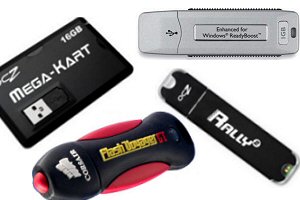
All of these drives, except the OCZ Mega-Kart, have the typical USB flash drive form factor that you are probably already familiar with (think of a 5-piece pack of gum). The OCZ Mega-Kart deviates from this shape and instead tries to look like a thick credit card. Additionally, the OCZ Mega-Kart is the only one of the four drives that doesn't boast support for Windows Vista's ReadyBoost feature, which is supposed to boost performance, especially in low memory situations, by using the flash drive as cache. The main area that ReadyBoost provides improved performance is when starting applications. With ReadyBoost, applications often start up more quickly, especially if you only have 512MB or 1GB of system memory. |
| OCZ Ralley 2 | ||||||||||
|
We are going to start with the OCZ Rally2. As the name suggests, this drive is a new iteration of OCZ's Rally. We have been carrying a 2GB Rally around for over a year now and have been quite happy with it. We are pleased to see that Rally2 features an aluminum chassis like the original Rally.
While both the new Rally2 and the original Rally feature a black aluminum shell, that is about where their design similarities end. The new Rally2 is actually a flatter black than the Rally, and the Rally2's ends are rounded for a sleeker appearance. The Rally2, like the Rally and most other flash drives, ships in one of those nearly-impossible-to-open blister packs that we all love to hate. Once you finally open the package, you will find the Rally2 drive, a lanyard and a USB extension cable. The lanyard is for wearing your geek bling (the Rally2 in this case) around your neck if you so desire. The USB extension cable is included for those of you who aren't fortunate enough to have front USB ports on your PCs. You simply plug the cable into a rear USB port, and then put the cable somewhere that is convenient for you when you need to connect the Rally2. That way, you don't have to crawl around to the back of your PC every time. As you can see in the picture above, the Rally2 is the same basic shape as many other USB flash drives on the market -- about as long as a 5-stick pack of gum but not quite as wide. It fits quite nicely in a jean pocket. When OCZ first introduced the Rally, the company also introduced its "Dual Channel Technology" for its line of flash drives. The technology was developed to maximize performance. Like the Rally, the Rally2 also features OCZ's Dual Channel Technology. We'll see how much that helps the performance when we test the transfer rate of the Rally2. In addition to the Dual Channel Technology, the Rally2 features a lifetime warranty and an orange LED status light. We like that the LED is orange, but it's a tad too bright in our opinion. This is of course a point of personal preference though. |
| OCZ Mega-Kart Specs & Features | ||||||||
|
We were quite excited to take a look at the OCZ Mega-Kart because of its relatively small size and large capacity. Although we prefer the form factor of a regular USB flash drive (like the aforementioned Rally2), we were still geeked (so to speak) about checking out a 16GB storage device that is barely larger than a couple of credit cards stacked on top of each other.
OCZ claims that the Mega-Kart is thin enough to fit in your wallet, but we would advise against it since we wouldn't want you to sit on it and risk breaking it. It could, of course, fit easily in your pocket, purse or bag. As we mentioned before, blister packs aren't our favorite packaging, but that is how the Mega-Kart ships. We do like that it's not much bigger than our BlockBuster membership card. Another cool thing about the Mega-Kart is that it has a small USB cable built in. When you flip it over, you get a better idea of how the cable works. It pops out, and the short cable is revealed.
The design is pretty clever and works rather well. The cable and USB connector stay securely locked in place when not needed. The only down-side of the design is that the Mega-Kart hangs awkwardly from a USB port once it's plugged in. Many people won't be bothered by this, but we did raise an eyebrow or two after plugging it in each time. It's just not what we expected or are used to. That said, the design could also afford some flexibility in tight squeeze situations. Like the Rally2, the Mega-Kart features an orange LED status light, but this one is a bit more tame. Unlike the Rally2, the Mega-Kart does not offer a lifetime warranty. Instead, the Mega-Kart is warrantied for only one year. We aren't sure why the warranty is so much shorter for the Mega-Kart, but we'd like OCZ to consider upping the warranty a bit. |
| Kingston DataTraveler ReadyFlash Specs & Features | ||||||||||||||||||||||
|
Kingston's DataTraveler line has been around for several years now. We have seen some of the DataTraveler drives of the past perform quite well, so we were looking forward to testing the ReadyFlash drive. Although the ReadyFlash is obviously designed with Windows ReadyBoost in mind, we were interested in more than just saving one or two seconds when opening applications, which is why we decided to test this drive just like the others in this round-up. On the performance results page, you will see just how well this drive performs.
By now, it should come as no surprise that the Kingston DataTraveler ReadyFlash comes packaged in a plastic blister pack like most other flash drives on the market. Kingston includes a small lanyard with a ring attached so that the ReadyFlash drive can be added to a keychain. Unlike all the other drives in this round-up, which are mostly black, the Kingston ReadyFlash is silver. Its chassis is plastic and features black rigid sides for better grip. The cap is really secure, which makes it somewhat of a hassle to remove. We assume this will loosen over time.
The ReadyFlash's blue status LED looks great with its silver body. Additionally, we were pleased to see Kingston include a five-year warranty with this drive. This warranty isn't as good as the OCZ Rally2's lifetime warranty obviously, but it sure beats the one-year warranty of OCZ's Mega-Kart. |
| Corsair Voyager GT Specs & Features | ||||||||||
|
Have you broken or water-logged your precious flash drives in the past? If so, Corsair has the flash drive for you -- the ruggedized Voyager GT. We didn't even know we needed a rugged flash drive until Corsair released the original Voyager a couple years ago. Users and reviewers have shown that the Voyager drives can withstand quite a bit of torture, including being run over by a car, being boiled, and being run through a wash cycle in a pair of jeans. While that does intrigue us, our interest was piqued when we learned that Corsair hand picks the NAND flash that is used in the Voyager GT to maximize performance.
Corsair designed the Voyager GT with performance in mind, but it maintained all the ruggedness of the original Voyager. What this ruggedness equates to is a Corsair proprietary all-rubber housing that encloses the entire drive (except for the USB connector of course). Even the cap is made completely of rubber. For consistency's sake, we'll mention that this drive, the fourth and final in our round-up, also comes in a not-so-friendly blister pack.
The Voyager GT definitely seems rugged when you hold and inspect it. We were surprised by its weight for a flash drive; it feels strangely "heavy" (at less than three ounces, it's definitely not heavy per se, just relative to some other flash drives). We assume this 8GB Voyager GT's weight is due to all the rubber in the rugged design and the fact that this thing packs in 8GB of flash memory. Speaking of all that rubber, the housing actually is kind of fat for a flash drive, which means you either can't or won't want to plug this drive into a USB port adjacent to an already occupied one. It simple won't fit (easily or at all) if the two ports are right next to each other. Also, we noticed that the rubber housing likes to pick up lint from your pockets.
Of all the drives in this round-up, the Voyager GT comes with the most extras, which include a lanyard for wearing the drive around your neck, a USB extension cable, and a security application for encryption and password protecting a partition. The Voyager GT also features the second best warranty in the group at 10 years. Additionally, the status LED for this drive is a cool blue. |
| Performance Testing | ||||||||
|
Over the past couple of years, we've used flash drives quite regularly, both for personal and business reasons. During that time, we stumbled across some rather slow drives. As you can imagine, trying to leave work at 5:00, and being stuck waiting for a flash drive data transfer to finish, your patience runs out rather quickly. For this reason, we were anxious to see how fast these four flash drives can read and write data. We tested the drives using SiSoftware Sandra's Removable Storage test and then by transferring data to and from the drives while timing the transfers.
The Sandra test measures performance in operations per minute rather than megabytes per second. Different file sizes are tested, and then the results are graphed. In the test result below, the 8GB Corsair Voyager GT is the red line; the 1GB Kingston DataTraveler ReadyFlash is the orange line; the 4GB OCZ Rally2 is the green line; and the blue line is the 16GB OCZ Mega-Kart. As you can see, the Corsair Voyager GT completely outperforms all of the other drives in this test. The Kingston DataTraveler ReadyFlash comes in at a close second, while the OCZ Rally2 follows in third place. Finally, we see the OCZ Mega-Kart far behind in last place. The Mega-Kart is obviously designed more for capacity than performance.
High Sandra scores don't matter if real-world performance doesn't add up. For that reason, we performed a set of read and write tests with all four drives. We created three different sets of files: 1) 97MB of NVIDIA driver files, 2) a 579MB 3DMark06 installer, and 3) 950MB of pictures, videos, MP3s and WMAs. We transferred the file sets to each drive to test their write performance, and then we transferred the file sets to our test machine (the Alienware Area-51 7500) to test their read performance. We performed each test three times on each drive and averaged the results. We took the transfer time results and translated those into transfer rates (MB/s). Then, we graphed the results for easy comparison. Check them out below.
All of the drives, except the OCZ Mega-Kart, post really good read speeds in the first test. The Corsair Voyager GT backs up its Sandra dominance with some real-world dominance as it takes first place in both the read and write transfer rates. Just as they did in Sandra, the Kingston ReadyFlash and the OCZ Rally2 take second and third place, respectively. The OCZ Mega-Kart performs quite dismally for some reason, but it redeems itself in the next test.
Once again, the Corsair Voyager GT completely dominates this test. Rugged and fast; we like the combo! Somehow the OCZ Mega-Kart improves quite a bit from the previous test. Evidently, it is faster with one big file than it is with a bunch of smaller files even if the group of smaller files is much smaller overall than the one big file. The OCZ Rally2 and Kingston ReadyFlash perform pretty well too, but this time the Rally2 beats the ReadyFlash in the read test.
The results of this test fall in line with the Sandra and 97MB transfer tests: the Corsair Voyager GT takes first, followed by the Kingston ReadyFlash, then the OCZ Rally2 and finally the OCZ Mega-Kart. Note that the Corsair Voyager GT maintained a read speed of over 30MB/s in all three tests. Perhaps more manufacturers will take a lead-in from Corsair and start hand-picking their NAND flash now. |
| Performance Summary & Conclusion |
|
Performance Summary: The performance seen in this flash drive round-up can be summed up fairly easily. The best performance hands down was offered by the 8GB Corsair Voyager GT. Corsair claims to have built the Voyager GT with performance in mind, and the results substantiate that claim. The 1GB Kingston DataTraveler ReadyFlash and OCZ Rally2 also perform well, with the ReadyFlash outpacing the Rally2 more often than not. We were a little surprised that the Rally2 didn't perform a little better. On the other hand, we didn't know what to expect of the OCZ Mega-Kart, but we were left wishing it could transfer data faster than it did.
Kingston's DataTraveler:
OCZ's Rally2:
OCZ's Mega-Kart:
Corsair's Voyager GT:
Get Into HotHardware's PC Hardware Forum And Discuss!
|

