|
|
| Introduction and the Z77 Chipset |
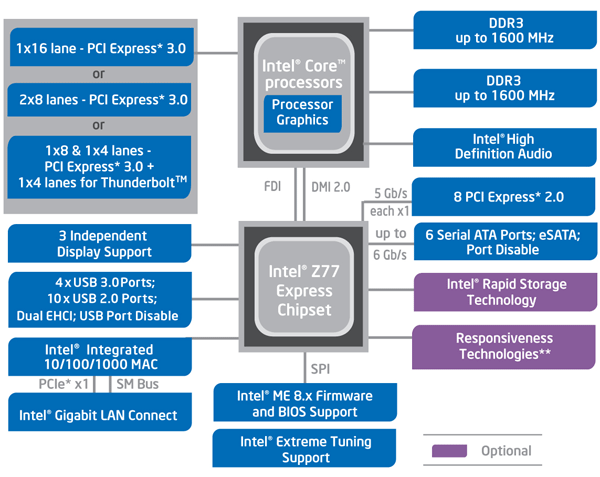
In preparation for the impending arrival of the company’s 3rd Generation Core processor products based on its Ivy Bridge microarchitecture, Intel has readied a new chipset dubbed the Z77 Express. We have already been able to show you a number of Z77 Express-based motherboards, thanks to a handful of sneak peeks while out at CES early this year and a few briefings that took place afterwards, but today we can finally give you the full monty on the chipset itself.
Before we show you the motherboards themselves, we should take a bit about the Z77 Express chipset at the heart of all the ‘boards. The high-level block diagram above gives a good visual representation of the Z77 Express chipset’s main features. Like the Z68 (and a few generations to come before it), the new Z77 Express chipset is essentially an I/O hub, as all of the traditional Northbridge functionality previously found in a Northbridge chip has long since been integrated into the processor itself. |
| MSI Z77A-GD65 |
For the purposes of this article, we acquired a handful of Z77 Express-based motherboards to give you all an idea as to what type of boards would be hitting the scene when the Z77 Express is first made available. First up, we have the MSI Z77A-GD65. Like the other Z77 Express-based motherboards we’ll be featuring here, all of the Z77 chipset’s features are available on the MSI Z77A-GD65, but MSI works a bit of their own magic as well. The MSI Z77A-GD65 features a mouse-friendly UEFI “Click BIOS II” that’s much easier to navigate than traditional text-based BIOS menus (more on this later). The board is also in MSI’s “Military Class III” family and features super ferrite chokes, highly conductive polymer capacitors and / or solid capacitors throughout, which should offer increased stability and longevity, as well as lower total power consumption. The Z77A-GD65 also has a digital PWM for more efficient power delivery.
The MSI Z77A-GD65 also supports “1 second overclocking” thanks to its OC Genie feature and button, but the UEFI sports all of the overclocker-friendly features we’ve come to expect from MSI for manual tweaking as well. MSI also includes their new Instant OC Control Center software which gives users the ability the monitor and control system parameters from within Windows, with no need to reboot when making changes. MSI includes plenty of documentation with the Z77A-GD65, in addition to an I/O shield, drive and utility CD, an SLI bridge, four SATA cables, front panel quick connectors, and extension leads for the integrated voltage checkpoints. There’s nothing over the top about the board’s bundle, but all of the necessities are there. |
| Asus P8PZ77-V Deluxe |
Next up, we have the Asus P8Z77-V Deluxe. The P8Z77-V Deluxe is one of the most feature laden motherboards in this round-up, in terms of both its hardware and software. In addition to exploiting all of the features inherent to the Z77 Express chipset, the P8Z77-V Deluxe offers additional USB 3.0 support by way of discrete ASMedia controllers, Bluetooth and WiFi connectivity, additional SATA 6Gbps ports, and what Asus calls its “Dual Intelligent Processors 3”. The Dual Intelligent Processors consist of Asus’ EPU unit, which we’ve covered in the past, and the TurboV processing unit. The processors work together with the P8Z77-V Deluxe’s programmable digital VRM (DIGI+ VRM) and give users the ability to monitor and adjust power delivery. According to Asus, the combination of the programmable digital VRM and Dual Intelligent Processors 3 results in superior power efficiency and longevity. The P8Z77-V Deluxe has a couple of other interesting features as well. For example, you can flash this board’s BIOS even if there is no CPU or memory installed via its “USB BIOS Flashback” feature. It also support the USB Attached SCSI Protocol, which can be enabled via Asus’ AI Suite software, to boost USB 3.0 throughout by as much as 170% (we have an article in the work specifically exploring this feature). Bundled with the Asus P8Z77-V Deluxe were a user’s manual, driver / utility CD, a WiFi & Bluetooth module (with dual external antennas), a package of front panel header quick disconnects, an I/O shield, SLI bridge, and six SATA cables. |
| Gigabyte Z77X-UD5H |
Here we have the Gigabyte Z77X-UD5H. Like the other motherboards featured here, the Z77X-UD5H is an enthusiast class, Z77 Express-based motherboard for socket 1155 Sandy Bridge and Ivy Bridge processors. The Gigabyte Z77X-UD5H offers all digital voltage regulation; a feature that Gigabyte calls 3D Power. The board is also part of Gigabyte’s “Ultra Durable 4” family of products, and is reportedly outfitted with double the amount of copper within the layers of the PCB and a new fiberglass fabric in the PCB which reportedly offers better humidity protection. Ultra Durable 4 branded products also reportedly offer enhanced electrostatic and thermal protection as well. In terms of more tangible features, the Gigabyte Z77X-UD5H offers a total of 16 USB ports (10 USB 3.0 and six USB 2.0), six SATA 6Gbps and four SATA 3Gps connectors, CrossFireX and SLI support, DualBIOS technology, and On/Off Charge support. The Z77X-UD5H also offers every display output option available (VGA, DVI, HDMI, and DP) and integrated mSATA. The mSATA port is located right about in the center of the board and makes it easy (and relatively cheap) for users to take advantage of Intel’s Smart Response Technology. Using the mSATA port, however, will disable one of the standard SATA ports. Inside the box, Gigabyte provides a pretty nice bundle with the Z77X-UD5H as well. Along with the board, we found a couple of manuals, a driver / utility CD, a case badge, a I/O shield, an SLI bridge connector, four SATA cables, and a bay mountable pair of USB 3.0 ports. |
| Intel DZ77GA-70K |
Finally we have the Intel DZ77GA-70K. The DZ77GA-70K is a member of Intel’s Extreme Series of motherboards, and as such, features the black and dark blue color scheme of its predecessors and a full complement of overclocking capabilities. As you’d expect from an Intel-built motherboard, DZ77GA-70K exploits all of the features inherent to the Z77 Express chipset and adds a few more, like Bluetooth, WiFi and Firewire, through the use of third-party controllers. The board features Intel’s “Fast Boot” technology, which speeds the boot process by eliminating the need to complete a full POST when the hardware and configuration of the system is unchanged from the previous boot. The DZ77GA-70K also supports Extreme Memory Profiles (XMP 1.3) for easy high-speed memory configuration and even includes an extensive set of overclocking tools via an excellent UEFI Intel is calling their Visual BIOS. We should point out that those overclocking tools are not only available via the UEFI, but also through a Windows-based application called the Intel Extreme Tuning Utility, or Intel XTU. XTU gives users the ability to tweak numerous performance-related options and monitors system temperatures and fan speeds. “One Touch” overclocking options are also available via a simple slider for those that want a quick and easy speed boost, without doing much tweaking. Included with the Intel DZ77GA-70K, we found an Intel “Extreme Series” mouse mat, a quick installation guide, a custom I/O shield, an SLI bridge, a WiFi and Bluetooth module (with requisite cable), a driver / utility CD, and a bay mountable cage with dual USB 3.0 ports. |
| UEFI Comparisons and Overclocking | ||||
Although not every motherboard on the market has made the switchover, with these new Z77 Express-based motherboards, the boring text-based BIOS menus of the past are no more. All four of the Z77 Express-based motherboards in this round-up feature graphically-rich, mouse-enabled UEFI (Unified Extensible Firmware Interface) menus that are very different from one another. These first two shots are of the main menu and CPU overclocking menu of Intel’s Visual BIOS, installed on the DZ77GA-70K. As you can see, the menus are well laid out and labeled and items can be tweaked easily via simple sliders. With unlocked K-Series processors, overclocking is as easy as dragging a slider to your desired speed and voltages and other items can be tweaked just as quickly. We really liked what Intel has done with their Visual BIOS; it is a huge step up in appearance and usability from their older text-based menu system. Gigabyte has taken a much different approach to their UEFI than the other manufacturers represented here. The Gigabyte Z77X-UD5H sports that Gigabyte is calling their 3D BIOS. What’s unique about its setup is that there is actually a clickable (and rotatable) 3D rendering of the actual motherboard pictured in the UEFI, and if a user would like to alter the settings of say the CPU or memory, all they have to do is click on them in the image. It’s a pretty cool setup, but be found it to be somewhat less responsive to mouse input than the others. There is, however, and advanced view also available with a simple to navigate list of options as well. Asus has been offering UEFI menus on their enthusiast boards for quite a while now, and it shows with the P8Z77-V Deluxe. The P8Z77-V Deluxe’s UEFI feels more refined than the others; it is well laid out, responsive, intuitive, and it is rife with advanced features. One-touch overclocking is available and the main menu shows a wealth of status information immediately upon entering the UEFI. An advanced view, however, offers a much more comprehensive list of tweakable options. And here we have MSI’s Click BIOS II. MSI has done a good job appointing Click BIOS II with plenty of features, but we wish the actual menu lists were somewhat larger. A significant portion of the screen is taken up by huge, clickable buttons on either side with the actual menus crammed in between. One of the more interesting features of the Z77A-GD65’s UEFI is its built in browser. It’s not accessible without installing a utility on the system (and reserving a bit of drive space), but when it is, it gives users the ability to access the web and e-mail without having to boot the OS.
Of course, all of these motherboard sport extensive hardware monitoring and overclocking features, so we set out to overclock our Core i7-2700K using a stock Intel air cooler and default voltages to see if there were any major differences between the boards. Ultimately, however, there was not. |
| Test Setup and PCMark 7 | ||||||||||||
Test System Configuration Notes: When configuring our test systems for this article, we first entered their respective UEFI menus and set each board to its "Optimized" or "High performance Defaults". We then saved the settings, re-entered the BIOS and set the memory frequency to the maximum officially supported speed for the given platform. The SSDs were then formatted, and Windows 7 Ultimate x64 was installed. When the Windows installation was complete, we updated the OS, and installed the drivers necessary for our components. Auto-Updating and Windows Defender were then disabled and we installed all of our benchmarking software, performed a disk clean-up, cleared temp and prefetch data, and ran the tests.
Futuremark's PCMark 7 is the latest version of the PCMark whole-system benchmarking suite. It has updated application performance measurements targeted for a Windows 7 environment and uses newer metrics to gauge relative performance, versus the older PCMark Vantage. Below is what Futuremark says is incorporated in the base PCMark suite and the Entertainment, Creativity, and Productivity suites, the four modules we have benchmark scores for you here.
The PCMark test is a collection of workloads that measure system performance during typical desktop usage. This is the most important test since it returns the official PCMark score for the system
All four of the Z77 Express-based motherboards we tested performed with a fraction of one another and the older Z68 platform. If you want to pick nits, the Asus P8Z77-V Deluxe technically put up the highest PCMark score, but the deltas separating the boards is so small that it falls well within the margin of error for this benchmark. |
| Cinebench R11.5 and POV-Ray | ||||||||
Cinebench R11.5 is an OpenGL 3D rendering performance test based on Cinema 4D from Maxon. Cinema 4D is a 3D rendering and animation suite used by 3D animation houses and producers like Sony Animation and many others. It's very demanding of system processor resources and is an excellent gauge of computational throughput. This is a multi-threaded, multi-processor aware benchmark that renders a 3D scene and tracks the length of the entire process. The rate at which each test system was able to render the entire scene is represented in the graph below.
In the single threaded Cinebench test, all of the boards performed within 1/100 of a point of one another, which is about as close as can get. In the multi-threaded test, however, there was a bit larger spread. All of the Z77 Express-based motherboards came in a touch ahead of the Z78 and the Intel DZ77GA-70K--somewhat surprisingly--took the lead overall.
POV-Ray , or the Persistence of Vision Ray-Tracer, is an open source tool for creating realistically lit 3D graphics artwork. We tested with POV-Ray's standard 'one-CPU' and 'all-CPU' benchmarking tools on all of our test machines and recorded the scores reported for each. Results are measured in pixels-per-second throughput; higher scores equate to better performance.
All of the Core i7-2700 powered systems, whether running on the Z68 or Z77 Expressed, performed right on par with each other. There was less than a 1% variation in performance between the Z77 Express based motherboards, which is to say they essentially performed identically. |
| LAME MT and SunSpider | ||||||||
In our custom LAME MT MP3 encoding test, we convert a large WAV file to the MP3 format, which is a popular scenario that many end users work with on a day-to-day basis to provide portability and storage of their digital audio content. LAME is an open-source mid to high bit-rate and VBR (variable bit rate) MP3 audio encoder that is used widely around the world in a multitude of third party applications.
In this test, we created our own 223MB WAV audio file and converted it to the MP3 format using the multi-thread capable LAME MT application in single and multi-thread modes. Processing times are recorded below, listed in seconds. Shorter times equate to better performance.
Just in case you were wondering--yes, this graph is correct. All of the Z77, Z68, and X79-based systems represented in this graph perfomed identically. The benchmark uses only one or two threads, and since the Core i7-2700K and Core i7-3820 feature similar cores that Turbo up to the same frequency, performance was the same across the board.
Next up, we have some numbers from the SunSpoder JavaScript benchmark. According to the SunSpider website:
All of the systems were testing using the latest version of Internet Explorer 9, with default browser settings, on a clean installation of Windows 7 Ultimate x64.
Once again, we saw minimal variation from system to system here, regardless of the motherboard, save for the AMD-based system which trailed the others by a wide margin. |
| Low-Res: Gaming Tests | ||||
For our next series of tests, we moved on to some more in-game benchmarking with Crysis and Enemy Territory: Quake Wars. When testing processors with Crysis or ET:QW, we drop the resolution to 1024x768, and reduce all of the in-game graphical options to their minimum values to isolate CPU and memory performance as much as possible. However, the in-game effects, which control the level of detail for the games' physics engines and particle systems, are left at their maximum values, since these actually do place a load on the CPU rather than GPU.
We saw minute performance differences between the various Intel-based motherboards in our low-res game tests, but there was no clear winner. |
| USB 3.0 Tests | ||||
Due to the fact that native USB 3.0 support is one of the main new additions to the Z77 Express chipset, and a couple of the motherboard had third-party, discrete USB 3.0 controllers on board as well, we did some testing to compare the performance of each solution.
As you can see, in terms of its write performance, the native Intel USB 3.0 performed right on par with the discrete ASMedia controller. Both Intel and ASMedia, however, had a clear advantage over the NEC controller when smaller block sizes were used. In regard to reads, the native Intel USB 3.0 interface trailed the ASMedia and NEC controllers at the smallest of transfer sizes, but Intel eventually surpassed the NEC controller and then just missed the mark set by ASMedia. |
| Total System Power Consumption | ||||
Before bringing this article to a close, we'd also like to take a but about power consumption. Throughout all of our benchmarking and testing, we monitored how much power each of our Z77 Express-based test system was consuming with a power meter, and compared them to the reference systems used throughout our benchmark tests.
Our goal was to give you an idea as to how much power each configuration used while idling at the Windows desktop and while under a heavy CPU workload. Keep in mind, this is total system power consumption being measured at the outlet and not the the individual power cnsumption of the motherboards alone.
The power consumption characteristics of each of the Z77 Express-based motherbaords we tested were quite different. The MSI Z77A-GD65 proved to consume the least amount of power of the bunch, under both idle and load conditions. Next came the Asus board, followed by Gigabyte's offering. Intel's DZ77A-70K consumed more power than all three, however. We've reached out to Intel in hopes of finding a clear answer as to why their board would consume more power than partner boards that have more intergrated peripherals (it's likely due to slight voltage differences), but haven't heard back just yet. |
| Our Summary and Conclusion |
Performance Summary: All of the Z77 Express-based motherboards we tested offered similar performance overall, which is to be expected when using identical hardware (i.e. the same CPU, RAM, GPU, drives, and PSU) to power the boards. All of the Z77 Express-based boards also performed about on par with the Z68 Express. In terms of overall system performance, there's virtually nothing to differentiate the motherboards we tested from one another. Heck, they all even have the same black-and-blue color schemes, integrated POST code error reporters, power and reset switches, and passive cooling.
Gigabyte Z77X-UD5H: According to Gigabyte, the Z77X-UD5H should be priced right around $200, which makes it the second most affordable in our round-up. It too lacks any included wireless connectivity options, but Gigabyte's board does have the most display output options should you plan to use the integrated graphics built into Intel's socket 1155 processors or want to take advantage of Lucid's Virtu for GPU virtualization. The Z77X-UD5H is also the only board with a built-in mSATA connector which is an interesting option for those thinking about leveraging Intel's Smart Response SSD caching technology. Gigabyte's "3D BIOS" UEFI could use some refinement, but all of the options most enthusiasts need are represented, and the motherboard was stable throughout testing. Overall, the Z77X-UD5H is another solid offering from Gigabyte.
Asus P8Z77-V Deluxe: Asus has set the MSRP of the P8Z77-V Deluxe at $279, making it the most expensive board in our round-up. The P8Z77-V Deluxe's price premium is easily justified, however. The board includes more USB ports than the others, it includes WiFi and Bluetooth, an Intel LAN controller, it's Thunderbolt-ready, its UEFI is well laid out and offers extensive tweakability features. The board also includes a PLX PCIe switch, which offers all of its slots full PCIe connectivity. The Asus P8Z77-V Deluxe also proved to be perfectly stable throughout testing. In short, the Asus P8Z77-V Deluxe may be pricier than the rest, but if you've got the funds and want / need one or more of the board's features, we'd recommend it.
|