|
|
| Introduction and Specifications | |||||||
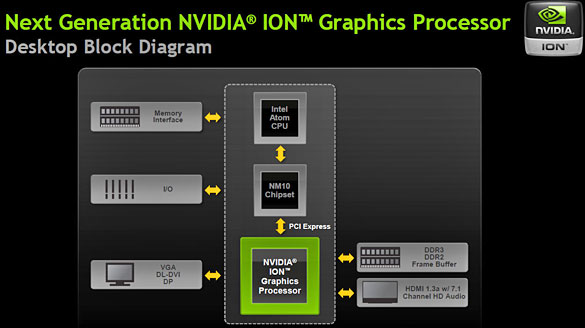
Nettops are not nearly as popular as their mobile contemporaries, i.e. netbooks, arguably due to the lack of any significant horsepower within the tiny machines. Up until now, most nettops have been good for little more than basic Office duties, Web surfing, and occasional 720p (max) movie playback. There's a fine line that has to be walked with a nettop; there's far too little space to shove a Core i3 or better CPU in there, and besides, companies are trying to keep pricing at reasonable levels. Thus, nettops have largely been left with one main processor option: Intel's Atom family.![]() But the new CPU isn't the only new feature in the HD-ID33 and HD-ID34 nettops, as they are known. The only difference between the two models is the included / not included RAM and hard drive; the ID33 is better for DIYers who may already have a spare 2.5" HDD laying around and a SO-DIMM, while the ID34 ships with a 250GB 5400RPM drive and 2GB of RAM. There's also NVIDIA's next generation Ion (Ion 2) inside, which means that 1080p playback and some light-duty gaming should theoretically be no problem. Also, the exterior design has been completely revamped from Zotac's ZBox HD-ID11 that we reviewed back in May.
![]() NVIDIA's Next-Gen Ion Graphics Processor, aka the GeForce 218GT |

| Design and Build Quality |
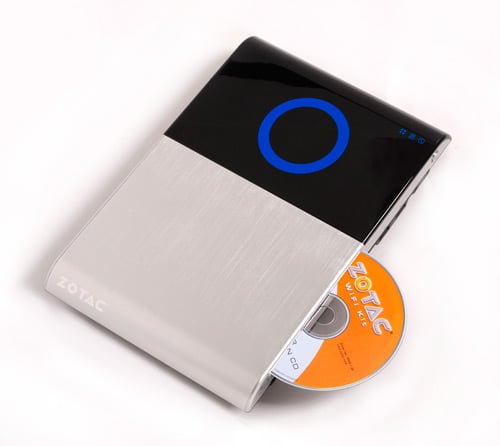
![]() Right off of the bat, the design of the ZBox HD-ID34 caught our eye. It's easily one of the most stylish nettops that we've seen, and honestly, it's one of the only nettops with an truly distinct aesthetic on the market. The vast majority of these systems are all small rectangles, easy to forget and hard to differentiate. But the new ID34 is a total overhaul and a breaking of the mold. It's mostly flat and designed to slide under your LCD monitor, under your television or slid into a bookshelf.
![]() We really like how flexible the design is. This form factor is more suitable for proper home theater installations than say machines like the Dell Zino HD, and of course, the inclusion of a Blu-ray player really takes things up a notch. Zotac has clearly designed this machine to be a contender for the slim HTPC of 2010. It's one of the first nettop/HTPC machines to actually support Blu-ray, as players have just now become affordable enough to make sense in a bargain-centric nettop. It's also a slot-load drive versus a tray drive, which saves even more space. It can also burn CDs and DVDs. Needless to say, the optical drive is as good as it gets, particularly for a nettop.
The 1.8GHz Atom D525 and next-gen Ion 2 both mean that this machine is better designed for multi-media than lower performance nettops. The only downfalls to this compact system are the comparatively slow DDR2-800 memory (it has to use SO-DIMMS, not standard DIMMs for desktops) and the 2.5" hard drive slot, which limits your capacity. There are plenty of SSDs on the market that fit in 2.5" slots, but those hoping to store many hours of HD footage or movie archives will need to rely on external or networked storage. We should also point out that there is an available internal Mini-PCIe slot as well. In fact, there are two Mini-PCIe slots, but one of them is used for the machine's integrated WiFi.
The ZBox HD-ID34 is designed a lot like MSI's Wind Top III. You can easily mount this on the rear of most any LCD monitor or any other VESA mount, which makes the quantity of installation options nearly endless. But the internal specifications are better than most other nettops. It's a great mixture of low-power and space-saving.
The exterior is a cool brushed aluminum mixed with black / blue accents. This makes it suitable for hiding or for showcasing, again opening up the amount of options you have for installing it. On the front edge, there's the slot-load Blu-ray drive, a USB 2.0 port, a USB 3.0 port and audio in/out jacks. There's also a dedicated power button as well as an SD card reader. |
| Software and Accessories |
![]() Because this machine is nettop, you shouldn't expect too many accessories and too many pre-loaded applications.Zotac doesn't include any extras when it comes to hardware, save for a mounting base, a few screws and a DVI-to-VGA adapter. You'll be bringing your own keyboard and mouse here, which is a blessing and a curse. On one hand, we're glad that Zotac didn't charge more to include a keyboard and mouse that may have been lackluster, but then again, budgeting for these devices adds to the overall acquisition cost.
Zotac includes the machine itself, a power cord and a power brick. Everything else is on you (aside from that DVI-to-VGA dongle and mounting base). As far as software is concerned, there's almost nothing included. The only major software inclusion that you'll find on here is Cyberlink PowerDVD 9, and that's only because Zotac is including a Blu-ray drive, so you'll need adequate Blu-ray playback software. We have always had good luck with Cyberlink software in the past, and this also proves satisfactory for BD and multi-media playback. One of the ways Zotac keeps cost down here is by not shipping the machine with an OS installed. If you've got an OEM copy of Windows 7 laying around, you're in luck; otherwise, you'll need to bump up your budget in order to purchase an operating system. Just as a note, we used our own copy of Windows 7 Ultimate for this review. |
| User Experience |
![]() We found Intel's Atom D525 to offer sufficient performance in Asus' Eee PC 1215N netbook, but would it feel fast enough on a desktop? It did. Right from the beginning, it's hard to dislike the newest ZBox. The design just gets things started in the right direction. When you like the design, it's easier to like the rest. We will say, however, that a lot of how you use the ID34 will depend on the keyboard and mouse that you use. But since this machine doesn't ship with either, we won't elaborate much on that. Just make sure you pick a combo that you enjoy, obviously.
So, how was actually using the machine? For under $500, including Blu-ray, we would argue that it would be hard to find a more capable nettop. Boot-up wasn't lightning fast due to the relatively slow 5400RPM drive included with the machine, and it was still possible to cause system lag when loading up multiple applications at once, but aside from a couple of intensive scenarios, the system ran smoothly. It handled general Office tasks with ease, and we weren't stuck dealing with multi-second lag times when performing simple tasks, like right clicking on icons or switching between applications like we were with prior Atom machines. In fact, we would say that the performance of the ZBox felt exactly like the performance we saw on the Eee PC 1215N, which shouldn't be surprising given just how similar the specifications are. The baseline system (2GB of DDR2-800 memory and a 250GB 5400RPM hard drive) is plenty powerful for basic tasks along with 720p/1080p video playback, but the barebones option would allow you to install 4GB of RAM and an SSD without wasting money on lower-performing included performance for a serious boost in speed. For a few hundred extra dollars, you could turn this little baby into quite the speedster. It's only worth doing, though, if you plan to use this as your primary desktop. If you only plan on using this at night to watch Hulu or a Blu-ray movie, for the few extra seconds it takes a 5400RPM hard drive to load the Cyberlink software, it's probably not worth spending the extra cash. The system fares quite well once an application is loaded and underway; as with any Atom, it takes a number of seconds for a heavy application like PowerDVD 9 to load, but it's not a deal-breaker, particularly at this price point. The system noise and heat output was also acceptable. Since we can imagine this being used as an HTPC, noise is very important. Even when spinning a Blu-ray Disc, the ZBox did a great job at keeping things quiet. It's not nearly as loud as a PS3 or Xbox 360, for example, and the Atom D525 keeps heat output down. We felt comfortable with the machine even squeezed between our cable box and A/V rack. It's not silent, mind you, but with any volume from your speakers you won't really notice the ZBox doing its job in terms of noise. And considering that Zotac took the time to add a Blu-ray player, we had to test it out. Put simply, the playback was excellent. We're impressed that Zotac managed to get a Blu-ray drive into a machine that starts at just $399, and if you have been holding off on buying a player for yourself, the ID34 makes a great option. It's more expensive than some BD players, but then again it's a full fledged PC. |
| Futuremark 3DMark 06 & PCMark Vantage | ||||||||||||||||
![]() To assess the performance of the ZOTAC Zbox, we pitted it against a number of various netbook systems based on Intel Atom processor designs, including the first generation of NVIDIA's Ion platform, as well as standard Atom solutions. Outside of the numbers from the ZBox HD-ID11, the performance figures we've provided are presented for a frame of reference more than anything else, since it was nearly impossible to provide identically configured test systems. As such these test metrics should not be considered "apples to apples" comparisons, but rather a general correlation of how the next-gen Ion-based Zbox will perform versus similar, low power platforms in its peer group.
The Futuremark 3DMark06 CPU benchmark consists of tests that use the CPU to render 3D scenes, rather than the GPU. It runs several threads simultaneously and is designed to utilize multiple processor cores. ![]() Pay close attention to the ZBox versus the Eee PC 1215N. The specifications on these two machines are nearly identical, though one's a destop and one's a netbook. Amazingly, the Eee PC actually edges out the ZBox in three of the four 3DMark 06 benchmarks, but the delta is so minute that we're chalking it up as a wash. Basically, the D525 + Ion 2 combo works the same in this desktop as it does on a notebook, and we definitely couldn't feel the performance difference between the two. As expected, the ZBox left the other two reference systems in the dust, proving that the D525 actually is a major leap for the Atom family (though that next-gen Ion doesn't hurt). ![]() Zotac ZBox ID-HD34 3DMark 06 Score
We ran the system through Futuremark’s latest system performance metric PCMark Vantage. This benchmark suite creates a host of different usage scenarios to simulate different types of workloads including High Definition video and movie playback and manipulation, gaming, image editing and manipulation, music compression, communications, and productivity. We like the fact that most of the tests are multi-threaded as well, in order to exploit the additional resources offered by multi-core processors.
![]() Here we see the Zbox HD-ID34 running neck-and-neck once more with the nearly identical (specification wise) Eee PC 1215N. It's uncanny how similar the numbers are. We've got the older ZBox HD-ID11 in here for comparison, and it's easy to see how the newer Atom edges the scores ahead on the HD-ID34. The new guy doesn't crush the old guy when it comes to raw figures, but we just feel like this setup is well equipped to handle the rigors of everyday computing, which hasn't been said by us regarding an Atom for some time now. ![]() Zotac ZBox ID-HD34 PCMark Vantage Score |
| Gaming Benchmarks | ||||
![]()
To touch on gaming ![]() If you're interested in seeing what kind of performance this Ion 2 chipset has when it comes to CUDA Media Encoding, be sure to look back at our in-depth coverage during the ZBox HD-ID11 review. |
| Power Consumption and Acoustics | ||||
![]() Throughout all of our benchmarking and testing with the NVIDIA Next Gen Ion-based ZOTAC Zbox, we monitored how much power our test systems were consuming using a power meter. Our goal was to give you an idea as to how much power a few of our systems consumed while idling and under a heavy workload
A Note On Acoustics We did notice a fair amount of heat being emitted from the HD-ID34; not an astounding amount, but it's noticeable if you put your hands near the vents. There's also a gentle, but constant, purring of fans while the machine is on. So far as we can tell, they never stop completely. But even a low amount of volume overpowers the hum, and we doubt it will both most owners. |
| Performance Analysis and Conclusion | ||||
![]() Performance Summary: We were duly impressed with the Zotac HD-ID11 when we reviewed it a few months back, and to put it simply, the new HD-ID34 is and even stronger product. We knew from our time with the Eee PC 1215N that Intel's Atom D525 was a step up from previous Atom chips in real-world scenarios, and when paired with the next-gen Ion 2 GPU, the setup makes for decent performance with a low-end price. We were able to play back 1080p media clips, Blu-ray Discs and hi-res Flash videos on the Zotac HD-ID34 with ease. We could even game a bit with older titles. And our general computing (Web browsing, multi-tasking, etc.) never felt sluggish as it has in the past with less potent Atom CPUs.
![]() Zotac has another winner on their hands with the HD-ID34. The new design is a huge step forward, and this machine is a perfect HTPC candidate. There's no HD tuner included, but the inclusion of a Blu-ray drive, two USB 3.0 sockets, a Mini-PCIe expansion slot, and integrated Wi-Fi make it perfect for plugging into an HDTV. Just toss an HDMI cable into the mix, and once configured, you have a sub-$500 Netflix, Hulu, Blu-ray, YouTube-watching machine. It'll handle any of those media tasks without issue, and those looking to use this as their main desktop as well will also likely be pleased with how it handles everyday chores. Overall performance doesn't compare to a true desktop system with a more potent CPU and GPU, but for everyday computing tasks (web browsing, office, etc), the HD-ID34 is fine.
Our only gripes with the otherwise solid machine are these: it gets warm, and the fans never completely shut off. It won't bother most people, but those needing a dead-silent media PC will have to look elsewhere, unfortunately. There's also no TV tuner, although one can be added using the Mini-PCIe expansion slot, so it can't be a full-fledged HTPC by definition out of the box. And finally, while the MSRPs on the ID33 (no RAM/HDD) and ID34 (250GB HDD + 2GB of DDR2 memory) are low at $399 and $499, respectively, neither build includes an operating system nor a keyboard/mouse. In other words, you'll need to budget for an OS as well as input devices. All told, you'll probably spend $650-$750 on this machine to get it running and get the pieces you need, so the intro MSRPs are somewhat deceiving.
|