|
|
| Introduction and Specifications | ||||
With a claim of “nearly 30-years of touch innovation” under its belt, HP is no stranger to touch-input technology. The company has recently integrated touch input into a number of its consumer and business product lines, such as tablets and displays and perhaps is most well-known for its line of TouchSmart all-in-one desktop PCs. In fact, when the TouchSmart first debuted in 2007, it was one of very first multi-touch desktop PCs to hit the market, though touch technology has come a long way since then, especially with the advent of Windows 7's touch capabilities.Taking advantage of a good thing when they see it, HP has produced a few major updates to the TouchSmart line, culminating in the latest release of the TouchSmart series, the 20-inch TouchSmart 300 series and 23-inch TouchSmart 600 series. Other than screen size and specs, both the 300 and 600 series have much in common, including a relatively thin chassis, glossy 16:9 widescreen display, and a plethora of touch-enabled features and applications. ![]()
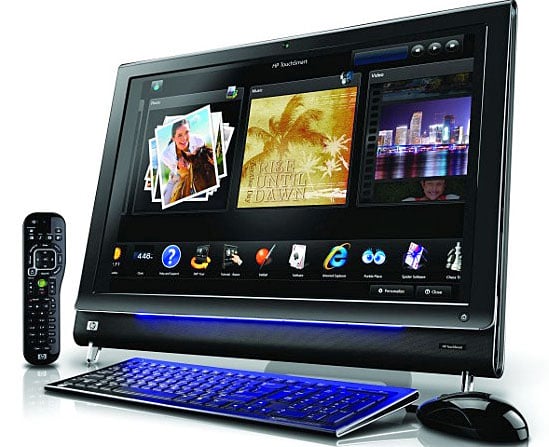
![]() Pricing for the 20-inch TouchSmart 300 series starts at 799.99, and the 23-inch 600 series starts at $999.99. We were sent the TouchSmart 600-1055, which sells for $1,499.99 (at the time of this review). All of these are the prices you would pay if you were to purchase the systems direct from HP. We were hard-pressed to find other vendors selling the system for much less--about $50 lower is the best we could find. The TouchSmart 600-1055 is a specific, non-configurable configuration--HP refers to it as a “quick-ship model;” but HP also sells versions of the 300 and 600 series that can be configured to order on HP’s site--these are the TouchSmart 300z, TouchSmart 600t, and the TouchSmart 600xt. The TouchSmart 600-1050 is powered by a 2.13GHz Intel Core 2 Duo Mobile P7450 processor, 4GB PC3-10600 DDR3 SDRAM, Nvidia nForce 730i chipset (1,066MHz Front-side bus), Nvidia GeForce GT230M GPU (1GB), 750GB 7,200RPM SATA hard drive, slot-loading BD drive, and running Windows 7 Home Premium (64-bit). The system also includes Gigabit Ethernet, 802.11b/g/n wireless networking, and Bluetooth. Rounding out the system’s feature set are integrated stereo speakers and a built-in TV tuner. |
| System Design |
Viewing the TouchSmart 600 from the front, it’s hard to tell that you are looking at a desktop PC--the roughly 1.5-inch thick bezel and front-mounted stereo speakers give the deceptive appearance that you are looking at merely a monitor. If you wanted, you could even wall-mount the system. The only other features located on the front of the system are a webcam and stereo mic holes in the center of the top bezel, the HP TouchSmart button located on the lower-right corner of the bottom bezel (pressing this powers up the system or launches the HP TouchSmart suite if the system is running), and the HP Ambient Light which illuminates the space directly beneath the system. The Ambient Light is hidden behind the system’s bottom bezel (you can control its color and brightness via software).The front bezel is made of glossy black plastic with a silver edge separating the bezel from the speakers--HP calls this “piano-black finish with chrome accents.” Other than the sides of the unit, which are silver, the rest of the system is all glossy black--including its backside. The 23-inch display is glossy as well, has a 16:9 aspect ratio, and a native resolution of 1920x1080. The TouchSmart 600 is 13-inches wide and 17.75-inches high. Not including the stand, the system is 2.83-inches thick; the stand attaches to a hinge on the back of the system and opens up to between 5 and 40-degrees. The backside of the system is also very sparse--in fact, other the stand, all that you’ll find on the back of the system are the power connector, a single USB port, security lock slot, and a small lever located behind the webcam for controlling the tilt angle of the webcam. Keeping with its minimalist appearance there isn’t a whole lot located on the right side of the system either: From top to bottom, the TouchSmart 600’s right side houses the power button, slot-loading Blu-ray drive, hard disk activity light, volume controls, and memory-card reader. A few more ports can be found on the left side of the system: HDMI and Composite Video/audio inputs (yes, inputs--more on this in a moment); Ambient Light button, two USB 2.0 ports, and mic and headphone jacks. The purpose of the video/audio input ports is so that you can connect a game console to the TouchSmart 600 in order to take advantage of the TouchSmart’s true 1080p display--an A/V source button located above the HDMI port cycles through the different inputs. If you’ve been paying close attention to list of ports mentioned so far, you’re probably wondering where the rest of the TouchSmart 600’s ports are hiding--and hiding is indeed what they are doing. Popping off a connector cover on the left side of the system reveals the remainder the system’s connections: three more USB 2.0 ports, Gigabit Ethernet, digital audio out (SPDIF), (analog) audio out, coaxial TV input, S-Video input, audio-in, and IR-out (which is used with the included IR blaster cable). A cable clip and small cut-out allow you route all the cables in such a way that you can reattach the connector cover once you’ve got everything plugged in. A total of six USB ports is not a lot but enough for most of you we're sure, though you lose one of them out of the box as the USB port on the back of the system comes already occupied by the USB dongle for the wireless keyboard and mouse. The TouchSmart 600 also comes with a remote, microfiber cloth for cleaning the display, an audio splitter cable (stereo RCA to 3.5mm), and a detailed 70-page user guide. You’ll have to create your own recovery discs, and if you plan on using the TouchSmart 600’s built-in TV tuner for watching over-the-air broadcasts, you’ll need to supply your own antenna. As with most all-in-one PC designs, the TouchSmart 600 is not upgradeable--none of the internal components (such as memory or hard drive) are user-accessible. Just as the TouchSmart 600 is HP’s third iteration of the TouchSmart series, the specific unit we reviewed was actually the third TouchSmart 600 system HP sent us. The first system appeared to run fine, but once we started using the touchscreen interface, we noticed that where the system was sensing input was not exactly where we were placing our fingers--something was not quite right with the touch sensors. HP quickly arranged for us to send that unit back and get a replacement unit on its way to us. HP was also quick to point out that “physical problems with the optical sensors is covered by the warranty, so should this ever happen to a customer, HP warranty would replace it.” The second replacement unit did not survive shipping, as the right corner was smashed in, thanks to some rough handling by Fed Ex. We didn’t even attempt to power it on--we boxed it back up and sent it back to HP. Finally, the third system arrived unscathed and operated as expected. |
| System Features & Software (Continued) | ||||||||||||||||
![]() Of all the TouchSmart suite apps, the Canvas app probably takes the most advantage of the touch interface, allowing you to use all sorts of multi-touch gestures to rotate, zoom, select, and move images around page. You’ll have lots of fun playing with the Canvas app, honing your multi-touch skills, but once you get past the whiz-bang, the app doesn’t actually do that much--you can make photo collages and tag pictures, and that’s about it. The Recipe Box is essentially a recipe application, but with a few tricks up its sleeve. For starters, it supports speech commands, so while you are elbow deep in a mixing bowl, you can have the system read the recipe or portions of it to you. The other cool thing Recipe Box can do is extract recipes from web pages and import them into Recipe Box.
The Hulu Desktop app uses a very simple interface for watching Hulu shows--we found the interface a bit clunky to navigate and search for titles. The Webcam app allows you to capture videos and photos and save them to disk or upload them to YouTube. The Webcam app includes emoticons, frames, avatars, filters, and distortions you can add to your video. With the Notes app you can create written notes on a selection of stationary, and create lists, video notes, and audio notes.
The Photo app lets you view images, play slideshows, upload photos to Snapfish, create slideshows, create CDs, and perform a few edits (such as rotate, crop, auto-enhance, fix red-eye, and tag an image). You cannot add networked files to the library. The Weather and Clock apps do exactly what you expect them to. The Live TV app lets you watch live and recorded TV and schedule recordings using the built-in program guide. You can watch DVD and BD movies with the DVD app. The HP Ambient Light app lets you pick the color and brightness of the system’s Ambient light. The Calendar app is a basic calendar program, which can be used stand-alone or can sync with an ICS file on your system or with Google Calendar. The RSS Feeds app is very basic, and we actually found it be a bit buggy. Lastly, the Browser app is merely a web browser built into the TouchSmart suite.
Nearly all the tasks and functions of these apps can be done outside of the TouchSmart suite--what the TouchSmart suite offers is way to perform these tasks using primarily a touch interface. Overall, we found the TouchSmart suite apps fun to use, but none of them are terribly robust in their capabilities; although one feature we thought was very cool was that you can enter search criteria simply by drawing the words on the screen (see the screenshot below).
Unfortunately, we ran into a number of issues when using the TouchSmart suite. The interface was often sluggish to respond to our touch input. We also experienced a number of apps that either crashed or stopped working, such as Netflix, Hulu Desktop, and the Video app. We’re not sure what the source of the trouble is, but it is likely not a coincidence that the apps we mostly had trouble with were all video-based applications that mostly had to stream content. That said, when video playback was working, it looked great (depending, of course, on the quality of the video source). DVD and BD movies looked sharp, with vibrant colors, and dark blacks--although the glossy display might be a distraction to some. Audio quality was equally impressive, with crisp sounding audio that could get quite loud without any noticeable distortion. Actual Blu-ray and DVD playback was flawless and stable. |
||||||||||||||||
| Application Performance | |||||||
![]()
We began our testing with SiSoftware's SANDRA, the System ANalyzer, Diagnostic and Reporting Assistant. We ran four of the built-in subsystem tests that partially comprise the SANDRA suite (Processor Arithmetic, Processor Multi-Media, Memory Bandwidth, and Physical Disks). The TouchSmart 600 is many things, but one thing it is not is a computing powerhouse. Then again, no one should expect an all-in-one desktop PC using a 2.13GHz Intel Core 2 Duo Mobile P7450 processor to break any performance speed records. That said, the TouchSmart 600’s overall performance on the SANDRA tests indicates that the system performs inline with the level of performance you would expect from its specs--which is another way of saying that the system is fast enough to handle just about any typical mainstream task you could throw at it. We wouldn’t use the system for HD video editing, but we would use it for watching HD videos. For our next round of benchmarks, we ran the complete Futuremark PCMark Vantage test suite. This component of our testing provides a solid assessment of a system's overall performance. "The PCMark Suite is a collection of various single- and multi-threaded CPU, Graphics, and HDD test sets with the focus on Windows Vista application tests. Tests have been selected to represent a subset of the individual Windows Vista Consumer scenarios. The PCMark Suite includes CPU, Graphics, Hard Disk Drive (HDD), and a subset of Consumer Suite tests." ![]() The results of our PCMark Vantage test tell us the same thing that the SANDRA tests do: The TouchSmart 600 has middling overall performance, but even so, your everyday apps should run without a hiccup. Also take note that the TouchSmart 600’s performance is not too far behind that of the Velocity Micro Z55, which uses a faster, quad-core 2.66GHz Intel Core 2 Q9450 processor.
Cinebench R10 is an OpenGL 3D rendering performance test based on Cinema 4D from Maxon. Cinema 4D is a 3D rendering and animation tool suite used by 3D animation houses and producers like Sony Animation and many others. It's very demanding of system processor resources and is an excellent gauge of pure computational throughput. Cinebench is a multi-threaded, multi-processor-aware benchmark that renders a single 3D scene and tracks the length of the entire process. ![]() The Cinebench results tell us two things. The first is that the TouchSmart 600’s single-threaded application performance is not the fastest in town, but it is passable. Even though we’re well on our way to a multi-threaded-application world, there are still plenty of apps and tasks that don’t take direct advantage of a CPU’s additional cores. Which leads us to the second point, which is that the TouchSmart 600’s dual-core processor can’t hold a candle to quad-core processors when it comes to multi-threaded performance. This is an important fact to digest--as more and more applications are designed to utilize multi-core processors, the TouchSmart 600’s pokey dual-core processor will be left further behind in the dust. The system’s processor might be good enough for many of today’s mainstream applications, but its capabilities with tomorrow’s apps remains questionable. In short, the TouchSmart 600’s Core 2 Duo P7450 processor is not very future proof, though again, it's what you'd expect in a system built with a low power mobile processor under the hood. |
| 3D Gaming performance | ||||
Serious gamers know better than to consider an all-in-one desktop PC
for high-end gaming needs. This doesn’t mean that you can’t play games
on an all-in-one, it just means you’re usually going to have make some compromises
in terms of the screen resolution you use, which quality settings you
turn on, and what sort of performance you are willing to live with. We
picked three popular 3D titles to see how the TouchSmart 600 fared with
some 3D gaming action.
We started off with the most-demanding title of the three, Far Cry 2, which uses advanced environment physics, destructible terrain, high-resolution textures, complex shaders, realistic dynamic lighting, and motion-captured animations. We ran the Far Cry tests at 800x600 and 1024x768, with 4x AA--in both DX9 and DX10 modes. Our second title, Left 4 Dead, is also a demanding DX-based game, but not quite as punishing as Far Cry 2 is. We tested Left 4 Dead at 1024x768, 1280x768, and 1280x1024, using 4x MSAA and 16x AF; and then we finished off our Left 4 Dead testing with 1280x1024 using 8x MSAA and 16x AF. The most forgiving of the bunch is the OpenGL-based, Enemy Territory: Quake Wars (ETQW); we ran ETQW at 1024x768, 1280x1024, and 1680x1050, with 4x AA and 8x AF. Other than the settings just mentioned, all three titles were tested with all of their in-game graphical options set to their maximum values. ![]() Even with the resolution dropped down to 800x600, an average frame rate of 22.6 fps is not a very enjoyable experience--and that was the highest score we got from the TouchSmart 600 on our Far Cry 2 test. To get higher frame rates would mean lowering or turning off a lot of the game’s eye candy--which is much of the game’s appeal. We readily admit that trying to run Far Cry 2 on the TouchSmart 600 is like trying to race a Prius at NASCAR--not very practical. But as games evolve and continue to pile on features that further push the capabilities of GPUs, the TouchSmart 600’s list of playable new game titles will continue to shrink. ![]() While incapable of competing with hardcore gaming rigs, the TouchSmart 600’s performance on our Left 4 Dead test are good enough to mean that this is a playable title. A frame rate of 33.7 fps at 1280x768 is nothing to brag about, but the frame rate is fast enough to call "playable". With just a few tweaks to some of the quality settings, you could likely see noticeably higher frame rates without having to make too many sacrifices. ![]() Last but not least is ETQW--even at 1680x1050, an average frame rate of 29 fps gives us hope. Once again, a few graphics quality settings tweaks and you could see higher frame rates at this relatively high resolution. Of course, lower resolutions see even better performance--such as the 52.7 fps we saw when the resolution was set to 1024x768. |
| Conclusion | ||
There is one last performance metric to mention, and it is one that more and more people are becoming concerned with: power consumption. We can’t tell you how owning a TouchSmart 600 is going to impact your carbon footprint, but we can tell you how much power it consumes and how much it is going to add to your electric bill. Believe it or not, computers tend to spend more time in an idle state
that any other, so a system’s idle state is usually an excellent
indicator of how much power it consumes, generally speaking.![]() You can tell that HP put a lot of thought into the design of the TouchSmart 600, with such stylings as its rather minimalistic design, HDMI inputs for gaming consoles, and hiding the majority of the system’s ports behind a removable cover. The system also features a screen that displays crisp and vibrant images, as well as stereo speaker system that delivers impressive sounding reproduction. Of course, the main feature of the TouchSmart 600 is the multi-touch-capable display--and to highlight this capability, HP includes a number of custom applications. While some of these apps are useful, it seems to us that a number of them were really little more than neat little demos of the system’s touch capabilities. We also encountered a few glitches with some of these apps--especially the ones that work with video. Regardless, as multi-touch/gesture technologies become even more pervasive in computing, it's obvious there are advantages that come with a system that has full touch input capabilities, such as the TouchSmart 600 does.The TouchSmart 600 does comes up a little short in the application and 3D gaming performance department. Overall performance is passable, but compared to the newer and faster GPU and CPU offerings found in today’s desktops, the TouchSmart 600’s multimedia capabilities are going to offer a more modest level of performance, though in this form factor lower-powered components are a requirement obviously. Combine that with the fact that none of the system’s components are upgradable--not even the memory or hard drive--and you have a system that is not very future proof. The TouchSmart 600 has some great features--but as a primary system, it doesn’t give you much room to grow. We tend to see the TouchSmart 600 more as a second PC--perhaps in a centralized location of a home, such as a living room or kitchen, that is if you're the power-hungry type at least. From a performance perspective, if you're looking for a more general purpose computing experience with HD multimedia capabilities, the TouchSmart will serve you just fine. This all comes down to the question: Is the system worth plunking down a grand and a half for? Based purely on specs, you can get far more powerful systems for a lot less money. However, the TouchSmart 600 is much more than sum of its parts--you could consider it an elegant fusion of functionality and technology--certainly a conversation piece, to say the least. To us, the decision to buy or not to buy is predominantly dictated by your desire to have an all-in-one desktop PC with multi-touch capabilities. If your answer is an emphatic “yes, I want one,” then you’d be hard pressed to find a better system that delivers on this front. Also keep in mind that there are less expensive models in the TouchSmart series, which will deliver much of the same functionality as you’d get with the TouchSmart 600 but with smaller screens or fewer options like the Blu-ray player that came with our system. We'll grant the TouchSmart HotHardware's Recommended seal, but it comes with the caveat that this recommendation is for the system in the context of a full-featured all-in-one desktop PC. It's a subtle nuance, but an important one. ![]()
|