|
|
| Introduction and Specifications | ||||||
The solid state drive, or SSD, market is incredibly hot at the moment, with a constant influx of new products that seem to leapfrog previous offerings at every turn. No one has been able to overtake Intel's X25 series of SSDs in terms of overall performance just yet, but the SSDs available from many other companies today are clearly superior to the previous generation.
We've covered a number of other solid state drives in the past here on HotHardware. For a closer look at some competing offerings and explanations of many of the technologies employed in SSDs, we're recommend checking out the following articles: In our Four-Way SSD Round-Up we explain the differences between SLC (Single Level Cell) and MLC (Multi-Level Cell) drives, and in our Intel X25-M coverage, we detail the specific enhancements Intel has made to their controller and describe the adaptive performance algorithm that has made their first SSD offering such a success in the eyes of enthusiasts. |
| OCZ Apex Series 120GB SSD |
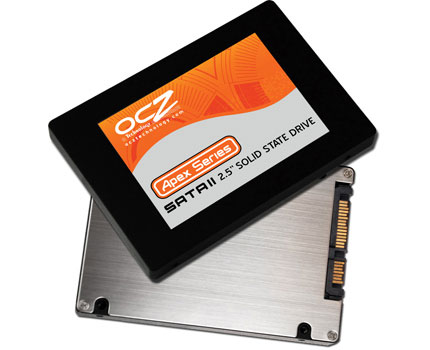
Like the vast majority of SSDs currently on the market, OCZ's Apex Series drive uses a standard 2.5" form factor, with a rather unassuming enclosure devoid any features, save for a few decals and the drive's SATA power and data connectors. OCZ Apex Series drives are available in 60GB, 120GB, and 250GB capacities; the drive you see here is the 120GB model. These are MLC (multi level cell) drives equipped with Samsung flash memory and JMicron controllers. What makes the OCZ Apex Series different than OCZ's previous solid state drive offerings, however, is the Apex series' use of what OCZ calls an "internal RAID 0 configuration" Instead of relying on a single drive controller, the OCZ Apex series is equipped with two controllers and the dual storage arrays are linked internally in a pseudo-RAID 0 setup. Although we should note, this is all transparent to the OS--the OCZ Apex Series drives appear as a single volume to the operation system. With the drive opened up, you can see the array of Samsung flash memory chips that actually store the data copied to the drive. In between the memory chips and the SATA power and data connectors, the pair of JMicron JMF602 controllers are visible. We should also point out that these JMicron controllers are the 'B' revision of the chips, which minimize the stutter reported with the earlier revision. |
| Test Setup IOMeter and SANDRA | ||||||||
Our Test Methodologies: Under each test condition, the Solid State Drives were installed as secondary volumes in our testbeds, with a standard spinning hard disk for the OS and benchmark installations. The SSDs were left blank without partitions wherever possible, unless a test required them to be partitioned and formatted, as was the case with our ATTO benchmark tests. Windows firewall, automatic updates and screen savers were all disabled before testing. In all test runs, we rebooted the system and waited several minutes for drive activity to settle before invoking a test. In the table above, we're showing two sets of access patterns; one with an 8K transfer size, 80% reads (20% writes) and 80% random (20% sequential) access and one with IOMeter's default access pattern of 2K transfers, 67% reads and 100% random access. What you see in the table above is an example of how random write operations kill I/O throughput of SSDs in IOMeter. There is no question random write performance is the Achille's Heel of MLC SSDs, though SLC-based SSDs have a much easier time with it. OCZ's Apex SSD performed relatively well in our IOMeter tests, besting all of the other SSDs with the obvious exception being Intel's X25-M.
In our SiSoft SANDRA testing, we used the Physical Disk test suite. We ran the tests without formatting the drives and both write and read performance metrics are detailed below. Please forgive the use of these screen captures and thumbnails, which will require a few more clicks on your part. However, we felt it was important to show you the graph lines in each of the SANDRA test runs, so you are able to see how the drives perform over time and memory location and not just an average rated result.
In the Write portion of SANDRA's Physical Disk Benchmark, the OCZ Apex series drive didn't fare as well. Here, the Apex Series drive was a bit slower then the competition, by a few megabytes per second, and Intel's drive once again comes out on top. |
| ATTO Disk Benchmark | ||||||||||
ATTO is a more straight-forward type of disk benchmark that measures transfers across a specific volume length. It measures raw transfer rates for both reads and writes and graphs them out in an easily interpreted chart. We chose 8kb through 1024kb transfer sizes over a total max volume length of 32MB. This test was performed on blank, formatted drives with NTFS partitions.
The OCZ Apex Series SSD performed very well in the ATTO Disk Benchmark. At the risk of sounding like a broken record, once again, the Intel X25 came out on top in terms of overall performance--especially considering its Read performance, but the OCZ Apex Series drive did very well in writes and clearly outpaced the other drives. |
| HD Tach Benchmark | ||||||
Simpli Software's HD Tach is described on the company's web site as such:
"HD Tach is a low level hardware benchmark for random access read/write storage devices such as hard drives, removable drives, flash devices, and RAID arrays. HD Tach uses custom device drivers and other low level Windows interfaces to bypass as many layers of software as possible and get as close to the physical performance of the device being tested."
Although the graph looks very erratic, with large peaks and valleys, the OCZ Apex Series drive put up some good scores in HD Tach. Its Read speed of over 169MB/s was the second fastest of the bunch, behind only Intel's SSD. But the OCZ Apex Series drive's write performance was the best overall, at over 117MB/s. |
| PCMark Vantage Testing | ||||
Next we ran the OCZ Apex SSD through a battery of tests in PCMark Vantage from Futuremark Corp. We specifically used only the HDD Test module of this benchmark suite to evaluate all of the drives we tested. Feel free to consult Futuremark's white paper on PCMark Vantage for an understanding of what each test component entails and how it calculates its measurements. For specific information on how the HDD Test module arrives at its performance measurements, we'd encourage you to read pages 35 and 36 of the white paper.
We really like PCMark Vantage's HDD Performance for its real-world application measurement approach to testing. From simple Windows Vista start-up performance to data streaming from a disk drive in a game engine and video editing with Windows Movie Maker, we feel confident that these tests best illustrate the real performance profile of our SSDs in an end user/consumer PC usage model.
We saw more of the same in our PCMark Vantage HDD testing. Once again, the Intel X25-M comes out on top, followed by the OCZ Apex Series drive which itself outperformed all of the other drives by significant margins. |
| PCMark Vantage Testing (Cont.) | ||||
Our next series of Vantage tests will stress the current weakness of most SSDs, that being write performance. Applications like video editing, streaming and recording are not what we would call a strong suit for the average SSD, due to their high mix of random write transactions. We should also note that it's not so much a weakness of the memory itself, but rather the interface and control algorithms that deal with inherent erase block latency of MLC NAND flash. SSD manufacturers are getting better at this, but still today, especially with consumer grade SSDs, spinning drives have the edge with respect to some write intensive applications over MLC-based Flash drives, but not as much over SLC-type SSDs. Or so it would seem if you look at the current offerings from other manufacturers. However, it appears Intel has found a way around this bottleneck.
The Apex Series SSD can't quite keep pace with OCZ's older SLC-based offering here, nor can it come close to Intel's X25-M. However, it does do well against the other MLC-based drives and the 10,000 RPM Velociraptor. |
| Power Consumption | ||||
Although hard drives don't typically draw huge amounts of power, we still wanted to see how this new breed of SSDs compared in terms of power consumption. Throughout all of our benchmarking and testing, we monitored how much power our test system was consuming using a power meter. Our goal was to give you all an idea as to how much power each configuration used while idling and under full load on a secondary test drive. Please keep in mind that we were testing total system power consumption at the outlet here, not just the power being drawn by the drives alone.
There's not much to see here. The OCZ Apex Series drive does seem to consume slightly more power than the other SSDs, likely due to the use of a second controller in the drive, but all of the SSDs use less power than the standard HD, and the deltas between the SSDs are minimal to non-existent. |
| Our Summary and Conclusion | ||||
Performance Summary: Summarizing the performance of OCZ's Apex Series SSD is rather straight-forward. The OCZ Apex Series SSD trailed the Intel X25-M is every benchmark in regard to Read performance, and generally trailed Intel's offering in write performance as well. In some instances, however, namely ATTO and HD Tach, the OCZ Apex drive came out on top in regard to write performance. In relation to the other OCZ and SuperTalent drives we tested, the OCZ Apex Series SSD was clearly faster than the other drives overall.
|