
|
|
| Introduction and Specifications | ||||||
When we think about what is perhaps the one draw-back that enthusiasts and gamers could point to with respect to an Intel chipset-based motherboard, historically, it was lack of NVIDIA SLI multi-GPU support. Though you could drop more than one AMD ATI Radeon-based graphics card into a P45, X38 or X48-chipset based motherboard, for the most part, SLI was a no-go, save perhaps for a few custom OEM solutions. This wasn't too much of a problem for gaming purists that wanted in on NVIDIA powered multi-GPU action, since there was always the most recent revision of the nForce chipset in support of Intel's platform architecture; that is of course until the launch of Intel's Core i7 platform. Intel's fledgling new desktop platform offers several new architectural advancements, in addition to native support for NVIDAI SLI technology. Though motherboard manufacturers like Asus need to have their board "certified" and enable SLI via hooks in their BIOS firmware, you can in fact now have your cake and eat it too, so to speak. Curiously, we have yet to hear from NVIDIA regarding an upcoming nForce motherboard chipset platform in support of Core i7 and from the sound of the recent banter between the two companies, we probably never will. Though, in this industry, never is a very long time. It will be interesting to see how the landscape shakes out for all parties involved.
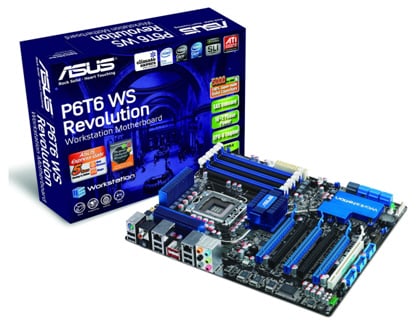
Regardless, taking this new capability for Intel chipsets one step further, motherboard manufacturers also have the ability to enable various 3-way SLI combinations through the use of NVIDIA's NF200 PCI Express fanout switch chip and also with existing PCI Express links in the X58 chipset itself. The Asus P6T6 WS Revolution motherboard is one such product and we've got a full evaluation of it on tap in the pages ahead. We'll show you how this new high-end X58 Express solution performs versus other motherboards in its class and also look at what a full Gen2 PCIe X16 3-Way SLI setup (48-lanes) can do for a killer gaming rig configuration; a realm where price is secondary at best, but fun nonetheless to explore. Let's get on with it then...
Dual Gig-E NICs, six SATA ports, two eSATA ports, HD Audio, 12-USB, four full-length X16 PCIe slots (three of which can be utilized to a full X16 connection), an on-board Marvell SAS RAID controller with two SAS ports (Serial Attached SCSI), and a diagnostic daughter card with power and reset switches--what else on earth could you want in a workstation or desktop motherboard, currently? The Asus P6T6WS Revolution virtually has it all and then some. In terms of the bundle, the P6T6 WS Revolution does come nicely equipped with a plethora of cabling, as well as a high quality user manual and driver CD that has a slew of useful utilities on it, including Asus EPU-6 Engine and Turbo-V software for one-touch performance tuning and power saving profile adjustments, and slider driven overclocking from the desktop. Asus also bundled in a pair of SAS data and power combination cables (in yellow above) with the board as well. In short, the bundle offers pretty much all you need to enable all of the board's features, with the exception of eSATA cables. Where are the eSATA cables? It seems that very few board manufacturers include them these days, which makes no sense at all to us. |
| A Closer Look | ||||
The Asus P6T6 WS Revolution has a well thought-out floor plan with respect to mechanical layout, with its connectors in seemingly all the right places. Specifically its 8-pin ATX power connector is on the top edge of the board, out of the way and ready for cable routing that could easily be worked along side or behind the motherboard tray in a chassis. The board also is built with Asus' patented Stack Cool 2 technology which employs an extra metal layer on the underside of the PCB, around critical, thermally stressed components in the CPU socket area. Beyond that, in terms of its cooling solution, the chipset heatsinks and heatpipe arrangement don't look especially exotic, though there is a larger sink on the Southbridge chip that also covers the NF200 PCIe switch. Also, around the socket area, you can see the board's claimed 16+2 phase power array. This essentially is a 16-phase circuit for the CPU and another 2 phase circuit for the QPI link and memory. Asus claims this design offers better power efficiency, better thermal characteristics and more overclocking headroom. The P6T6 WS Revolution's included G.P. Diagnosis card is a welcome addition that plugs on to one of the board's pin header locations. It offers a two character LED diagnostic readout display as well as reset and power switch functionality. This is a nice touch and great added functionality but we would like to see a clear CMOS switch added to this little PCB, especially since there isn't one on the back IO panel.
The P6T6 WS Revolution has a fully decked-out IO panel on the backside of the board, complete with dual Gig-E NICs, 6 of the total available 12 USB 2.0 ports (an additional 6 are available on internal headers, though we would have liked 2 more on the IO panel), eSATA and S/PDIF audio ports. Notably missing is any trace of a Firewire port on the board, which quite frankly, we didn't miss at all, though some users obviously might. |
| BIOS and Overclocking | ||||||||
![]()
The Asus P6T6 WS Revolution utilizes a standard issue Phoenix Award BIOS that has a wide assortment of options for enabling and disabling features and peripherals, as well as overclocking and voltage adjustments. This BIOS also has the same basic individual per-core CPU clock ratio adjustments that we demonstrated in our Intel Core i7 video spotlight, as well as Intel's Turbo Mode, dynamic clock ratio adjustments that can be set. In the case of an Extreme edition processor, you can of course dial up the core clock multiplier to a higher setting, as well as turn it down, though we tested with a stock Core i7 920 and thus there was no ability to adjust its multiplier, only the base reference clock speed. As you can see, there are various memory multiplier settings as well as a myriad of DRAM timing settings to choose from. Voltage levels of all the major interfaces around the CPU, chipset and system memory can be adjusted in very granular increments. As you can see we have the ability to to tweak CPU VCore, VTT, and PLL voltages, as well as QPI and IOH voltage levels. You also have the ability to individually adjust control and data line voltages for the DRAM system memory interface, on a per channel basis. We're not sure what sort of advantage this can offer but regardless, it's obvious this board's BIOS is setup for extreme flexibility.
If you got the chance to check out our initial Core i7 launch coverage, you'll know that Intel's new 45nm processor with integrated memory controller and QPI serial link, also has a lot of headroom with respect to clock speed. We set out to see what the Asus P6T6 was made of, overclocking our stock, retail Core i7 920 with only the help of a stock retail HSF cooler installed. Our results were rather impressive actually... ![]() Core i7 920 2.66GHz - Overclocked to 3.99GHz With only a small bump in core voltage to 1.35V, we were able take the reference clock of our retail Core i7 920 processor to 190MHz, up from its 133MHz stock speed. With its standard 20x multiplier and an additional 1X bump from Intel Turbo Mode technology in the BIOS, we realized a 3.99GHz clock speed with an overall multiplier of 21X. This is about as fast as we've seen any Core i7 920 hit to date in house, especially with a stock, retail Intel Core i7 cooler keeping things in line thermally. |
| Test System and SANDRA Testing | |||||||||
![]() Test System Configuration Notes: When configuring our test systems for this article, we first entered their respective system BIOSes and set each board to its "Optimized" or "High performance Defaults". We then saved the settings, re-entered the BIOS and set memory timings for either DDR2-1066 (AMD) with 5,5,5,15 timings, DDR3-1333 with 7,7,7,20 timings (Intel Core 2), or DDR3-1066 with 7,7,7,20 timings (Intel Core i7). The hard drives were then formatted, and Windows Vista Ultimate was installed. When the Windows installation was complete, we updated the OS, and installed the drivers necessary for our components. Auto-Updating and Windows Defender were then disabled and we installed all of our benchmarking software, performed a disk clean-up, defragged the hard drives, and ran all of the tests.
We began our testing with SiSoftware's SANDRA 2009 SP1, the System ANalyzer, Diagnostic and Reporting Assistant. We ran three of the built-in subsystem tests that partially comprise the SANDRA 2009 SP1 suite with the Asus P6T6 WS Revolution (CPU Arithmetic, Multimedia, and Memory Bandwidth). All of the scores reported below were taken with the processor running at its default clock speeds of 2.66GHz but with Intel Turbo Boost enabled for a final clock speed of 2.8GHz and 3GB of DDR3-1066 RAM running in triple-channel mode.
Our quick-take SANDRA numbers are rather telling, in terms of what we can expect from this Asus motherboard. As is clearly visible in all metrics listed here, the Asus board is tuned slightly more aggressively versus the Intel and MSI motherboards. Though we had each motherboard configured identically, with the processor set to its stock speed, Intel Turbo Mode technology enabled and DDR3-1066 CL7,7,7,20 memory timings, the Asus board is just a little bit faster in both raw CPU throughput and memory bandwidth. We'll see if these slight differentials play out in real-world benchmark numbers in the pages ahead. |
| Futuremark PCMark Vantage Testing | ||||
We then ran our test motherboards through PCMark Vantage, Futuremark’s latest system performance metric built especially for Windows Vista. PCMark Vantage runs through a host of different usage scenarios to simulate different types of workloads, including High Definition TV and movie playback and manipulation, gaming, image editing and manipulation, music compression, communications, and productivity. Most of the tests are multi-threaded as well, so they can exploit the additional resources offered by multi-core CPUs.
Our PCMark Vantage tests, though they employ actual standard compute workloads like image editing and manipulation, show similar results to our SANDRA benchmark numbers with these boads. The P6T6 WS Revolution offers the best overall performance, though obviously all of these motherboards were grouped together pretty tightly. |
| Cinebench Rendering and Lame Encoding Tests | ||||||||
Cinebench R10 is an OpenGL 3D rendering performance test based on Cinema 4D. Cinema 4D from Maxon is a 3D rendering and animation tool suite used by 3D animation houses and producers like Sony Animation and many others. It's very demanding of system processor resources and is an excellent gauge of pure computational throughput.
This is a multi-threaded, multi-processor aware benchmark that renders a single 3D scene and tracks the length of the entire process. The rate at which each test system was able to render the entire scene is represented in the graph below. In the immortal words of the great Yogi Bera, it's like deja vu all over again. The Asus P6T6 WS Revolution just barely outpaces the other two X58 Express-based boards but all boards finish this test pretty much right on top of one another.
In this test, we created our own 223MB WAV file (a hallucinogenically-induced Grateful Dead jam) and converted it to the MP3 format using the multi-thread capable LAME MT application in single and multi-thread modes. Processing times are recorded below, listed in seconds. Shorter times equate to better performance. By now you should be getting the picture that, in terms of processing horsepower and memory bandwidth, in real-world applications, there isn't much in terms of performance that separates one X58 motherboard from another. In general we're looking at less than a 2% differential between these three boards, in terms of the performance numbers we've seen thus far. |
| 3DMark06 CPU and 3DMark Vantage CPU | ||||||||
3DMark06's built-in CPU test is a multi-threaded DirectX gaming metric that's useful for comparing relative performance between similarly equipped systems.
This test consists of two different 3D scenes that are processed with a software renderer that is dependent on the host CPU's performance. Calculations that are normally reserved for your 3D accelerator are instead sent to the CPU for processing and rendering. The frame-rate generated in each test is used to determine the final score.
Here again the three X58 boards we tested all clock in at about the same score with small only variances between them.
3DMark Vantage's CPU Test 2 is a multi-threaded test designed for comparing relative game physics processing performance between systems. This test consists of a single scene that features an air race of sorts, with a complex configuration of gates. There are aircraft in the test that trail smoke and collide with various cloth and soft-body obstacles, each other, and the ground. The smoke spreads and reacts to the planes as they pass through it as well, and all of this is calculated on the host CPU.
The follow-on to 3DMark06, 3DMark Vantage, shows similar results in its CPU test module. Regardless, amongst the X58-based board we tested, there is less than a 1% differential between the fastest score recorded and the slowest score. On this test the Intel board pulled up the rear but not by much. |
| Low Resolution Gaming Test - Crysis | ||||
For our next test, we moved on to some in-game benchmarking with Crysis. When testing processors and motherboards in this next scenario, we drop the resolution to 800x600 and reduce all of the in-game graphical options to their minimum values to isolate CPU and memory performance as much as possible. However, any in-game effects, which control the level of detail for the games' physics engines and particle systems, are left at their maximum values, since these actually do place some load on the CPU rather than GPU.
Suprisingly, this time there is a much more prominent spread between the three motherboards we tested in this benchmark. This test basically is isolating CPU throughput as well as overall system and memory bandwidth available. Here the Asus P6T6 WS Revolution, at stock speed settings for the Core i7 920 processor we tested with, is over 13% faster than the Intel board and about 5% faster than the MSI Exclipse. We can attribute much of this to Asus' aggressive tuning of the P6T6 WS Revolution, though despite that tuning, at this point in our testing, we had yet to see even a blip in stability with the board. Actually, as it turned out, the board was rock solid through even the more rigorous testing we put it through next. |
| High Res Gaming Testing, 3-way SLI with Far Cry 2 | ||||
We started our high-resolution 3D game testing with the recently released Far Cry 2. This time we have the resolution dialed up in the game to 1920X1200, the native resolution for our 24" test LCDs. We also turned up all quality settings and anisotropic filtering for textures to maximum levels. Benchmarks were then run with super-crisp 8X AA with Ultra High Quality enabled as well. This is a torture test that will bring any graphics subsystem to its knees, unless you're running at least a pair of high end cards in tandem--though we were testing a trio of GPUs at once, in a 3-Way GeForce GTX 285 SLI configuration.
Testing Three Full X16 Gen2 PCI Express For Graphics:
The first thing to note here is that processing horsepower does affect performance in this test setup, for a couple of reasons. First, there is a fair degree of inter-GPU transaction workload for the host processor to contend with and also, with all this GPU bandwidth available, even at this high resolution and these ultra high image quality settings, the test becomes slightly more CPU-bound. As such, going from 2.8GHz to 3.2GHz on the Core i7 actually yielded a 6-7% performance gain on the Asus P6T6 WS Revolution and Gigabyte boards and a 9% performance gain on the MSI Eclipse. Apparently, with the MSI board's lower available PCIe bandwidth in one of its slots, there are a higher number of PCIe transfers taking place that puts more of a strain on the processor, hence the enhanced benefit of a faster CPU. For the Asus P6T6 WS and Gigabyte boards, a faster CPU offers slightly less advantage, since they can afford a larger transfer size with each transaction. The net result is that both the Asus P6T6 WS Revolution and Gigabyte GA-EX58 Extreme, with a 2.8GHz Core i7 processor clock, actually perform as fast as a 3.2GHz processor on the MSI board, under this specific benchmark scenario. |
| High Res Gaming Testing, 3-way SLI with ET: Quake Wars | ||||
In our ET: Quake Wars testing, we again have the resolution dialed up in the game to 1920X1200. We also turned up all quality settings and anisotropic filtering for textures to maximum levels. Benchmarks were then run with super-crisp 8X AA and 16X AF levels.
Finally, as you'll note in the graphs below, we've setup a similar test to the Far Cry 2 benchmark on the previous page. Only here we'll see what 3-Way SLI with three full X16 links can do in an OpenGL-based game engine from Id Software.
If you look at the numbers here and compare the spread, the results scale linearly with our Far Cry 2 test results, only perhaps they're even a bit more pronounced. In fact, the Asus P6T6 WS Revolution and Gigabyte GA-EX58 Extreme are able to just edge out the MSI board, even with a 400MHz CPU clock speed deficit at 2.8GHz on the Core i7. |
| Performance Summary and Final Thoughts | ||||
Performance Summary: Looking at the performance profile of the Asus P6T6 WS Revolution in totality, the product lived up to its high-end design target in every way. In standard desktop and workstation application performance, the board consistently was the fastest of the lot that we tested it against, one of which was a fairly mature offering from MSI. Though admittedly, the performance delta between most all X58 Express-based boards currently is going to be thin and bordering on insignificant. That said, the P6T6 WS Revolution offered exceptional overclocking capabilities and unwavering stability, along with top end performance in our high-end gaming tests with a 3-Way SLI graphics subsystem in play. However, as we showed empirically through our comparison numbers versus the Gigabyte X58-based board that only supports 3-Way SLI in a X16,X8,X8 configuration, the P6T6 WS Revolution's X16,X16,X16 3-Way SLI capability doesn't offer any appreciable upside performance currently.
If we were to look at the Asus P6T6 WS Revolution strictly from a no-compromises, you've got to have it all end user perspective, this motherboard is decidedly the board to have at the time of this article's publication. Though there are rumblings that other motherboard manufacturers (MSI for one) are coming forth soon with NF200-equipped X58 solutions, from what we can tell today, those boards have yet to hit retail. This leaves the P6T6 WS Revolution currently in a class by itself, or so it would seem. The question is, for what end user type is this board targeted to and what type of end user in reality will have interest in it. After all, this motherboard weighs in at around $369, which is roughly $60 - $100 higher than the average high-end X58-based motherboard these days. So you'll need to have good reason to justify this product's price premium which then boils things down to features and performance.
|

