|
|
| Introduction |
|
Like many products, there are entry-level D-SLRs, professional-grade D-SLRs, and plenty of models in between. Canon’s 50D blurs the line between amateur and professional D-SLR cameras. This camera strikes a good balance with its price and feature set. With the 50D, you get a lot of features you wouldn’t find on entry-level models, but you won’t pay professional-grade prices, either. Users who are just making the jump to a D-SLR, for example will appreciate the 50D’s Live View mode, which lets you use the D-SLR’s LCD to frame an image, similar to the way you would frame an image using a point and shoot camera. For more advanced shooters, the 50D also has full manual controls to give you all the traditional adjustments in image staging for your photographs.
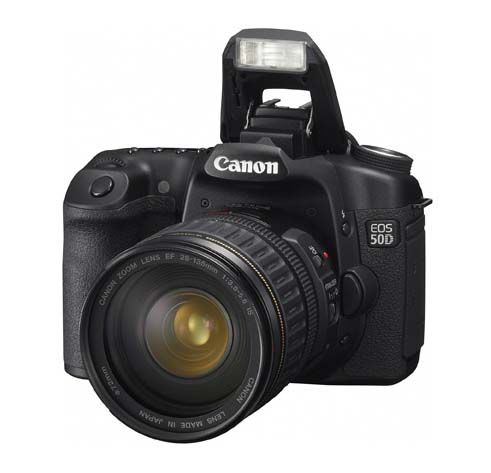
In Canon’s lineup, the 50D will serve as a sister model, not a replacement to the 40D that was released last year. With both models in Canon’s line, the manufacturer is offering consumers a choice between two solid DSLR cameras with slightly different features and prices. As one might expect, the 50D offers a number of improvements over its predecessor, including an APS-C sized, 15.1 megapixel CMOS sensor (4,752 x 3,168). While more megapixels don’t always result in a better camera, it’s still a worthy feature to mention, and one that the average buyer is sure to notice. It’s also important to remember that the 50D is not just any 15.1 megapixel camera. This is a high resolution Digital SLR model from a well-known and well-respected brand that has a history of excellent optics. But since brand and megapixel count alone aren’t enough of a reason to select a camera, we’ve put the 50D through a few tests to see how it fares. |
| Included Accessories & Specifications | ||||||||||||||||||||||||||||||||||||||||||||||||||||||||||||||||||||||||
|
Included Accessories
|
| A Look at what’s New |
|
As we would expect with any new product, Canon has added new features and refined other features with the 50D. Here’s a closer look at what sets the 50D apart from its predecessors.
As mentioned, the Canon 50D has a 15.1 megapixel CMOS sensor, which is increased from the 40D’s 10 megapixel sensor. At the time the 50D was released, it had the largest megapixel count for an APS-C sensor. The large sensor also results in large image files—approximately 5MB for a JPG and 20.2MB for a RAW file. Recognizing that some users won’t always need these super high resolution formats, Canon included two sRAW settings to assist with more manageable file sizes. sRAW1 results in a 25% smaller image, while sRAW2 provides a 50% smaller image, which is the equivalent of files captured at 7.1 or 3.8 megapixel resolutions, respectively.
Canon’s DIGIC 4 Image Processor moves the larger sized photos of the 50D at a faster pace than its predecessor. Although the 50D has a slightly lower burst rate of 6.3 frames per second, compared to the 40D’s 6.5 frames per second, keep in mind that the 50D is transmitting significantly more data. Given this, 6.3 frames per second is very respectable for the 50D. Furthermore, Canon was able to maintain 14-bit data for RAW images. The faster processing speed of the DIGIC 4 Image Processor also works hand-in-hand with UDMA cards to support fast writing speeds. In fact, with a UDMA CF card, you’ll be able to shoot at 6.3 frames per second for up to 90 JPEG or 16 RAW images. Using a standard CF card, you’ll still get a maximum burst up to 60 JPEGs. Additionally, the new DIGIC 4 Image Processor provides for finer details and even more natural color reproduction, compared with the previous DIGIC III Image Processor. The DIGIC 4 also offers Peripheral Illumination Correction for up to 40 EF lenses, along with the improved Auto Lighting Optimizer, which corrects brightness and contrast automatically. The 50D has a high-precision 9-point wide area AF that uses cross-type points at f-stops of f/5.6 or faster, making it possible for the camera to focus faster, more accurately, and in difficult lighting situations. The EOS 50D also has a diagonally mounted cross-type sensor that is sensitive to both vertical and horizontal lines at f/2.8, which improves operation in dim lighting conditions. ISO Sensitivity Expandable to 12,800 The 50D’s ISO sensitivity is now expandable to 12,800. Even with the aforementioned increase in resolution, Canon has managed to reduce sensor noise, thanks to changes to the design of the microlens array as well as to the sensor itself. These changes made is possible for Canon to offer its widest range of ISO settings yet, ranging from ISO 100 to 3,200, with two higher settings: H1 is equivalent to ISO 6,400 and H2 provides an ISO equivalent of 12,800. Even though Canon reduced the noise significantly, it’s best to avoid the highest ISO settings whenever possible since they still do cause some digital noise (as you’ll see in the test shots later.) Still, the expandability is nice, since sometimes it will mean the difference of a respectable shot or nothing at all. By combining the ISO expandability with the adjustable noise reduction feature of the camera, you’ll be able to shoot in situations that would have otherwise required a flash on previous cameras. New, High-resolution LCD The Canon 50D features a 3-inch LCD with 920,000 dots. This high-resolution display supports a VGA resolution of 640 x 480 RGB pixels, making it easier to view all of the fine details of a photo directly on the camera’s display. To help make the screen viewable in bright conditions, Canon built three anti-reflection layers into the screen. The LCD has a broad viewing angle of 160 degrees horizontally and vertically.
For users who are just getting into photography and don’t understand how different shutter and aperture settings affect an image, Canon’s Creative Auto Mode simplifies things. In this mode, you can choose to blur or sharpen the background; control the firing of the flash; adjust picture brightness; change the picture style; access single, continuous, or self-timer shooting modes; and change the image recording quality using easy to understand and manipulate controls. In both the Basic Zone shooting modes as well as the Creative Zone modes, you can access the Quick Control Screen by pressing the joystick straight down. From this screen, you’ll be able to easily change various settings, including drive modes and image recording quality. This screen also provides a good overview of current camera settings. The Live View mode on the 50D offers face detection, which is something we haven’t seen with other Canon D-SLRs released prior to the 50D. This feature is pretty self-explanatory and can detect up to 35 faces in a frame and adjust the exposure of the image appropriately. There are two other AF modes within Live View as well, namely Quick Mode and Live Mode. In Quick Mode, the dedicated AF sensor is used to focus in the same way as when you are using the viewfinder. Thus, the Live View image will be momentarily interrupted while the camera is focusing. If you want the Live View to display constantly, then use Live View mode, which uses the image sensor to focus. This mode will take longer to focus, but you won’t miss seeing any of the action on the camera’s LCD. Of course, you can always focus the camera manually in Live View mode as well by switching the lens to manual focus. While in Live View mode, you can press the zoom button on the back of the camera to zoom in 5x and 10x. This helps you select and achieve the best focus.
To help you show off all of your fantastic shots, the EOS 50D has a HDMI (High-Definition Multimedia Interface) output that allows you to display crisp, clear images on a HDTV. When the camera is connected to a HDTV, the resolution is set to match the TV and images are displayed in a full-frame 3:2 ratio with black bars to the left and right of the image.
Micro Adjustment of Focus For serious photographers, the 50D lets you adjust the position at which the lens thinks the focus is perfect. The micro adjustment of focus feature is a 40 step scale from +20 to -20 units that let you finely tune the focus of the lens. You can apply changes as a constant offset to all lenses if the camera body is slightly out of adjustment, or you can record an offset for each Canon lens, with support for up to 20 different lenses.
The early problems that D-SLRs had with dust have largely been taken care of, thanks to new technologies such as Canon’s Self-Cleaning Sensor Unit, which was upgraded for the 50D with a fluorine coating on the low-pass filter for even better dust resistance. The Self-Cleaning Sensor Unit also uses ultrasonic vibrations to shake dust particles off of the low-pass filter in front of the sensor each time the camera is powered up or shut down. Another part of the dust removal system includes a software component which lets you map and save sensor spots as Dust Delete Data. This information is attached to the image file for removal during post processing using Canon's DPP software. |
| Sample Images | ||||||||||||||||||||||||
Of course, a camera’s sole purpose is to take pictures, so without further adieu, here are a few sample images taken with the 50D in combination with Canon's EF-S 17-85mm f/4-5.6 IS USM lens and an Extreme III card from SanDisk.
Sample images - click for high res The camera is fun to shoot with, and the nine auto focus points give you the ability to easily single out a portion of the image on which to focus. The camera’s pop-up flash provided adequate light to illuminate close subjects, as you can see with the grass and pinecone shots. Using a fast shutter speed, I was able to stop action in the photographs of the two boys swimming. ISO
|
| The Final Shot | ||||
|
Overall, we were very pleased with the 50D’s performance and controls. The camera’s fast burst rate of 6.3 frames per second definitely puts it a notch above most entry-level D-SLRs, which generally offer about 3 frames per second. This faster speed can make a big difference in your ability to capture a shot, such as when you’re trying to get the perfect shot of a leaping athlete or the like. In addition, the camera took almost no time to power on before it was ready to take a picture.
The 50D also looks like and feels like a serious camera with its black, textured surface and beefy grip. It’s comfortable to hold and has the feel of a quality built product, in part due to its weight; with the EF-S 17-85mm f/4-5.6 IS USM lens attached and a battery and memory card inserted, it weights about three pounds. Furthermore, the 50D’s controls seem to be in the right locations, and we like that Canon made better use of the Direct Print button by allowing it to serve dual purpose as easy access to Live View Mode. Canon’s Quick Control screen is another helpful addition. Both of these features also make use of the 50D's gorgeous 3-inch LCD. For users who are transitioning from a film SLR, it’s important to keep in mind that Canon’s D-SLRs have a 1.6x digital crop factor, so a 28-135mm lens is really the 35mm equivalent of 44.8 to 216 mm lens.
The 50D's overall image quality was good and it delivered consistently clean images with crisp details. For users who are upgrading from earlier Canon D-SLR models, Canon’s across-the-range Picture Style tone and color combination will give you consistent performance between both cameras. Canon offers the 50D in a body only configuration with an MSRP of $1,399 and as a kit version with Canon's EF 28-135mm f/3.5-5.6 IS USM zoom lens at an MSRP of $1,599. Of course, many retailers are offering their own kit configurations or bundle deals, and you can often find better sale prices as you’ll see in our PriceGrabber listing below.
|