|
|
| Introduction and Specifications | |||||||||||||||||||||||||||||||||||||||||||||||||||||||||||||||||||||||||||||||||
With all of the recent hoopla surrounding Intel and NVIDIA as of late, today's announcement may come as a bit of a surprise to many of you. To say that there has been some tension between Intel and NVIDIA lately would certainly be putting it mildly. But the fact of the matter is, for now at least, the two companies share a somewhat symbiotic relationship. The products we'll be showing you here are proof of this fact.
|
| GeForce mGPUs, Not Just For Games |
Much of NVIDIA's recent marketing has centered around the notion that GPUs and mGPUs aren't just for gaming any longer, which you'd expect considering they've got GPU architectures in their arsenal capable of much more than graphics. Of course, we've known this to be true for quite some time, but there definitely seems to be more happening in the GPGPU arena as of late. Over the past few weeks and months, NVIDIA has shown off a number of applications that all benefited from the power of a GPU, and none of them are games.
|
| Our Test Systems and SANDRA | ||||||||||||||||||
How We Configured Our Test Systems: When configuring our test systems for this article, we first entered their respective system BIOSes and set each board to its "Optimized" or "High performance Defaults". We then saved the settings, re-entered the BIOS and set memory timings for either DDR2-1066 (AMD) with 5,5,5,15 timings or DDR3-1333 with 7,7,7,20 timings (Intel). The hard drives were then formatted, and Windows Vista Ultimate was installed. When the Windows installation was complete, we updated the OS, and installed the drivers necessary for our components. Auto-Updating and Windows Defender were then disabled and we installed all of our benchmarking software, defragged the hard drives, and ran all of the tests.
|
| PCMark Vantage Suite | ||||
We also ran the GeForce 9300-based Asus and Zotac motherboards through Futuremark’s latest system performance metric built especially for Windows Vista, PCMark Vantage. PCMark Vantage runs through a host of different usage scenarios to simulate different types of workloads including High Definition TV and movie playback and manipulation, gaming, image editing and manipulation, music compression, communications, and productivity. Most of the tests are multi-threaded, so they can exploit the additional resources offered by a quad-core CPU.
|
| LAME MT and Kribibench | ||||||||
In our custom LAME MT MP3 encoding test, we convert a large WAV file to the MP3 format, which is a popular scenario that many end users work with on a day-to-day basis to provide portability and storage of their digital audio content. LAME is an open-source mid to high bit-rate and VBR (variable bit rate) MP3 audio encoder that is used widely around the world in a multitude of third party applications.
In this test, we created our own 223MB WAV file (a hallucinogenically-induced Grateful Dead jam) and converted it to the MP3 format using the multi-thread capable LAME MT application in single and multi-thread modes. Processing times are recorded below, listed in seconds. Once again, shorter times equate to better performance.
Out custom LAME MT benchmark was essentially a wash between the GeForce 9300s and Intel G45, although the NVIDIA platform did finish slightly faster in the single-threaded version of the benchmark.
For this next batch of tests, we ran Kribibench v1.1, a 3D rendering benchmark produced by the folks at Adept Development. Kribibench is an SSE aware software renderer where a 3D model is rendered and animated by the host CPU and the average frame rate is reported. We used two of the included models with this benchmark: a "Sponge Explode" model consisting of over 19.2 million polygons and the test suite's "Ultra" model that is comprised of over 16 billion polys. In the two Kribibench rendering tests we ran, the system built around Intel's G45 finished just slightly faster than the Asus and Zotac GeForce 9300 motherboards. The difference can be attributed to the G45's use of faster, and hence higher bandwidth, DDR3 RAM. |
| Cinebench and 3DMark06 | ||||||||
Cinebench R10 is an OpenGL 3D rendering performance test based on Cinema 4D. Cinema 4D from Maxon is a 3D rendering and animation tool suite used by 3D animation houses and producers like Sony Animation and many others. It's very demanding of system processor resources and is an excellent gauge of pure computational throughput.
This is a multi-threaded, multi-processor aware benchmark that renders a single 3D scene and tracks the length of the entire process. The time it took each test system to render the entire scene is represented in the graph below, listed in seconds.
3DMark06's built-in CPU test is a multi-threaded DirectX gaming metric that's useful for comparing relative performance between similarly equipped systems. This test consists of two different 3D scenes that are processed with a software renderer that is dependent on the host CPU's performance. Calculations that are normally reserved for your 3D accelerator are instead sent to the CPU for processing and rendering. The frame-rate generated in each test is used to determine the final score.
3DMark06's built-in CPU benchmark reported scores for Asus and Zotac GeForce 9300-based motherboards that were just slightly better than the Intel G45. |
| Gaming: F.E.A.R. and Crysis | ||||
For our next set of tests, we moved on to some in-game benchmarking with Crysis and F.E.A.R. When testing motherboards or processors with Crysis or F.E.A.R., we drop the resolution to 800x600, and reduce all of the in-game graphical options to their minimum values to isolate CPU and memory performance as much as possible. However, the in-game effects, which control the level of detail for the games' physics engines and particle systems, are left at their maximum values, since these actually do place some load on the CPU rather than GPU.
|
| Hybrid SLI Testing: GeForce Boost | ||||
Next, we moved on to some Hybrid SLI testing with 3DMark06 and Crysis. As we've mentioned, when coupled with a GeForce 8500 GT or 8400 GS, the GeForce 9300 can utilize NVIDIA's GeForce Boost technology, for increased 3D performance. We tested the GeForce 9300 GT with 3DMark06 and Crysis using the built-in IGP, with a GeForce 8500 GT, and with the IGP and 8500 GT working in tandem in GeForce Boost mode.
|
| SD and HD Video Performance | ||||
We also did some quick testing of the GeForce 9300's video processing engine as it is implemented on the Asus P5N7A-VM, in terms of both image quality and CPU utilization with some HQV and H.264 playback tests.
Next we conducted a test using an H.264 encoded movie clip which is available for download from NASA's HD showcase website. The CPU utilization data gathered during this tests was taken from Windows Vista's built-in Performance Monitor while playing back on the GeForce 9300 using PowerDVD 8 Ultra. The graphs show the CPU utilization while playing back the 1080i QuickTime clip on the GeForce 9300. As you can see, utilization was quite low and HD video playback shouldn't be a problem for this chipset. |
| Total System Power Consumption | ||||
Before we bring this article to a close, we'd like to cover a few final data points. Throughout all of our benchmarking and testing, we monitored how much power our test systems were consuming using a power meter. Our goal was to give you all an idea as to how much power each configuration used while idling and under a heavy workload. Please keep in mind that we were testing total system power consumption at the outlet here, not just the power being drawn by the motherboards alone.
|
| Our Summary and Conclusion | ||
Performance Summary: There are number of performance comparisons we need to make while summarizing the benchmarks scores from this article. If we compare the two GeForce 9300-based motherboards we tested here to each other, we find that the Asus P5N7A-VM and Zotac GeForce 9300 perform about on par with one another; they trade victories depending on the benchmark, but the deltas are quite small. In comparison to Intel's G45 chipset, the GeForce 9300 generally performs on roughly the same level in productivity applications, with a slight edge going to the G45 where its increased memory bandwidth comes into play. In any GPU intensive situation, however, the GeForce 9300 is simply on a different level than the G45. In the game tests, for example, the GeForce 9300 was up to 4.4X faster than the G45.
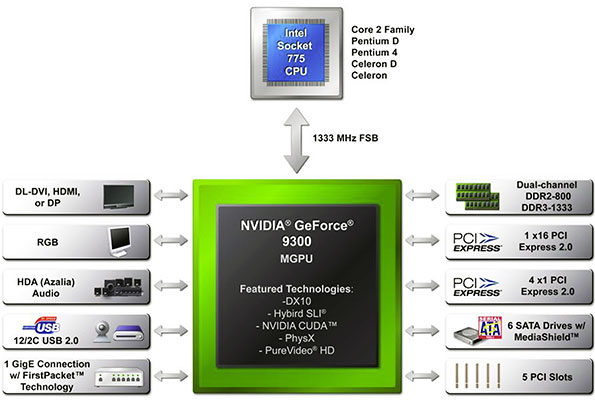
NVIDIA has a solid offering on their hands with the new GeForce 9300 / 9400. We can definitely see this chipset being popular with the HTPC crowd. If you wanted an Intel-based HTPC built around a current Intel CPU, up until now, that usually meant settling for an Intel IGP or an older GeForce 7-series mGPU, which couldn't offer the same kind of 3D or video playback performance. Although this is going to sound cliche', with the GeForce 9300 / 9400, HTPC afficionadoes no longer have to make any comprimises. The GeForce 9300 and 9400 represent full-featured, low-powered, core logic chipsets, with competitive application performance and the best integrated graphics processor available for the Intel platform. Video playback performance is great, and the Intel platform finally has an IGP that can play many current games with acceptable framerates. Even if you're not an HTPC afficionado, we suspect many of you can see the value in that type of product, which is probably why these chipsets landed in Apple's brand new Macbook offerings.
|