|
|
| Introduction |
Physics: as geeks, we just have to love the subject. We loved learning about geniuses like Isaac Newton and concepts like gravity, acceleration and inertia. Also, typical of geeks, we love gaming. So, combining physics acceleration and gaming just sounds like a really cool idea. For the past several years, we've been learning more and more about physics in gaming in the form of PhysX, a technology created by a company called Ageia. The original approach to PhysX by Ageia was a dedicated PhysX card that sported a PPU (physics processing unit). Ageia partnered with companies like BFG and ASUS to bring the PhysX cards to market. We actually reviewed the BFG version here in the HotHardware labs over two years ago. The entire real-time, in-game physics landscape has changed quite a bit since that time, however. With NVIDIA's relatively recent acquisition of Ageia, we all knew it was only a matter of time before we'd see some kind of announcement or launch detailing what NVIDIA's plans were with the PhysX technology. We've already seen some information on PhysX with regards to 3DMark Vantage and Unreal Tournament 3. Today, we get to take a glimpse into what else NVIDIA has been up to with PhysX, which, according to NVIDIA, is "the most popular physics API in the world with over 140 shipping titles across all major platforms, including the PC, Wii, Xbox360, and Playstation 3." At the heart of the PhysX technology lies the claim that in-game physics leads to more realistic gameplay. We can't help but agree with that claim. Just think about how enjoyable rag-doll physics has been over the last several years. Picking up and throwing a Combine soldier with the gravity gun in Half-Life 2 just wouldn't be the same without some physics calculations going on in the background. With PhysX, though, NVIDIA hopes to take things to all new levels, of course, by utilizing the tremendous computing power of the GPU, rather than relying on the CPU.
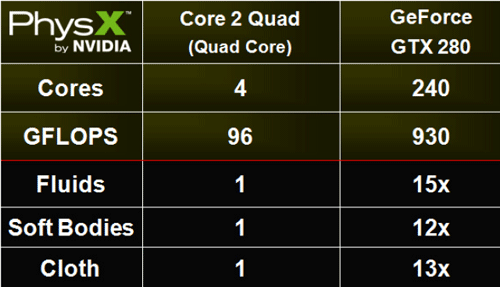
Keep in mind that PhysX isn't just about making games look better; it's about making seem more realistic and less scripted. PhysX adds realism by making game environments behave closer to how they would in real life. Because so many calculations have to happen at once to create realistic physics effects, real-time physics in games is a multithreaded problem, which means that having more processing cores to throw at the problem will result in more physics effects that can be added to games. This is why NVIDIA is moving physics calculations to the GPU. According to NVIDIA, you need to use a GPU in order to produce more advanced physics effects, like snow accumulation or real-time dynamic flooding.
NVIDIA PhysX is currently the only in-game physics engine for the PC that can utilize GPU acceleration in order to fully utilize the enormous parallel processing power offered by modern GPUs. Plus, it is also fully scalable. Better performance can be achieved with PhysX when more compute cores are used to complete the physics calculations. As a result, you would also see more effects on the screen. For instance, when you blow up a car without PhysX running on the GPU, it may explode into 20 or 30 pieces. When that same car explodes with PhysX running on the GPU, it can explode into hundreds of pieces, but performance would not suffer. It is really important to point out (and NVIDIA continues to stress) that NVIDIA's PhysX technology is not proprietary. Developers can actually download the PhysX SDK and begin working with the technology today. NVIDIA has tried to make it easy for developers to create scalable physics for their games, all the way from simple effects for the CPU to complex tasks for the GPU.
|
| Supported Games and Tech Demos | ||||
By now, you are probably wondering what it takes to process PhysX on a GPU. Well, if you have a GeForce 8, 9 or GTX200 Series video card, then your GPU can become a physics processor once you install the 177.79 GeForce driver and the PhysX driver (v8.07.18), both of which will be made public on nvidia.com by August 12, 2008. The next logical thing to wonder about is what demos, applications and games can actually take advantage of this technology. As we mentioned on the previous page, NVIDIA claims there are over 140 shipping titles across all major platforms, including the PC and the latest consoles. For a list of PhysX-enabled games, go to: www.nzone.com/object/nzone_physxgames_home.html. Evidently, this list is not up-to-date (or just not complete or we're just missing something) as there are not 140 titles listed. Regardless, you can get a good idea of the variety of PhysX games available there. A couple of the more notable games on that list are Unreal Tournament 3 and Ghost Recon Advanced Warfighter 2, both of which are featured in this first PhysX Pack and neither of which require an introduction.
We were surprised to learn that PhysX is being utilized not only in games like UT3 and GRAW2 but also in a new social networking service/game called Nurien. Like other social networking services and games, Nurien is all about expressing yourself and establishing your own unique online identity. Unlike other social networking services and games, Nurien actually features mini games that make use of NVIDIA PhysX. One such game, called Runway, is based on the Unreal Engine 3. Nurien and Runway are still under development, but the demo (v0.7) we watched was very interesting and included cloth simulations (i.e. skirt and curtain movements), hair, and smoke particles. As with other NVIDIA launches, there are tech demos to showcase the technology. If you are still with us and are really interested in NVIDIA PhysX, we strongly suggest you check out the Fluids Tech Demo. This demo contains two different scenes, both of which are very cool and definitely worth your time. According to NVIDIA: "The primary purpose of the NVIDIA PhysX Fluid Demo is to illustrate Smooth Particle Hydrodynamics (SPH)-based particle simulation technology accelerated by the NVIDIA GPU." |
| Upcoming Games, Benchmarks, and Final Thoughts | ||||||
Upcoming GamesNVIDIA PhysX definitely appears to be picking up steam and gaining quite a bit of support on the development front. Here is a list of upcoming games that will feature GPU PhysX support.
BenchmarksNow, it's time to see what happens when the rubber meets the road. We tested GPU PhysX using Futuremark 3DMark Vantage and Warmonger on the test system outlined below.
Before taking a look at our benchmark results, take a quick look at the "GPU and Driver Configs" table above. We created this table with the hopes of eliminating confusion. As you have already gathered, GPU PhysX requires several prerequisites, including the right hardware and driver versions. Additionally, the game has to support it, and it has to be enabled within the game. So, as you will see below, you can actually test a GPU PhysX configuration with the GPU PhysX disabled to see how it compares to CPU-based PhysX performance. 3DMark VantagePhysX only affects one part of the 3DMark Vantage testing, and that is CPU Test 2. The fact that CPU Test 2 is affected, of course, leads to the final score being affected. We are presenting you with the overal scores and the CPU Test scores. We included both CPU Test 1 and CPU Test 2 to show you that, in fact, only CPU Test 2 changes.
As you can see, the GPU PhysX configuration smokes on CPU Test 2. It puts up a score that is around 20 times better than the other two configurations that don't support GPU PhysX.
|