
|
|
| Introduction & Specifications | ||||||
![]() In the last six months we've seen a wide variety of cost effective, yet powerful, video cards hit the market. First came NVIDIA's superb GeForce 8800 GT last October which, despite being introduced at an upper mid-range price point, provided top-notch performance not far off from the best cards of the day at nearly 1/3 the price. The 8800 GT was followed closely by the launch of the thrifty GeForce 9600 GT just a few months later which provided similar performance for even less. Then, last week, ATI fired back with the excellent Radeon HD 4850 and Radeon HD 4870 video cards which retail at the same affordable mid-range prices but provide strong performance that is eclipsed only by the most monstrous and expensive cards currently available. Indeed, building a capable gaming computer hasn't been this cost effective in years and at this time we have an unprecedented number of solid video card choices in the mid-range price segment. Unfortunately, nearly all of the action has been on the desktop. While notebook graphics have received a few updates in the last year, relatively little progress has been made in terms of performance in the mid-range. Since its debut last May, the GeForce 8600M has been the poster child for mid-range mobile graphics. Until recently, it was the graphics card most commonly seen in multimedia and gaming inclined mid-range notebooks. This is unfortunate since the GeForce 8600M has shown that it simply isn't an ideal gaming card and it can't begin to compete with the superb mid-range desktop video cards of today. The introduction of the GeForce 9600M series and the Mobility Radeon HD 3600 series greatly expanded the number of graphics card choices available for mid-range notebooks, but unfortunately performance has not improved much over the previous generation.
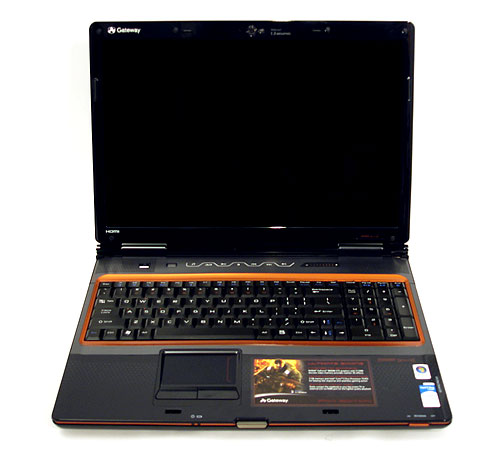
The result of this stagnation in the mid-range mobile graphics segment is that gamers will need to upgrade to a high-end GeForce 8800M equipped notebook in order to enjoy gaming performance similar to a mid-range gaming desktop system. While there are quite a few manufacturers building 8800M equipped notebooks, almost all of them are high-end products that demand top dollar for the pleasure. Gateway's "P-Series FX" line-up of 17" gaming notebooks seems no different at first glance. However careful inspection of product specifications reveals that their most junior P-Series FX model weighs in at just $1,349.99, a decidedly mid-range price point. Yet it's still powered by a GeForce 8800M, just like the rest of the otherwise high-end FX notebook line-up. This GPU choice alone potentially makes the junior P-Series FX model one of the best gaming and multimedia machines in the entire mid-range notebook price segment, so we couldn't resist taking a closer look.
![]()
Unlike the rest of the P-Series FX models, the P-6831FX can't be ordered from Gateway's website, nor can it be customized. It's only available at BestBuy in a single fixed configuration. Thankfully, it's fairly well equipped and you get a lot of bang for your 1,350 bucks. The P-6831FX is powered by a 512MB GeForce 8800M GTS, a very capable video card. The 17" screen only sports a somewhat low resolution for its size of 1440x900, but this may actually be a blessing in disguise. A lower resolution means you'll seemingly get even more gaming performance out of the GeForce 8800M than you would with a screen capable of a higher 1680x1050 or 1920x1200 resolution. In order to keep costs down, Gateway has equipped the P-6831FX with a relatively low-end Core 2 Duo T5450 processor, one of the slowest of the mobile Core 2 Duo's. Thankfully the processor is the weakest link in the whole system and nothing else is notably lacking. While the T5450 is a perfectly fine office productivity and basic multimedia processor, we're a little worried about how it will perform in today's games. As you'll see in our benchmarks on the following pages though, our fears were relatively unfounded, at least when it came to gaming. |

| Design & Build Quality |
![]()
![]()
|
| Software & Accessories |
![]()
![]()
|
| Usage Experience |
![]()
Throughout our week of testing, we found the P-6831FX to be a a very sturdy notebook. While it's quite a bit bigger and heavier than we would have liked for commuting, it was fairly manageable and it didn't lead to any serious bouts of back pain. This definitely isn't the best choice for the frequent traveler, but if you must travel, the P-6831FX isn't the worst choice either. However, the P-Series FX notebooks are really built for gaming and we certainly did plenty of that during our testing. As you'll see in the benchmarks on the upcoming pages, the GeForce 8800M under the hood had no trouble with anything we threw at it.
Upgrading Options
|
| Test Setup & 3DMark06 CPU | |||||||||||||||||
![]() The Gateway P-6831FX was left "as delivered" for the duration of benchmarking. This represents the configuration that the consumer would receive the system in. Nothing was installed or altered, with the exception of the necessary benchmarking software. We decided to compare the P-6831FX to the Dell XPS M1730, ASUS C90S, Toshiba Satellite X205-SLi4 and Toshiba Satellite A305 for points of reference.
To start out our testing, we began with a focus on CPU performance, utilizing FutureMark 3DMark06's CPU performance module. 3DMark06's test is a multi-threaded "gaming related" DirectX metric that's useful for comparing relative performance between similarly equipped systems. This test consists of different 3D scenes that are generated with software and hardware GPU renderers, which is also dependant on the host CPU's performance. In its CPU tests, the calculations normally reserved for your 3D accelerator are instead sent to the central processor. GPU rendering tests employ a mix of SM2.0, SM3.0 and HDR techniques and effects. ![]() The Gateway P-6831FX isn't off to a particularly good start, coming in last in our first benchmark. This isn't surprising however, since the P-6831FX's Core 2 Duo T5450 is the slowest processor out of all of our comparison notebooks. At only 1.67GHz, with 2mb of L2 cache, the T5450 is one of the slowest mobile Core 2 Duo processors available. |
| Futuremark PCMark Vantage | ||||
![]() For our next round of benchmarks, we ran the complete Futuremark PCMark Vantage test suite.
"The PCMark Suite is a collection of various single- and multi-threaded CPU, Graphics and HDD test sets with the focus on Windows Vista application tests. Tests have been selected to represent a subset of the individual Windows Vista Consumer scenarios. The PCMark Suite includes CPU, Graphics, Hard Disk Drive (HDD) and a subset of Consumer Suite tests."
The PCMark Vantage "Memories" suite includes the following tests: Memories 1 - Two simultaneous threads, CPU image manipulation and HDD picture import
The P-6831FX comes in last place in the PCMark Vantage Memories test. The DDR2-667 memory under the hood of the P-6831FX isn't uncommonly fast and in combination with the slow processor results in a relatively unimpresive showing. The Vantage HDD suite includes the following tests: HDD 1 - HDD: Windows Defender
The P-6831FX's sluggish 5400RPM hard drive lands it in second last place. Hard drive performance on the P-6831FX was not observed to be very good during regular usage. Copying files and installing programs seems to take longer than it should, even when the 5400RPM hard drive is taken into consideration. Load time in games was a bit longer too, but it wasn't that noticeable during our testing.
|
| Futuremark PCMark Vantage Continued | ||||
![]()
Courtesy, Futuremark: "Gaming is one of the most popular forms of entertainment for all ages. Today’s games demand high performance graphics cards and CPUs to avoid delays and sluggish performance while playing. Loading screens in games are yesterday’s news. Streaming data from an HDD in games – such as Alan Wake™ – allows for massive worlds and riveting non-stop action. CPUs with many cores give a performance advantage to gamers in real-time strategy and massively multiplayer games. Gaming Suite includes the following tests: " Gaming 1 - GPU game test
The PCMark Vantage gaming tests have significant CPU intensive components. While the graphics card does play a role here in this module, it isn't a graphics specific test. This explains why the P-6831FX did so poorly. Despite having a fast graphics card, the slow processor let the P-6831FX down, landing it in last place. Vantage Productivity suite includes the following tests: ![]() The Vantage Productivity test suite tests the system's processing, storage and memory systems. This is unfortunate since none of these are the P-6831FX's strong points. It comes in last place by a rather wide margin. Vantage Music suite includes the following tests: Music 1 - Three simultaneous threads, Web page rendering – w/ music shop content, Audio transcoding: WAV -> WMA lossless, HDD: Adding music to Windows Media Player
The overall PCMark Vantage score is a weighted average of all of the modules in the Vantage suite calculated in total "PCMarks". Here are the results: ![]() Since the P-6831FX came in last place in nearly every single module, it's not surprising that it would come in last for the overall score. So far we've seen that the P-6831FX is poorly equipped for standard productivity tasks. Up next are some gaming benchmarks, the P-6831FX's strength. Hopefully it does better than what we've seen so far. |
| Gaming Performance | ||||||||||
![]() For our first gaming-related benchmarks, we'll look at the Gateway P-6831FX's performance in Futuremark's 3DMark06. We also briefly looked at the P-6831FX's performance in Company of Heroes and Prey.
Here we see a very different story compared to our PCMark Vantage results. The GeForce 8800M GTS finally gets a chance to show us what it can do and it doesn't disappoint. The P-6831FX came in second for the overall score and it also secured the highest score for the Shader Model 3.0 test. The single GeForce 8800M GTS managed to outperform the Toshiba X205, which is equipped with dual GeForce 8600M GTs in SLI. This is just a preview of things to come.
Company of Heroes and Prey were both configured to a high graphical detail setting. Every graphics setting was either turned on or set to "High". Anti-aliasing and anisotropic filtering were disabled. The P-6831FX was tested with an external monitor using the HDMI output. This was done since the P-6831FX's screen does not support the resolutions we needed for comparison with the other notebooks. Check out the next page for benchmarks of the P-6831FX at it's native resolution of 1440x900. ![]() Prey is our first real-world gaming test and the P-6831FX posts an amazing score, coming in at first place at both resolutions. Even at a resolution of 1680x1050, the P-6831FX managed to crank out nearly 90fps. Needless to say, Prey is definitely playable on the P-6831FX.
The P-6831FX performed very well in Company of Heroes. It significantly outpaced all of the other notebooks at 1680x1050, including the dual GeForce 8700M GT equipped XPS M1730. While the stress of the higher resolution causes the dual 8700M GTs to take a steep performance hit, the GeForce 8800M GTS is barely effected. Keep in mind that the P-6831FX has the slowest processor of the lot, to really appreciate how powerful the GeForce 8800M GTS under its hood is. These tests were all conducted with the P-6831FX hooked up to an external monitor to achieve the resolutions we are testing at. Next, we'll see how it performs at it's native resolution. |
| Gaming @ 1440x900 | ||||
![]() In our second set of gaming-related benchmarks, we'll look at the Gateway P-6831FX's performance at its native resolution of 1440x900 as well as with Anti-Aliasing and Anisotropic filtering enabled.
![]() At the P-6831FX's native resolution, the GeForce 8800M GTS provides a bit more performance compared to 1680x1050. At the highest image quality we tested with anti-aliasing set to 4x and anisotropic filtering maxed out at 16x, the P-6831FX was still able to achieve a very good average frame rate of 86.4 fps. The game was perfectly playable and looked great.
We also experimented with Company of Heroes at 1440x900. We benchmarked the whole range of anti-aliasing settings for Company of Heroes. The P-6831FX performed very well at all settings and remained very playable even at 16x CSAA. Image quality was great and the game ran fairly smooth. However we did notice occasional stutter when scrolling around the battlefield. We attribute that to the slow processor or perhaps the hard drive, rather than dips in frame rate. Lastly, we spent some time in Crysis. While the GeForce 8800M GTS seems to have enough power to run Crysis smoothly at 1440x900 with image quality set to high, the P-6831FX was let down a bit by the relatively slow Core 2 Duo T5450 that comes with the P-6831FX.
We really felt the processor bottleneck in Crysis and we noticed a lot of stuttering, especially at the High image quality level. However, if you're willing to sacrifice some image quality, the P-6831FX will run Crysis at a playable frame-rate. Overall, the native resolution of the P-6831FX seems like a good fit and all of the games we tried, with the exception of Crysis at high settings, ran well and looked great. |
| Battery Performance | ||||||
![]()
Rounding out our testing, we ran MobileMark 2007 to assess the notebook's overall battery life while running a series of applications through a testing script. We are using the standard benchmark settings from Bapco, along with a few other minor system tweaks. The screensaver was disabled and the volume was set at approximately 20%. MobileMark 2007 utilizes the following applications
![]() The P-6831FX's bulky 9-cell, 7800mAh battery nearly earns its keep in the MobileMark 2007 battery test. It managed to provide about an hour and 48 minutes of battery life, which is fairly respectable for a notebook of this size. Battery life isn't nearly as important for a desktop replacement model like the P-6831FX, but it's nice to see that nearly two hours of battery life is on tap should it be needed. Unfortunately battery life while gaming would be significantly lower, in the sub 1 hour range. The P-6831FX's 120 watt AC power adapter is of an above average size and not very convenient to lugg around, but you'll need it if you plan on gaming for any meaningful length of time. |
| Performance Summary & Conclusion | ||||
Performance Summary: The P-6831FX produced excellent scores in all of our gaming related benchmarks. Not even the Dell XPS M1730 with its dual GeForce 8700M GT's in SLI could outperform the single GeForce 8800M GTS powering the P-6831FX. Though Dell has since upgraded the M1730 with dual GeForce 8800M GPUs as well. It is obvious that the P-6831FX's performance is bottlenecked by the low-end processor, but it still managed to produce amazing benchmark scores in our gaming tests. None of the other the mid-range notebooks in our test came close to the P-6831FX when it came to gaming. We have spent a lot of time with the Gateway P-6831FX since receiving our review unit and we've thoroughly put it through it's paces. We found it to be an excellent notebook. The build quality is certainly very high and except for the odd fingerprint smudge, our review unit still looks like we just took it out of the box for the first time. Like other 17" notebooks, the P-6831FX is quite bulky and the chunky 9-cell standard battery which protrudes from the rear of the notebook by nearly an inch certainly doesn't help the situation. Battery life is mediocre given the notebook's size and specifications.
However the most interesting aspect of the P-6831FX is its unique combination of hardware and price point. Gateway smartly balanced the high cost of the GeForce 8800M GTS graphics chip with a cheap low-end processor to produce an affordable gaming notebook that is head and shoulders above other products in the sub-$1500 price range, as we saw in our benchmarks. While the P-6831FX is certainly bottlenecked by the entry-level processor, its GeForce 8800M GTS is a monster compared to mid-range mobile graphics chips like the 8600M GT and it has more than enough raw power to make up for the processor's shortcomings when it came to games. The fact the P-6831FX was able to outperform a XPS M1730 powered by a high-end Core 2 Extreme X7900 processor and dual GeForce 8700M GTs in SLI in our benchmarks, is proof of the P-6831FX's gaming prowess. Unfortunately the P-6831FX isn't an especially versatile machine out-of-the-box. While it kicks serious butt in games, it's weak processor prevents you from tackling CPU intensive tasks and the low screen resolution hampers productivity. Thankfully all of these issues can be remedied with a few easy end-user upgrades like the use of an external screen via the P-6831FX's VGA or HDMI outputs, and a processor upgrade for increased computational ability. A Core 2 Duo T8000 series mobile processor can be found for between $200-$300 and will provide the number crunching power the P-6831FX is sorely lacking. Installing the processor is also fairly straight forward thanks to the excellent accessibility of the CPU socket. Even with a $300 Core 2 Duo T9300 processor upgrade, the P-6831FX is still just $1650, which is several hundred cheaper than most other similarly equipped gaming notebooks. Gateway has produced a very unique product with the P-6831FX. A mid-range notebook with high-end gaming performance that is simply unmatched at this price range. While the P-6831FX does have it's share of shortcomings, none of them encroach on it's primary function of providing excellent gaming and multimedia performance, which it does extremely well. We believe the Gateway P-6831FX represents the one of best values in gaming notebooks currently and is left with slim competition in the sub-$1500 price range, when it comes to raw gaming performance. We would easily recommend to anyone interested in a gaming notebook to take a good look at the P-6831FX and we're happy to award it our Editor's Choice award.
|
