
|
|
| Inroduction and Specifications | ||||||
AMD made it very clear in our sneak peek at the 780G integrated chipset and Athlon X2 4850e processor that its platform aspirations were coming to pass. Not only did the company introduce a complementary hardware ecosystem, complete with processor, chipset, and graphics solution, but it succeeded in trumping the best effort of its principal rival. Intel’s G35 simply couldn’t keep up with the 780G’s alacrity in gaming and video decoding. The 780G chipset demonstrated somewhat playable frame rates—a boast most built-in GPUs cannot make. We heard grumblings that the built-in Radeon HD 3200 graphics weren’t enough to give mainstream gamers the high resolutions and detailed textures today’s titles offer. Why bother if you’re not going to get that “elevated” experience? Isn’t that like dinging Toyota’s Avalon because it won’t yield the guttural experience of a Ferrari when you blast up the Pacific Coast Highway? For the gaming enthusiast who can’t afford to add a GeForce 8800 GT or Radeon HD 3850 to his system, AMD’s 780G could mean the difference between playing Half Life 2: Episode 2 or a compelling night of Solitaire. This is the open door where before there was a wall. On top of its performance, the 780G/Athlon X2 4850e combination paints a rosy picture of value. The CPU is priced at $89 and the Gigabyte motherboard we used as a test bed in the launch article rings in at $99. Even after adding a $50 Radeon HD 3450 card to take advantage of Hybrid Graphics, you’re still hanging out under the $250 mark. That Gigabyte board, the GA-MA78GM-S2H, was the one AMD chose for its initial batch of sampling. And it represented the chipset’s built in functionality well, while delivering great stability, an impressive set of features, and modest configurability through Gigabyte’s M.I.T. BIOS controls. ASUS is hot on Gigabyte’s heels with its own 780G-based board, though. The M3A78-EMH HDMI defies ASUS’ habit of packing in every add-on available at a premium price by sticking to the basics, consequently driving down the price target for a 780G platform by another $10. Expect to find this one around the $89 mark. Should you spend the extra Alexander Hamilton to get eSATA support, optical output, and FireWire on the Gigabyte board or do ASUS’ cuts make good sense to the cost conscious? Stay tuned as we compare the microATX motherboards, and then pit the 780G chipset against Intel’s G35 in a round of high-definition video playback.
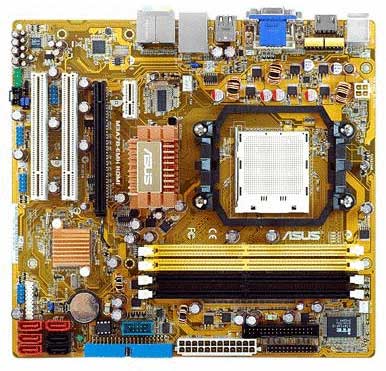
Our ASUS M3A78-EMH HDMI didn’t arrive in retail packaging. Rather, it shipped as a kit, together with an Athlon X2 4850e CPU, two gigabytes of DDR2-800 memory from Corsair, and a reference cooler—the same type used in our 780G sneak peek to help cut down on noise. But that didn’t stop us from digging into the retail box’s bundle. When you buy the M3A78-EMH HDMI, you get the board, a driver CD, the user’s manual, an I/O shield, an array of storage cables, and a SATA-to-Molex power adapter. Notably missing from the package is a DVI-to-HDMI adapter, which you do get with ASUS’ Intel G35-based P5E-VM HDMI board. There’s also no digital audio connectivity. ASUS’ documentation talks about an audio module, but it doesn’t ship alongside this board. There’s no question that ASUS built the M3A78-EMH HDMI to curl toes in the living room, the home office, and at work. Just be aware that the bundle is minimalist, and if you want to hook up to either of the digital video outputs, you’ll need the right cables since ASUS doesn’t provide adapters. |
| Bundled Software and BIOS | ||||
ASUS, like most motherboard vendors, augments its hardware offerings with software bundles intended to add value. We’d split the M3A78-EMH’s bundle up into two categories: software utilities that complement hardware functionality and standalone apps that you’d (ASUS hopes) want anyway, even if they weren’t included with the board.
The second category is significantly more forgettable. A 90-trial for Norton Internet Security greets you with incessant reminders that you need protection beyond its 90-day window of availability. Corel’s SnapFire Plus helps arrange photos and burn them to DVD—ideal if you’re too inept to do the job on your own, but hardly a value. InterVideo’s DVD Copy CopyLater could be considered more useful, since it transcodes media files to the format of your choice. No, it doesn’t rip copy-protected DVDs to your desktop, in case you were wondering.
The AMI-based BIOS ASUS uses is ample for a mainstream machine, but it’s decidedly less configurable than Gigabyte’s GA-MA78GM-S2H, which facilitates independent clock control over the Radeon HD 3200 GPU along with almost every other facet of processor, HyperTransport, and memory performance. ASUS’ processor overclocking window lets you manually key in a reference clock manually or tweak by percentage, automatically increasing the processor and HyperTransport frequencies. There’s also an option to change the HyperTransport’s link frequency and width to a setting lower than the default—perhaps useful if HT speed is holding back your overclocking efforts.
There are only two real video tweaks: you can manually set aside a block of system memory up to 512MB or you can turn SurroundView on and off. SurroundView is the feature that lets you add a discrete card and take advantage of up to four independent display controllers, yielding serious multi-monitor configurations. If you’re looking for an inexpensive motherboard to overclock, look elsewhere. The ASUS M3A78-EMH HDMI has a handful of rudimentary speed tweaks. Without any voltage adjustments, though, you’ll be severely limited in what you can do. We took our 2.5 GHz Athlon X2 4850e from 2.5 GHz to 2.625 GHz with a 10 MHz reference clock increase, but 3DMark06 wasn’t at all responsive to the jump. |
| Our Test Sustems and 3DMark06 | ||||||||||
The ASUS M3A78-EMH HDMI press kit that AMD shipped was identical to what we received for our 780G preview, right down to the Corsair memory modules populating two of the board’s slots. Once again, we used the Athlon X2 4850e 45W CPU and a passively cooled Radeon HD 3450 card in order to test Hybrid Graphics. Interestingly, the platform didn’t want to output a picture with our monitor plugged into the onboard VGA connector while a discrete card was installed. Removing the add-in board or moving the monitor to the add-in board’s VGA output fixed the problem. Keep that in mind if you pair the ASUS board to a discrete graphics card. Once again, we tested using AMD’s RC 8.47 Vista x32 driver instead of the WHQL-approved 8.452 package, if only to normalize our results. We also used the same updated direcpll.dll file in order to get Futuremark’s PCMark Vantage benchmark suite running properly.
Argue the validity of synthetic benchmarks until you’re blue in the face—no matter which side of the fence you’re on, 3DMark06 enables granular analysis of individual features and capabilities using the latest graphics architectures. The overall score takes all of the individual tests into account for a holistic view of what a solution can do under extreme duress.
Given the same core logic with an integrated graphics processor running at the same 500 MHz clock speed (and no way to tweak it northward), we’d expect to see the ASUS and Gigabyte boards pacing each other. And that’s exactly what we get. Our results with the GA-MA78GM-S2H and Radeon HD 3450 show what you get when you add a $50 discrete board to the mix, while ASUS’ P5E-VM HDMI shows what Intel’s G35 chipset can do. Clearly, when it comes to 3D performance, AMD has the upper hand. The 3DMark06 processor test is closely matched as well. ASUS’ 780G offering does edge out Gigabyte’s by two percentage points here, though both integrated configurations trail the Hybrid Graphics setup. |
| PCMark Vantage | ||||
The ASUS and Gigabyte motherboards trade blows here. ASUS’ M3A78-EMH HDMI comes out ahead in four of the seven individual suites. When all is said and done, though, the Gigabyte GA-MA78GM-S2H pulls out a slim overall victory by less than one percent. |
| Cinebench and USB Performance | ||||||||
Cinebench, based on Maxon’s CINEMA 4D rendering tool, is a processor-intensive test having less to do with the chipsets we’re pitting against each other. Release 10 of the benchmark features a new scene that incorporates light sources, procedural shaders, ambient occlusion, and multi-level reflections.
We all looked at the Cinebench results from the 780G sneak peek and commented on how evenly matched our AMD- and Intel-based platforms really were. AMD clearly did its homework when it was pricing the Athlon X2 4850e. The chip hangs right alongside the dual-core Pentium E2200 in Cinebench.
ATI’s chipsets have, in the past, taken flak for lackluster USB 2.0 transfer speeds. Now that AMD has taken over, we were curious to see how that story has changed. To test, we attached a 500GB Maxtor OneTouch II drive to the AMD and Intel platforms and timed the transfer of a 500MB folder of music, movies, Web pages, and documents of various sizes. From our 780G preview: There’s some variance between the 780G numbers with and without Hybrid Graphics, despite the many times we ran these numbers. Nevertheless, the real story seems to be that AMD and Intel are on par here. When you divide the numbers out, you get between 11.1MB/s and 10MB/s of throughput. The ASUS board puts down similar numbers to Gigabyte’s 780G platform. |
| LAME MT and Compression | ||||||||
We restarted our ASUS-based test bed several times in order to ensure that these results were accurate, and it turns out that the M3A78-EMH HDMI simply edges out the Gigabyte platform we presented in the 780G preview. The even bigger news is that all three AMD-based configurations blow past the Intel G35 setup, driven by a dual-core Pentium E2200 processor.
Next up, we measured the time it took for Windows to compress a 500MB folder of music, movies, Web pages, and documents of various sizes and timed the operation until it completed. Bear in mind these tests have to be run several times in Vista for accurate results since the operating system has a proclivity for running background tasks that skew performance numbers. The M3A78-EMH HDMI takes a few seconds longer to compress our 500MB folder full of files than the Gigabyte board, but again all three 780G-based numbers trump the G35 scores. |
| Gaming: HL2 - EP2 | ||||
Our Half-Life 2 numbers are incredibly close. At least 3D performance is consistent between these two 780G-based motherboards. |
| Gaming: Company of Heroes | ||||
Relic’s WWII RTS originally centered on a DirectX 9 engine, but now includes DX10 functionality able to tax modern graphics architectures. Once again, the game’s visual options were maxed out in a bid to demonstrate the eye candy possible with AMD’s latest platform. After we saw what the numbers first looked like, however, we turned the settings down to High, hoping for more playable numbers using the built-in performance test. |
| Gaming: ET - Quake Wars | ||||
Based on id’s Doom 3 engine, Enemy Territory: Quake Wars demands enough from discrete card; never mind the integrated graphics cores we’re throwing at it today. We created our own timedemo benchmark using the Pacific map and turned the graphics options all of the way up. For the sake of mercy, we didn’t use any anti-aliasing or anisotropic filtering. |
| Hi-Def Video Impressions |
On top of our standard benchmark suite, we wanted to put ASUS’ M3A78-EMH HDMI to task in some real-world video tests to help determine whether the value platform, powered by an $89 CPU and featuring integrated graphics, could handle the rigors of high-def playback. Then, we added background processing to the challenge by running a full Windows Defender scan, typical of what a home user might experience as they watch a movie at home. According to AMD, the UVD built into its 780G chipset accelerates VC-1 and H.264 decoding, in addition to MPEG-2 offloading. We grabbed the VC-1-based Terminator 2 1080p clip from Microsoft’s WMV HD gallery and ran it in a loop on the ASUS board. CPU utilization averaged around 35% throughout the clip, leaving plenty of room for multi-tasking. Then, we started a Windows Defender scan and watched utilization jump to about 60% with spikes as high as 80%. In both cases the video clip played with zero stuttering. Given smooth playback throughout, we’d call that a pass. We fired up the Intel G35 platform next. Contrary to what we were expecting given AMD’s marketing material, ASUS P5E-VM HDMI returned smooth playback as well. With Windows Media Player running by itself, CPU utilization hovered around in the 45% neighborhood. With Windows Defender cranking alongside, utilization rose to a modest 70%. Despite lackluster gaming performance, Intel’s G35 will in fact churn through high-def content without performance issues. |
| Power and Our Conclusion | ||||||||
When it comes to power consumption numbers, we’re used to making concessions for massive energy hogs like multi-card setups and flagship CPUs. The 780G is a different kind of beast, though. In our preview we saw the 780G-based Gigabyte board idling around 80W and sucking down 130W under full load. Its idle was just under that of Intel’s G35 platform, and both configurations turned in similar results under full load.
AMD and Intel continue turning in energy-efficient consumption numbers. The ASUS board cuts its draw by a couple of watts at idle and a single watt under load. We’re also able to compare those numbers to what you’d see with a Radeon HD 3450 sitting in the board’s one available PCI Express x16 slot. The rise in energy flow is offset by significant performance gains in most of the 3D titles we tested.
The real question is: which 780G motherboard do you buy? AMD has a long list of partners planning to unveil their own unique designs. But right now there are still only a handful of choices. You have the Gigabyte GA-MA78GM-S2H, the ASUS M3A78-EMH HDMI we’re evaluating today, and an even less expensive offering from ECS that might prove a formidable contender at $69. With a street price of $99, Gigabyte’s board is the most expensive. ASUS follows at $89. Based on price alone, it’s tempting to crown ASUS the winner here since it delivers comparable performance at a statistically significant lower price. However, ASUS may want to make a couple changes to the board before it’s able to claim the value title. Currently, you give up too much for that $10 savings in out opinion. From BIOS flexibility to optical output and even eSATA support, which we see as an increasingly important feature. If you don't need those features, go ahead and save yourself the 10 bucks, otherwise Gigabyte’s GA-MA78GM-S2H remains our top choice.
|

