|
|
| Introduction and Architecture | ||||
|
Since this performance preview is targeted to PC Gamers, to start things off we might as well play a game. Riddle us this... What would be the antithesis of a product like a thin and light Notebook PC that is energy efficient, eco-friendly, and performance-per-watt tuned for those of you on the go? Some of you may hazard a guess that it would be a high performance Desktop Replacement notebook machine or perhaps a Workstation computer of some sort. Those might be good answers but we'd beg to differ.
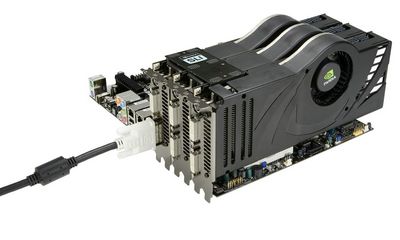
The requirements for a 3-Way SLI setup are fairly straight-forward. You can easily build one of these monster configurations yourself and annoy your friends at National Grid and Keyspan in the process too. All you'll need is an 1100 Watt power supply with at least six 6-pin PCI Express power connectors or four 6-pin and two 8-pin connectors, an nForce 680i or 780i motherboard with three full-length PCIe slots, a fairly roomy case with good airflow, Windows Vista and the right NVIDIA driver to support 3-Way SLI. Incidentally, NVIDIA has noted that AMD-based 3-Way solutions are forthcoming. We'll take a look at what a 3-Way SLI-enabled system from the folks at MainGear Computers looks like next. |
| System Image Gallery |
Maingear Computers is a fairly new-comer to the scene, starting out in 2003. Based on the east coast, out of Union City New Jersey, the company offers a line of Desktop systems, Media Center PCs and Notebooks built with the gamer in mind, most of which come with NVIDIA-based 3D Graphics subsystems. We took a look at one of their EPHEX line of systems built around an nForce 680i motherboard, Intel Core 2 Extreme QX6850 quad-core processor, a Silverstone TJ10 case and of course, three GeForce 8800 Ultra graphics cards under the hood.
Adorned with cold cathode blue lighting and an Asetek LCLC (Low-Cost Liquid-Cooling) kit over its processor socket, the Maingear EPHEX means business. The completely self-contained Asetek kit is really something to see actually and we'll be covering it a bit more in a full Maingear system showcase in the near future. This system ships with a processor speed of 3.8GHz, a nice overclock for its 3GHz Core 2 Extreme QX6850 processor. And then of course there are the three NVIDIA GeForce 8800 Ultra cards strapped in with their new NVIDIA 3-Way SLI connector. Once installed these three cards obviously consume all available expansion slot positions in the case, with the exception of the very top PCI Express X1 slot in the first position above the first full X16 slot. |
| Our Test Machines and 3DMark06 | ||||||||||||||
|
HOW WE CONFIGURED THE TEST SYSTEMS: We tested all of the graphics cards used in this article on either an EVGA nForce 680i SLI motherboard (NVIDIA GPUs) or an Asus P5E3 Deluxe (ATI GPUs) powered by a Core 2 Extreme QX6850 quad-core processor and 2GB of low-latency Corsair RAM. The first thing we did when configuring the test systems was enter their respective BIOSes and set all values to their "optimized" or "performance" default settings. Then we manually configured the memory timings and disabled any integrated peripherals that wouldn't be put to use. The hard drive was then formatted, and Windows Vista Ultimate was installed. When the installation was complete we fully updated the OS, and installed the latest DX10 redist and various hotfixes along with the necessary drivers and applications.
Our very first benchmark score out of the gate should tell you exactly where 3-Way SLI is useful and where it is not. We've provided you a baseline here of more standard, "mainstream" resolutions and AA settings to see the performance profile of 3-Way SLI at these settings and then at extremely high resolutions and image quality settings, where 3-Way really shines. We'll continue to show you all the datapoints like this along the way in this article, to give you the full perspective. |
| Half Life 2: Episode 2 | ||||||
|
Valve's Half Life 2 engine is not known to be a GPU resource hog by any stretch. In fact, the game has rather impressive visuals when you consider how well it runs on even mid-range or low-end graphics hardware. We've turned things up a notch in image quality in our next round of tests though, in an effort to spread out the field a bit more.
At resolutions all the way up to 1920X1200 with 4X AA enabled, 3-Way SLI performance is completely negated by SLI loadbalancing transactions, as you'll note in the larger graph above. However, for those of you that might consider plugging not two but three graphics cards like a GeForce 8800 Ultra into your rig, running 30" flat panel resolutions, like those you can run on a Dell 3007 WFP-HC, these three amigos pay off handsomely. There's a 39% increase in performance with 8X AA enabled at a resolution of 2560X1600 for 3-Way SLI in this test versus standard SLI. |
| Company of Heroes | ||||||
|
Again, when you look at 3-Way SLI from a standpoint of even moderately high resolutions like 1600X1200, the case for it is much less compelling. 3-Way is only 14% faster than standard SLI at 1600X1200 with 4X AA enabled in Company of Heroes. Scale up to 1920X1200 and you'll gain a 27% performance edge with three cards over standard dual-GPU SLI. However, the real bang for the buck again comes at 2560X1600 resolution with 4X AA enabled, where 3-Way SLI is about 40% faster than standard SLI and 150+% faster than a single card. |
| Enemy Territory: Quake Wars | ||||||
|
It's a recurring theme that just doesn't change. 3-Way SLI isn't helpful if you're running 1920X1200 resolution with anything less than 8X AA, or better still, 2560X1600 resolution with 4X AA or higher. At 1920X1200 with 4X AA enabled, 3-Way is slower than standard SLI, again due to increased SLI transaction workload and load-balancing. Regardless, we see similar big gains at 2560X1600 with 4X AA or 8X AA enabled, where three GeForce 8800 Ultra GPUs provide a 20 - 40% advantage over standard SLI and obviously much larger gains over a single card. |
| Crysis Performance | ||||||
|
At the time of NVIDIA's 3-Way SLI launch, we were unable to bring you Crysis benchmark numbers that we felt comfortable with. This was partly an NVIDIA driver issue and also because we were waiting on a patch from Crytek that would allow for more efficient SLI scaling overall. With the release of the Cyrsis 1.1 patch, we now have a stable, scalable platform with which to test on. And as you'll see in the benchmark numbers ahead, Crysis is still an extremely taxing game.
We have to be honest with you all. The above screen shot was taken for affect more than anything else. Regardless of what you may have envisioned, even three GeForce 8800 Ultra cards in 3-Way SLI mode, are no match for Crysis at a 1680X1050 widescreen resolution with very high image quality settings and 8X AA. Those of you who thought GPUs were no longer the bottle neck for ever increasing realism, might want to rethink things a bit. This is a pretty picture but at 16 FPS, it's a slide show in the game. That said, there are only subtle differences in image quality at "High" and "Very High" quality settings in the game's menu, but the upside performance gains can be significant as you'll see next.
At very high image quality settings in the game, even at 1680X1050 with 2X AA, a single GeForce 8800 Ultra won't offer the memory bandwidth and GPU throughput required to run Crysis smoothly. However, drop in another card for SLI and things become significantly more responsive. At high quality settings and 1920X1200 resolution, the GeForce 8800 Ultra SLI setup is about 50% faster than a single card. Three GeForce 8800 Ultras in 3-Way SLI on the other hand, offer a 33% increase in performance over a pair of cards in SLI mode and a 98% performance gain over a single card. This is the type of scaling we expected to see in general from the 3-Way test machine and more in line with what NVIDIA projected for us prior to the game patch release.
In this test we wanted to highlight GPU scaling efficiency even more, so we turned Crysis image quality settings back up to very high, but turned down AA just a notch to 4X. This proved to be the best case scenario in Crysis for the 3-way SLI test setup, where it outpaced a pair of cards in standard SLI by about 36% and a single card by 130%. In addition, the 3-Way setup was able to maintain overall playability in the game, at 35+ FPS, which is about as low as you'd want to limbo in a first person shooter title like this. With these numbers in mind, what's the moral of our story here? Do you actually need a 3-Way SLI setup to play Crysis at its most impressive image quality settings? Absolutely not. But if you've got the disposable income and the power budget to boot, it certainly will improve your game play. Thanks to NVIDIA's continuous improvement efforts at the driver level and the collective efforts of the company along with game developers like Crytek, mutli-GPU scaling continues to offer respectable and appreciable gains in performance. |
| Power Consumption and Acoustics | ||||
|
The graph above puts things into a perfectly clear perspective in case there was any doubt in your mind. A 3-Way SLI setup with three NVIDIA GeForce 8800 Ultra graphics cards installed uses an enormous amount of power. Granted, the system is fairly well-equipped with three standard SATA hard drives as well but even at their peak draw, three hard drives consume around 30 - 35 watts on average. The rest is all power consumption for system memory, motherboard, main processor cores and graphics processors. Peak power draw for a GeForce 8800 Ultra is somewhere in the neighborhood of 175 Watts; that's 525 Watts for the graphics subsystem alone. What's interesting is how power consumption scales from our standard 8800 Ultra SLI two-card setup to 3-way. If you look at peak power for the standard SLI setup (578W) and then add another 175W for one more GeForce 8800 Ultra card, you come up with about 750 Watts. However, the 3-Way SLI power consumption reading we took was about 50 Watts higher than that, indicating that power consumption requirements for the system (chipset, main CPU and RAM) was also a bit higher as well in the 3-Way setup. |
| Our Summary and Conclusion | ||||
|
|