
Logo   Banner   TopRight
TopUnder
Transparent
Seagate Barracuda 7200.11 1TB Hard Disk
Transparent
Date: Nov 07, 2007
Section:Storage
Author: Alex Evans
Transparent
Overview


Seagate was surprisingly late to join the small, but elite club of storage manufacturers shipping one terabyte (1TB) class hard drives. Somewhat expectedly, the first out of the gate was Hitachi, who made it to market several months beforehand with a high-density five-platter 1TB hard disk design. While Hitachi’s performance, thermals, and acoustics have all been tested to be fairly solid overall, many high-end buyers have been waiting for other large manufacturers, namely Western Digital and Seagate, to get into the game to see how these other products compare. Now, all of the major disk manufacturers are shipping terabyte-class products, so we should start to see overall prices fall soon, as these guys start to look at what the next step beyond 1TB will be.

Seagate’s Barracuda 7200.11 drive has been on the radar for quite some time, and as of now, it appears to be shipping in volume. The 7200.11 family (named as the 11th-generation of 7,200 RPM hard disks) allows for storage capacities up to 1000GB/1TB and cache sizes up to a whopping 32 MB, along with the latest Seagate generation of technologies for fine-tuned performance and acoustics. Seagate has kindly provided their new flagship desktop drive to us for a round of testing against some similarly classed hard drive designs. Let’s get started.
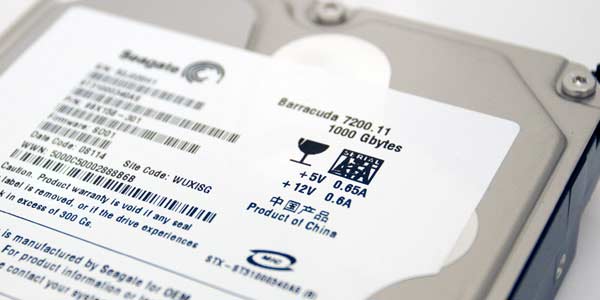


"Seagate has a proven track record of consistently delivering reliable products in volume, and the new Barracuda 7200.11 family is no exception. Designed with up to four platters and the only second-generation perpendicular recording technology in the industry, the Barracuda 7200.11 drive offers the ideal balance of world-class technology and value, providing customers with an optimal overall solution. The capacity, reliability and performance of this drive, along with its 5-year limited warranty, ensure the longevity of digital content for years to come."


  • 1 Terabyte Disk Space (4 x 250 GB Platters)

  • Serial ATA-II/300 Disk Interface

  • 32 MB Cache Memory

  • 7,200 RPM Spindle Speed

  • 4.16ms Average Latency

  • 8.0W Idle, 12.0W Full Power Load

  • 27 dBA Idle, 29 dBA Acoustic Level

  • Native Serial ATA Power Connector

  • 750,000 Hour MTBF

  • Five Year Seagate Warranty
Transparent
Design and Specifications


Seagate is not looking to revolutionize their hard drive lineup with the 7200.11 series of hard disks. They have an excellent product which they’ve refined over the years with the Barracuda 7200, and now in its eleventh generation, the results are downright impessive for a 7,200 RPM class disk. Of course, this drive’s biggest (no pun intended) feature is that it can store a massive 1TB of data over a quad-platter array. Seagate’s previous generation 7200.10 series topped out at 750 GB, so we see a nice 25% boost up in capacity between generations. While it’s possible for Seagate to crank out higher capacity 7200.11 models, we believe that 1 TB will stay as their top of the line desktop hard disk for some time – at least until one of the major disk companies passes 1 TB. Also something to keep in mind, when a 1TB disk is formatted with a modern file system like NTFS, you’ll 'only' truly get about 930GB of usable space.

The Barracuda 7200.11 is not a particularly interesting product from a visual perspective. The Barracuda 7200.11 1TB drive has the same form factor as prior versions of the 7200 family. Of course, underneath its fairly plain externals lies four 250 GB platters, one platter less than Hitachi’s 1 TB hard drive. With only four platters spinning under the hood, it will be easy to see a (positive) difference in both acoustics and thermals (for the better).


Much like the 7200.10 series, Seagate has opted for a Serial ATA only power set up for their disk, moving away from 4-pin Molex connectors that some disk manufacturers still like to utilize. The drive officially supports Serial ATA-II/300 speeds, but interestingly enough, the drive ships with a jumper which sets it to Serial ATA/150 speeds. While even a SATA150 connection should be plenty for the needs of a 7,200 RPM hard disk, this connector speed can be a bottleneck in terms of burst transfer rates. With such a huge amount of cache onboard (32MB), you need the ability to push and pull data from this part of the drive as fast as possible. With the removal of said jumper, the drive immediately becomes a full-fledged SATA-II/300 drive and can be installed as such. Make sure you remove the jumper before you install, since some operating systems dislike when you swap between SATA and SATA-II modes after installation.

Unlike the 7200.10 family, however, Seagate will NOT be offering the new 7200.11 series with an Ultra ATA connector option. That’s right – if you haven’t upgraded your motherboard in the past decade and still don’t have Serial ATA ports, you can’t buy this 1 TB hard disk. Seems reasonable to us.


Seagate hides their controller and memory chips on the bottom side of their PCB. This allows them to push minor drive alterations to this area with no alarm, but it also helps protect the chips from being scratched or damaged during installation. Seagate also stuffs a thin layer of foam between the PCB and the base of the hard disk, which presumably helps muffle some of the disks’ noise creation as well.

While we don't have all of the other 1TB drives available for a shootout, what most really want to know is how it stacks up against other 1TB hard disks currently on the market. We can see the differences on paper with a handy chart, seen below.
 

Hitachi Deskstar 7K1000 1 TB

• 5 x 200 GB Platters

• SATA-II/300 Interface

• 32 MB Cache Memory

• 7,200 RPM Spindle Speed

• 8.5-9.2ms (Normal), 14-15ms (Silent) Seek Times

• 4.17ms Average Latency

• 9.0W Idle, 13.6W Full Power Load

• 29 dBA Idle, 32 dBA Acoustic Level

Unknown MTBF

• Three Year Hitachi Warranty

Seagate Barracuda 7200.11 1 TB

• 4 x 250 GB Platters

• SATA-II/300 Disk Interface

• 32 MB Cache Memory

• 7,200 RPM Spindle Speed

• 4.16ms Average Latency

Unknown Seek Time

• 8.0W Idle, 12.0W Full Power Load

• 27 dBA Idle, 29 dBA Acoustic Level

• 750,000 Hour MTBF

• Five Year Seagate Warranty

Western Digital Caviar GP 1 TB

• 4 x 250 GB Platters

• SATA-II/300 Interface

• 16 MB Cache Memory

• 5,400 - 7,200 RPM Spindle Speed

• 5.6ms Average Latency

• 8.9ms Seek Time

• 4.0W Idle, 7.4W Full Power Load

• 25 dBA Idle, 27 dBA Acoustic Level

• Unknown MTBF

• Three Year Western Digital Warranty


We see some interesting omissions from the spec sheets. Hard drive manufacturers are never on the same page about what specifications to publish, which leaves us with a smattering of some standardized information which we can see and some which is left in the dark. Seagate, in particular, does not list seek times (which we consider to be quite important). Hitachi and Western Digital state numbers in the 8-9ms range – our tests show Seagate’s drive in the 11-12ms range, which may be why it’s not stated. Hitachi and WD, however, do not publish MTBF numbers (that we could find) and only have three year warranties, as opposed to Seagate’s five. WD’s Caviar GP is definitely the quietest and lowest power drive of the 1TB family, but this comes at a price, as the drive only has 16MB of cache and has a variable spindle sped which will spin down to 5,400 RPM when loads are low.

Transparent
Testbed and Vista Performance


Test System Details
Specifications and Revisions

  • Intel Core 2 Duo E6600 (2.4 GHz) Processor
  • eVGA Nvidia nForce 650i Ultra Motherboard
  • 2 x Kingston XMS DDR2-800 Memory (2 x 1 GB, CAS 4-4-4-12)
  • 1 x Nvidia GeForce 8800 GTS 320 MB
  • 1 x Plextor PX-755SA DVD+/-RW Drive
  • 1 x Corsair HX620W 620W Power Supply
  • Windows Vista Ultimate Edition (x64)

  • Seagate Barracuda 7200.11 1 TB
  • Western Digital Raptor 74 GB
  • Western Digital SE16 500 GB
  • Maxtor Diamondmax 10 320 GB

Windows Vista Performance
Windows Experience Index : Storage Score


Each of our testbed drives were installed in a PC running Windows Vista, at which point we'd have it run the Windows Vista Performance benchmark. While they don’t give specifics on what the benchmark tests, it does create a storage performance number (5.9 generally being the best possible performance for a Vista enabled system at this time). We’ve generally found it to be pretty helpful in judging the overall “feel” of a Vista system.

As we can see, the Barracuda 7200.11 showcases excellent overall Windows Vista performance, even out-pacing the Raptor 74 GB. We believe this may be due to the Barracuda’s much larger cache amount or that Vista is requesting some files in a method which Native Command Queuing benefits performance. 

Transparent
HDTune


HDTune Storage Benchmark
Version 2.54 (x32)


HDTune shows the Barracuda 7200.11 1TB drive in a very positive light, at least in terms of raw disk performance. Both average and maximum transfer rates show the 7200.11 well above competing 7200 RPM hard drives, and well above the WD Raptor 74GB as well. The Raptor does, however, showcase its excellent random access time in the final test, whereas our 7200 RPM hard disks fall far behind.

Transparent
PCMark Vantage


PCMark Vantage Vista Benchmark
Storage Scenario Benchmarks


PCMark’s new Vista-only Vantage benchmark shows how different tasks really highlight disk performance between a modern 7,200 RPM hard disk and a 10,000 RPM hard disk. In two of our three tests, the Raptor holds a solid lead over competing 7,200 RPM drives, although in terms of Media Center performance, our Raptor scores surprisingly bad, whereas the new Barracuda drive runs in the middle of the pack in overall performance.

Transparent
PCMark Vantage (Continued)


PCMark Vantage Vista Benchmark
Storage Scenario Benchmarks


The final three Vantage tests showcase the Raptor maintaining solid leads across the board, whereas the Barracuda 7200.11 drive fights against the Caviar SE16 drive for second place. In these particular tests, the Barracuda doesn’t look that great in comparison to some of the other synthetics we’ve seen, although the drive still manages to hold its own.

Transparent
Power Consumption


Total System Power Consumption
Measured with SeaSonic PowerAngel Hardware Watt Monitor


Even with a massive capacity advantage over the drives we pitted against it, the Barracuda 7200.11 is surprisingly light in terms of power usage. Even during massive file transfers, the disk did not show any large increase in power consumption, as the disks showed numbers similar to other 7,200 RPM class hard drives.

Transparent
Conclusion


From a technical standpoint, the Seagate Barracuda 7200.11 is one of the most advanced consumer level hard disks on the market. The drive showcases second generation perpendicular recording, 32 MB of cache, excellent multi-tasking performance, very light power consumption and noise production, and let’s not forget the massive 1 TB amount of storage space. The advanced 250GB/platter technology which Seagate has used has allowed them to create a monster of a drive, in terms of both performance and capacity, which also happens to run quietly in your system.


When mounted in a chassis without active airflow, we measured the drive hitting temperatures of 50-55ºC, which is warm but certainly tolerable for a real world situation such as this. Considering the capacity of this drive, we would recommend a low-noise chassis fan to keep it running healthy and happy for a long period of time. It definitely doesn’t need a noisy, high-speed fan to keep thermals under control, but some active airflow would definitely help overall temperatures as well as peace of mind. As for acoustics, when mounted in a chassis, the drive was virtually inaudible. Even when the drive was performing disk intensive tasks like defragging, there was no change in the overall noise level (which is already a very low noise environment). For this particular environment, the drive was essentially silent to my ears, which is quite impressive, all things considered.

Our experience with the drive running a Windows Vista system has been interesting. For the most part, the Barracuda 7200.11 1 TB drive runs flawlessly, especially during heavy multi-tasking scenarios. However, there are moments when we realize that we’re still dealing with 7,200 RPM technology, as opening large programs quickly still can be slower in comparison to a 10,000 RPM Raptor disk. However, for the most part, Seagate can deliver much of the same experience of a 10K RPM hard disk at a much lower price per GB and with much friendlier environmental aspects (noise/heat).

As of today, Seagate’s Barracuda 7200.11 1 TB is a bit more expensive compared to WD’s and Hitachi’s 1 TB hard drives, but not to the point where we think greatly hurts its value. Seagate has a longer warranty compared to the competition, and is the only drive which has a four platter design combined with 32MB of cache. Currently, this drive sells for about $330 online, which is 0.33 cents per GB. Hitachi’s 1TB drive sells for roughly 0.31 cents per GB, whereas WD’s Caviar GP goes for about 0.27 cents per GB. In comparison, 500GB 7,200 RPM hard drives can be had for about 0.19 cents per GB today, so if you just need raw capacity and don’t care about noise/heat, these are still better values. However, if you want a boatload of storage space with excellent Vista performance and near inaudible acoustics, the Barracuda 7200.1 1TB drive is a great option.


  • Massive Storage Capacity
  • 32 MB Onboard Cache
  • Near Inaudible Acoustics
  • Low Power Consumption / Heat Production
  • Five Year Warranty
  • More Expensive Per GB Compared To Competition
  • Somewhat High (~12ms) Seek Times
  • Set to SATA-150 Mode By Default


  • Discuss This Article In HotHardware's Community Forum!


    Content Property of HotHardware.com

