



Zalman Z-Machine GT1000 High End Gaming Case


As enthusiasts, we're always looking for the next great design in computer cases. We're eager to see companies innovate in various areas of design, including cooling, tool-less installation, and style. When we see a new case hit the market, we often hope that it is made of aluminum, includes quiet 120mm or larger fans, and is easy to work in. We like aluminum because it usually looks good and is typically lightweight. We prefer the convenience of tool-less installation features because we are frequently swapping out parts.
We happen to have a new case in the labs that meets some of these criteria, the Zalman Z-Machine GT1000, which Zalman labels a "High End Gaming Enclosure." This case is made from aluminum, but it bucks the lightweight trend of aluminum due to it being constructed of aluminum that is 4-5mm thick. That alone should make you realize we aren't dealing with an ordinary case here. In addition to its high quality, thick aluminum construction, the GT1000 offers plenty of cooling and innovative tool-less installation.
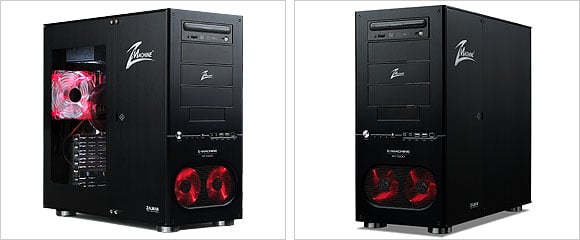
The GT1000 comes in two different colors: titanium and black. The case features two 92mm intake fans in the front and one 120mm rear exhaust fan. The titanium model features blue LED fans, and the black one sports red LED fans. We have the black model on our bench, and a quick glance reveals that this case has a lot of potential.
 |
|
Specifications:
| Enclosure Type | Tower | |||
| Enclosure Dimensions | 480mm X 220mm X 450mm (18.9" X 8.7" X 17.7") (L*W*H) | |||
| Weight | 12.5kg (27.5lb) | |||
| Material | Aluminum 4~5T | |||
| Motherboard Compatibility | Standard ATX / microATX | |||
| PSU Compatibility | Standard ATX / ATX12V | |||
| PCI/AGP Card Compatibility | Full Size | |||
| Drive Bays (Tool Free Kit provided) |
3.5" Bay x 7 5.25" Bay x 4 | |||
| Cooling Components | Front Intake Fans : 92mm LED Fan x 2 Rear Exhaust Fan : 120mm LED Fan x 1 | |||
| Expansion Card Slots |
7 Slots(Tool Free Bolts provided) | |||
| Front I/O Ports | USB Port x 2, IEEE1394(Firewire) Port x 1 Headphones x 1, MIC x 1 | |||
| Color Options | Titanium / Black | |||
Features:
- Designed for Low Noise & Optimal Cooling
- Noise & Vibration Preventive Structure: All sides of the GT1000 are comprised of aluminum material of 4~5mm thickness and have each been assembled by an engineer to provide a firm enclosure with noise and vibration preventions. Furthermore, the connection part for the HDD (Hard Disk Drive) is made of rubber rollers and dampers, which serve to capture the vibration and noise from escaping.
- Optimal Airflow: The GT1000 enclosure is designed to maintain optimum internal temperature at all times, incorporating two 92mm LED Front Intake Fans and a 120mm Rear Exhaust Fan for high volume airflow through the system at low fan RPM for high performance cooling with quiet operation, and accommodates even the hottest CPUs that generate over 130watts of heat.
- Designed for HDD with High TDP: The latest high performance HDDs have high generation of heat due to high RPM. The two 92mm LED Front Intake Fans draw in cool air from the outside into the system. As HDD is the first component to be cooled by this cool air, the decrease in the product’s life expectancy and the occurrence of data error caused by high heat are minimized.
- Control of Noise & System Cooling: The ZM-MC1 is provided with the GT1000, which allows the control of fan RPM according to the ambient environment (temperature, humidity, etc.). Thus, the user can manually control the fan RPM to control the levels of noise and internal system cooling.
- Various Features & Convenience
- One Touch-Opening Door Side Panel: The side panel is designed to be opened with a one touch opening door method. Thus, the side panel can be opened without the use of any special tools, which makes it convenient for users who have frequent component changes.
- Convenient Front Input/Output Ports: The Front I/O Port includes sockets for speakers (headphones), microphone, 2 USB devices, and a 1394 (Firewire) device for convenient system access. Audio sockets support HD Audio (Azalia) and AC’97 specifications.
- Tool-Free Installation:
- Tool-free HDD installation: Patent pending design that incorporates anchored spinning bars with cylindrical rubber wheels allows the user to install and remove the HDD simply by rolling the HDD in and out of the chassis without having to use any tools. Furthermore, there is sufficient space in the lower section of the enclosure where two HDDs can be installed in a tool-free manner.
- Tool-free 5.25” installation: The hand bolts are fixed onto the 5.25” bay at all times, which allows the installation and removing of the 5.25” driver in a tool-free manner.
- Tool-free Expansion Card installation: Hand bolts (not standard bolts) are used for installing and removing the expansion cards, which allows tool-free installation.
- Elegant Design
- Unlike typical cases that only incorporate a thin aluminum facade front cover, the entire GT1000 enclosure incorporates firm 4-5mm thick anodized pure aluminum panels that prevent system vibration, reinforce system cooling by dissipating internal heat, and provide the highest in aesthetic quality.
- The three LED fans with altering brightness depending on the fan’s RPM provide greater aesthetic quality.
- A transparent window has been installed on the side panel to provide excellent aesthetics as well as to allow the user to be able to view the diverse components installed inside the system.
- All connecting bolts and card holder are plated or colored to provide an elegant image as well as to provide a semi-permanent corrosion prevention.
- Excellent Expandability
- Besides the four 5.25” Bays and one 3.5” Bay exposed to the outside, the installation of six 3.5” HDD is possible, providing the best expandability among enclosures in the same group.
;)
Zalman uses the typical packing technique to protect the GT1000 during shipping: a plastic bag around the case and styrofoam surrounding the top and bottom. Our test sample arrived without a single scratch or dent. As you can see, the box shows you what can be found inside, and it lists some of the case's main features.
;)
;)
In addition to the case itself, Zalman includes a somewhat useful manual and a small white box full of accessories. Inside the box, we found two cable tie-downs, drive bay screws, motherboard screws, power supply screws, spare Allen bolts, motherboard stand-offs, an Allen wrench, and a Zalman ZM-MC1 (which can be used to control fan speed). The ZM-MC1 is the cable you see on the far left of the right image above. On one end, it has a 4-pin Molex-style connector, and on the other end, there are four three-pin fan connectors. The two black connectors supply 12V while the white connectors supply 5V. You can use the 5V white connectors to slow down a couple fans to make them quieter.








