Just around this time three years ago, Intel launched their 925X and 915 motherboard platforms, bringing to market a new microprocessor socket, support for DDR2 memory, and support for PCI Express. Although the chipsets were decent performers and had good features, Intel was criticized for forcing the adoption of these new technologies when the market wasn’t really demanding it. At that time, Intel’s NetBurst processors trailed AMD’s and the company caught a lot of criticism from motherboard partners, OEM computer manufacturers, and press alike.
Fast forward to today, and we are in a completely different situation. Intel has received accolades for their Conroe and Kentsfield based processors, and their 975X and P965 chipsets have been very successful. And like we saw three years ago, Intel has recently launched a new chipset family - formerly codenamed Bearlake - that usher in a slew of new technologies to the market place. This new chipset is replacing the mainstream P965 and is called the P35, and with it, Intel brings support for the 45nm Wolfdale and Yorkfield cores (Penryn), 1333MHz bus speeds, an improved memory controller and south bridge, and support for DDR3 memory. But unlike what we saw three years ago, the P35 chipset will also be available with support for DDR2, allowing the market to gradually transition toward DDR3, instead of forcing its adoption.
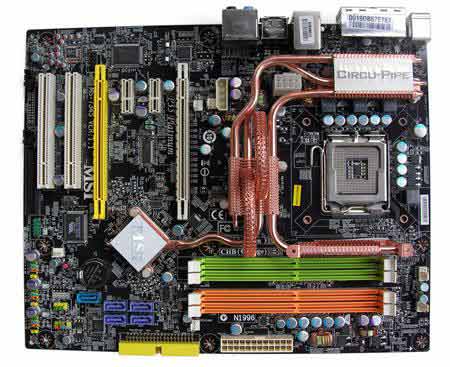
One of the first companies to market with a DDR2 variant of the Intel P35 chipset is MSI, with the MSI P35 Platinum motherboard we’ll be reviewing today.


|
|
|
MSI P35 Platinum
|
|
Features and Specifications
|
|
|
|
CPU
|
|
|
|
|
•
|
Supports Socket 775 for Intel Core2 Extreme, Core2 Duo, Pentium 4 (Prescott, P4EE), Pentium D, Pentium XE/Celeron D processors in LGA 775 package
|
|
•
|
Supports FSB 800/1066/1333 MHz
|
|
•
|
Supoprts Intel 05B/05A and 04B/04A processors
|
|
•
|
Supoprts EIST techonology
|
|
•
|
Supports Intel Hyper-Threading (HT) Technology
|
|
•
|
Supports Intel Quad Core Technology to 1333MHz and up
|
|
|
|
|
|
|
|
Chipset
|
|
|
|
|
Intel® P35 Chipset
|
|
•
|
Supports FSB 800MHz, 1066MHz & 1333MHz
|
|
•
|
Support Dual channel DDR2 667/800/1066 memory interface up to 8GB (P35 chipset supports up to DDR2-800 officially. For DDR2 800+, manually BIOS adjustment is needed)
|
|
•
|
Support Dual PCI Express 16X interface with either 1x16 or 1x4 operation.
|
|
|
|
|
Intel® ICH9R Chipset
|
|
•
|
Integrated Hi-Speed USB 2.0 controller, 480Mb/sec, 12ports
|
|
•
|
6 Serial ATAII ports (2 eSATA + 4 SATAII) w/ transfer rate up to 3Gb/s and support RAID 0, 1, 5 and 10
|
|
•
|
PCI Master v 2.3, I/O ACPI 2.0 Compliant
|
|
•
|
Integrated AHCI controller
|
|
|
|
|
|
|
|
FSB
|
|
|
|
|
•
|
Support FSB 800MHz, 1066MHz & 1333MHz
|
|
|
|
|
|
|
|
Main Memory
|
|
|
|
|
•
|
Supports 4 unbuffered DIMM of 1.8 Volt DDR2 SDRAM
|
|
•
|
Supports up to 8GB memory size
|
|
•
|
Support Dual Channel DDR2 667/800/1066MHz and up (Intel P35 chipset supports up to DDR2-800 officially. For DDR2 800+, manually BIOS adjustment is needed)
|
|
|
|
|
|
|
|
|
|
|
|
Slots
|
|
|
|
|
•
|
Two PCI Express 16X slots with 1x16 and 1x4 operations (PCI Express Bus SPEC V1.0a compliant; supports CrossFire Technology)
|
|
•
|
Two PCI Express 1X slot
|
|
•
|
Two PCI 2.3 32-bit Master PCI Bus slots. (support 3.3v/5v PCI bus interface)
|
|
|
|
|
|
|
|
On-Board IDE
|
|
|
|
|
One Ultra DMA 66/100/133 IDE controller integrated in Marvell 88SE6111
|
|
•
|
Supports PIO, Bus Master operation modes
|
|
•
|
Can connect up to 2 Ultra ATA 100 drives
|
|
|
|
|
Serial ATAII controller integrated in ICH9R and Marvell 88SE6111
|
|
•
|
Up to 300MB/s transfer speed
|
|
•
|
Can connect up to 7 Serial ATA II drives (4 internal drive & 2 eSATA drives from ICH9R, 1 drive from 88SE6111)
|
|
•
|
Supports ACHI controller with SATAII RAID 0, 1, 5 and 10 (ICH9R)
|
|
•
|
Supports SATAII hot plug
|
|
|
|
|
|
|
|
On-Board Peripherals
|
|
|
|
|
•
|
1 floppy port supports 1 FDD with 360K, 720K, 1.2M, 1.44M and 2.88Mbytes
|
|
•
|
1 Serial port (COM A, Pin-Out)
|
|
•
|
12 USB 2.0 ports (Rear x 6/** Front x 6)(** Front USB ports are supported by pin-out)
|
|
•
|
1 6-in-1 audio jack (S/SPDIF out)
|
|
•
|
2 PS/2 connectors
|
|
•
|
2 IEEE 1394 (Rear x 1/ **Front x 1) (** Front 1394 port supported by pin-out)
|
|
•
|
1 LAN RJ45 connector
|
|
|
|
|
|
|
|
Audio
|
|
|
|
|
High Definition link controller integrated in Intel ICH9R chip
|
|
•
|
Audio codec Realtek 888T
|
|
•
|
Compliance with Azalia 1.0 spec
|
|
•
|
Flexible 8 Ch. audio with jack sensing
|
|
•
|
Supports VoIP Card (Optional)
|
|
|
|
|
|
|
|
LAN
|
|
|
|
|
•
|
Realtek RTL8111B PCI-Express Gb LAN Controller
|
|
|
|
|
|
|
|
IEEE 1394
|
|
|
|
|
VIA 6308P chipset
|
|
•
|
Supports up to two 1394 ports (Rear panel x1, front x1)
|
|
•
|
Transfer rate is up to 400Mbps
|
|
|
|
|
|
|
|
BIOS
|
|
|
|
|
•
|
The mainboard BIOS provides "Plug & Play" BIOS which detects the peripheral devices and expansion cards of the board automatically.
|
|
•
|
The mainboard provides a Desktop Management Interface(DMI) function which records your mainboard specifications.
|
|
|
|
|
|
|
|
Dimensions
|
|
|
|
12in.(L) x 9.65in.(W) ATX Form Factor
|
|
|
|
|
|
|
Mounting
|
|
|
|
9 mounting holes
|
Since the MSI P35 Platinum is targeted at the mainstream, the package contents of the board are very basic. Along with the standard documentation and driver disk, the P35 Platinum is equipped with four SATA cables, a PATA cable, a Molex to SATA power adapter, a PCI firewire port, and a back I/O panel.




;)
;)

;)
;)








