|
|
| Introduction & Specifications | ||||||
Netbook-mania and the first retail-available responses to the Eee didn't appear until nearly 6 months later, but when it did, it arrived in the form of the MSI Wind, followed closely by the Acer Aspire One. The Eee PC has gone through multiple design iterations since then, but both the MSI Wind and the Aspire One have stayed relatively the same. While Acer's strategy with the Aspire One was to trawl the bottom of the netbook market, in terms of cost, and they've managed to stay there, thus ensuring the product's continued relevancy, MSI's Wind is decidedly a mid-range netbook product. Since the Wind's initial release seven months ago, the middle of the netbook market, roughly defined here as the $350-$500 range, has become very crowded. It seems like everyone and their subsidiary is getting into the netbook game and there are now dozens of models and submodels vying for your money, with even more product launches right around the corner. In this suddenly crowded niche market, is the MSI Wind still a good choice, or has it fallen behind the competition? Don't get us wrong. We're not saying that MSI has been standing still this whole time. On the contrary, the folks at MSI have been cooking up a number of new netbook products, as we'll certainly see at CES in the coming weeks. MSI has also released a cheaper 8.9" version of the Wind, the U90, which is currently available in parts of Europe, Australia and Canada. However, at least for the time being, the original MSI Wind, now dubbed the Wind U100, is still the only MSI netbook officially sold in the US. Today we're going to pit it head-to-head with a couple of its younger competitors to see if can keep up with the mass of new competition.
While the Wind hasn't changed much, it has aged quite well. The 1.6GHz Atom N270 processor is still a staple of the netbook market and the 945GSE platform with GMA 950 graphics is found in just about every netbook, new and old. The Wind has also seen several price drops, additional storage and a new 6-cell battery option. The original configuration available at launch, a 3-cell with 80GB hard drive, now sells for around $350 while the newer 6-cell version with a 160GB drive that we have in our lab today can be found for just over $420. Overall, in terms of technical specifications, the MSI Wind still appears to be competitive. Read on to find out if the rest of the package stacks up and if the new 6-cell battery is worth the extra cost. |
| Design & Presentation |
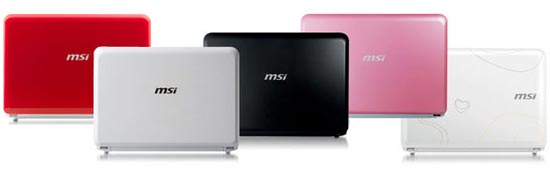
The two other original color options are black and pink. A red version is also available, although a bit hard to find, and a special "Love Edition" was also produced that featured multicolored hearts on a white background. However, chances are good you'll only be able to find the Wind in white and black, unless you do some hunting. (click to enlarge) The Wind is very much a minimalistic unicolor design. Besides the primary color, in this case white, there are literally no other colors present anywhere on the chassis, excluding labels. While this makes for a uniform appearance, it can also come off a little bland. There aren't even any details or accents. The only splash of color comes from the various status LEDs. The power button features an inset blue LED to indicate power. There is also a huge row of status LEDs along the bottom right edge of the palm rest. There are 8 LEDs in total to indicate everything from hard drive activity and Bluetooth status to battery level and caps lock. These LEDs light up green and may flash orange to indicate certain status conditions. As previously mentioned, the exterior of the U100 is covered in a uniform glossy white that is very much reminiscent of earlier iPod designs. Except for a single low-key gray 'msi' logo, there are no other blemishes on the lid. The bottom of the Wind, on the other hand, is not Apple-like at all as it is covered by a variety of stickers and pitted with vents and ducts. The Wind's speakers are also located on the bottom of the unit, one at each of the corners under the palm rest. The overall design of the Wind is fairly typical of currently available netbooks. The Wind is built around the keyboard which plays a large part in determining the size of a netbook's chassis. The chassis of the wind is only as wide as the keyboard and the keys go right up to the edge of the unit on the left and right sides. Despite tightly fitting the width of the chassis to the keyboard and using a very compact keyboard design, the unit still ends up being a bit wider than the 10.2" widescreen panel and as a result we end up with a 3/4" thick screen bezel. The thick bezel is a little on the unsightly side, but its not so thick as to be a major annoyance. The Wind comes packaged with a MSI branded notebook sleeve. Ours came in white and presumably the other color options would come with matching sleeves. The sleeve itself is definitely on the cheap side. The exterior is made of cheap vinyl with a faux leather pattern. The sleeve closes via a single zipper and the interior is lined with black cloth. There are no pockets for accessories although a mesh divider is present inside. However the divider is rather useless since the sleeve is a perfect fit for the Wind and there isn't much room for anything else beyond a sheet or two of paper. However, for the low price of free, it's hard to grumble too much. The top and bottom of the sleeve are padded and it will provide a certain level of protection for the Wind so at least it's functional. |
| Build Quality & Features |
The Wind offers the standard arrangement of extra gadgets and connectivity. Integrated into the screen bezel is the ubiquitous webcam with accompanying microphone. The right side of the unit also has an unusually speedy 4-in-1 media card reader. The Wind offers 3 USB ports, two on the left and one on the right, as well as VGA-out and 10/100 ethernet. This is a pretty typical setup for a netbook although some newer models sport faster Gigabit ethernet ports which puts the Wind at a slight disadvantage. However since netbooks are portable machines, you're not likely to be relying on ethernet much anyway and the built-in 802.11 b/g/n wireless card will serve most users well. The Wind has a single cooling fan located on the left side. This is a low-output blower style fan that helps air circulation within the chassis by bringing it up from vents along the bottom of the unit and expelling it out a vent on the left side. The fan is off most of the time and occasionally turns on to help with cooling as needed. MSI Wind U100 Screen (click to enlarge) The Wind U100 features a 10.2" LED backlit screen with the now standard netbook resolution of 1024x600. The screen has a matte finish with decent anti-reflective properties and the backlight is plenty bright. We had no problem using the Wind outdoors although direct sunlight on a sunny day will still be a problem. Unsurprisingly for a netbook, the LCD panel used by the Wind is a TN unit of mid-range quality. It gets the job done but don't expect miracles. Like many netbooks, the viewing angle is noticeably poor. However the screen does offer decent brightness and good color. For single-user use from an intimate up-close sitting position, we found the screen rather pleasant. Overall we'd say the screen quality if on par with other mid-range netbooks we've tried in the past like the ASUS 1000 and the Lenovo S10. MSI Wind U100 Keyboard & Touchpad (click to enlarge) Like nearly all netbooks, the Wind features a somewhat miniaturized keyboard with a very compact layout. The primary letter and number keys are slightly smaller than those found on a typical 15.4" notebook but not by much. It was hard to notice the difference unless the Wind was placed side-by-side with a full-size notebook. The rest of the keys, however, have received very noticable shrink treatments. The F-keys and arrow keys have all been shrunken which is rather common, even on larger notebooks. Annoyingly some of the punctuation keys have also been shrunk to 3/4th width. This threw us off at first and took some getting used to. Overall the keyboard is fairly pleasant to type on. It didn't feel cramped although the layout took a few minutes to get the hang of. The keys have good tactile feedback and felt sturdy. The keyboard is also free from "mush" and "sag". While the Wind's keyboard is quite good, we can't say the same about the touchpad. First off, it's tiny at only 2" by 1.7". While we can understand the touchpad couldn't be very tall due to space constraints, we wonder why MSI chose a square design. It would have helped immensely had the touchpad been wider. Another gripe is the design of the touchpad buttons. Instead of using two separate buttons, the Wind has a single rocker button. The bar rocks back and forth like a seesaw for left and right clicking. While this works relatively well for single clicks, it makes simultaneously pressing the left and right buttons at the same time nearly impossible. To top off the list of gripes we have with the Wind's touchpad, it also uses a Sentilic unit, rather than the more popular Synaptic units used in most notebooks. Unlike Synaptic touchpads, Sentilic units, such as the one used by the Wind, cannot recognize finger gestures which means no finger-slide scrolling. Instead you need to continuously tap a corner of the touchpad to scroll. Sentilic touchpads are also significantly less configurable. While Synaptic touchpad drivers allows you to adjust just about every setting and feature of the touchpad, Sentilic units are much more limited. For instance, you can't change the sensitivity of the touchpad which would be less of an issue if the default wasn't so high. The touchpad would often register clicks when we simply hovered above the touchpad without touching it, or it would go into "click-and-drag" mode inadvertently after only a single "click". While it may be possible to eventually get used to the touchpad's sensitivity, this isn't something we should have to deal with. |
| Upgrade Options & Software | ||||
The Wind is one of the easiest to open netbooks. A couple easy to access screws are all that bar you from the innards of the netbook. Instead of a small removable service access panel, the Wind is all or nothing; the entire bottom shell comes right off. Popping off the bottom reveals all of the innards of the Wind. Under the hood is a single DDR2 DIMM slot, hard drive bay and a mini-PCI slot. It's worth noting that the DIMM slot is empty by default, we didn't remove the memory in our photos. The Wind's motherboard actually has 1GB of DDR2-667 soldered directly to it. The four RAM chips are soldered right next to the base of the DIMM slot. The system features a single blower-style fan. This is actually used as a case fan, it is not attached to a heatsink of any sort and only serves to circulate air within the chassis. The N270 Atom processor and the 945GSE northbridge are cooled by a large metal heatspreader while the ICH7 southbridge is left to fend for itself. Overall the Wind has a tidy layout that should be easy to work with. Unless you are planning to replace a component, the only available upgrade option is filling the open DIMM slot with 1GB of memory, since the chipset can only handle 2GB total.
(click to enlarge) The MSI Wind is pretty light-weight in terms of preinstalled software. On first boot, we were greeted by a relatively clean desktop, except for a collection of shortcuts. There wasn't much in the way of preinstall bloat although a 60-day trial of MS Office 2007 was installed and so was Ulead Burn Now, optical media authoring software. Installers for Norton Internet Security 2008 and CyberLink DVD were also included but the applications themselves weren't installed by default. The option to install is simply left to the user which we thought was a smart choice. Overall the Wind came with a refreshingly clean install of Windows without any excess bloat. We really like that MSI left the option of installing Norton Internet Security and CyberLink DVD up to the user although we wish they had extended that to MS Office and Ulead Burn Now too. |
| Overclocking & Performance |
This is definitely a neat feature that sets the Wind apart from the rest of the pack, especially if you consider that nearly every netbook currently available is equipped with the same Intel N270 Atom processor. This overclocking feature has the potential of giving the Wind the performance crown out of the current batch of netbooks, at least until dual-core Atoms or a competing product make it onto the scene. Automated overclocking that's fully supported by the manufacturer? Of course we just had to try out this feature for ourselves so we loaded up the v1.09 BIOS and proceeded to run a set of benchmarks with the overclocked Wind. ![]() ![]() Our SANDRA CPU benchmarks show that the Wind performs on par with the rest of the netbooks in our benchmarks. This is as it should be since they are all running the same 1.6GHz N270 Atom processor. Regardless of whether you have a $350 netbook or a $800 barely-netbook, if it's running the N270 Atom, you're getting the same performance, processor-wise. However, things get interesting when you add the overclocked Wind into the equation. When overclocked by 24%, the Wind's N270 is running at about 2GHz and that extra 400MHz translates into a sizable performance advantage leaving the rest of the pack in the dust. ![]() ![]() The MSI Wind achieves its overclock by increasing the FSB frequency. This is reflected in the memory benchmarks. All of the netbooks in our benchmark are running the same Intel 945GSE chipset with DDR2-667 memory which means they should perform on par with each other and the benchmark results support this hypothesis. Once overclocked however, the MSI Wind picks up an impressive 25% performance lead over its own stock performance in terms of bandwidth. Memory latency also receives a smaller 15% performance boost. ![]() The netbooks in our benchmarks use a variety of different hard drives from different manufacturers so, unlike the previous tests, we see some variation here. The 160GB Western Digital drive our review unit was equipped with performed near the middle of the pack. Unsurprisingly, overclocking does not effect hard drive performance at all. Overall, we'd say the overclocking feature introduced by the v1.09 BIOS is a huge success. With a simple press of the Fn+F10 keys, you can toggle on overclocking on-the-fly. The FSB overclock results in significant performance boosts to the CPU and memory. However not everything is rosy. The overclocking feature can only be used when the Wind is tethered to AC power. Pressing the Fn+F10 key combination while under battery power turns on Eco mode, which is quite the opposite of overclocking. A somewhat unpleasant side effect of the new BIOS is increased fan usage. Using the default BIOS our review unit was shipped with (v1.06) the Wind's single fan rarely turned on and when it did it would spin at a low setting that was barely audible. As soon as we flashed to the new v1.09 BIOS, we noticed the fan was on almost constantly unless the system was completely idle, regardless of whether the system was overclocked or not. While overclocking the fan became even louder. Although the fan is still plenty quiet even at its loudest, we prefer silent over quiet any day. Overall, we think the overclocking feature is worth the minor side effect of slightly increased noise and hassle of flashing the BIOS. We estimate the total overall real-world performance increase provided by the overclock to 2Ghz to be roughly 20%. The added performance makes the Wind the fastest netbook currently available, at least while it's tethered to an AC outlet. This is quite impressive for a $350-$430 netbook. |
| Battery Performance |
In order to test battery performance, we used the Battery Eater Pro utility. We tested the Wind using Battery Eater's Classic and Idle tests. First we tested how well the Wind performed under ideal conditions using the Battery Eater idle test which simply idles the system until the battery drains. We also ran the test with the wireless radios turned off and the screen set to half brightness. Then we tested the Wind under stressed conditions using the Battery Eater Classic test. In this test mode, both the CPU and GPU are stressed to full load until the battery runs out of juice. The screen was set to full brightness for this test and the system was connected to a wireless AP and the Bluetooth was enabled. ![]() Overall the Wind and its 6-cell battery performed very well. In the ideal settings test, the Wind kept going for just over 6 hours. That is roughly enough juice for an average day, considering the system would be allowed to enter power saving modes during normal use. The Wind's performance in our stress test was also fairly good. It managed just under 4 hours of juice while both the processing and graphics subsystems were fully maxed out. This should be a good indicator of how the Wind will perform in a worst-case scenario. Real-world performance will likely fall somewhere in between our two tests for continuous use or do much better than our idle test if your only using the Wind periodically throughout the day, allowing it to enter standby mode to save power in between uses. |
| Conclusion | ||||
The Wind offers a sturdy chassis that will take your constant handling in stride. The system is well built and covered in high quality paint that is very fingerprint resistant. Although the design comes off a bit bland, it's still a pretty good looking machine that will look the part in any situation, boardroom or coffee shop.
The Wind's 10.2" LED backlit LCD, while not extraordinary, is a good unit with plenty of brightness that serves its purpose well. While viewing angles are poor and color accuracy is lacking, a tiny netbook probably isn't the best platform for frequent movie watching or graphics editing anyway. Like most netbooks, the Wind is built for portability and it does this with aplomb. The Wind packs the same Intel Atom platform as nearly every other netbook on the market so its not surprising it doesn't set any performance records. However, MSI has saw it fit to include a handy automated overclocking feature in their latest BIOS that will push the 1.6GHz N270 Atom processor up 24% to 2GHz. As we saw in our performance benchmarks, this gave it a healthy performance advantage over stock units and at least for now, the overclocked Wind holds the netbook performance crown. Overall, the MSI Wind U100 is still a pretty competitive unit. Ultimately the point of a netbook is to provide a cheap, luggable secondary computer you can bring with you on trips and the Wind fits the bill perfectly. With 6 hours of battery life, plenty of storage and enough performance for most of your out and about computing needs, the Wind remains a solid choice.
|