Under The Hood with Android 4.1, Jelly Bean

Jelly Bean, The Latest Version Of Android
Google claims Android 4.1, aka Jelly Bean, is the fastest and smoothest version of Android yet. When we took a look at the first Jelly Bean-equipped tablet a couple of weeks back, the Nexus 7, we felt Jelly Bean had a lot to offer users, both in terms of performance enhancements as well as new functionality. Here, we'll take a closer look at some of the new and improved features that come with Jelly Bean.

Jelly Bean is Inherently Faster -
One of the goals Google had while creating Android 4.1 was to improve upon the user experience by making the mobile OS feel fast and smooth. In this regard, Jelly Bean is most certainly faster than its older brother, Ice Cream Sandwich. In real-world usage, we felt the Nexus 7 was smooth and very responsive, just as we'd expect from Jelly Bean. Google has a cool video that compares the speed of Jelly Bean with Ice Cream Sandwich if you'd like to see the differences for yourself. Check it out below.
Behind the scenes, Jelly Bean is designed to instantly boost the frequency of your device's CPU the moment the screen is touched, to enable a faster response. Recognizing that you don't need the CPU boost all of the time, the OS will turn the CPU clock down when it's not needed to save battery life, as is the case with other versions of Android as well.
Jelly Bean Notifications With Actions -
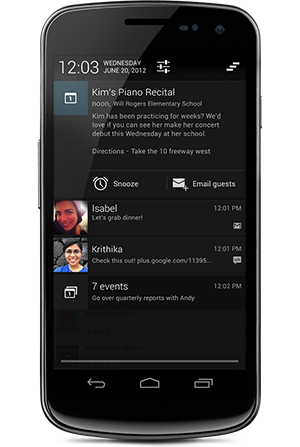
Google also improved the notification shade in Jelly Bean by adding actions and expansion options to the notifications. When you pull down the notification bar for example, you'll notice the first notification is expanded. This is helpful if you want to see the first few sentences of an email, for example. You can expand and condense other notifications as well.
You'll also notice that different notifications have different actionable items. For example, depending on the notification, you can set a reminder, email guests related to a calendar event, call someone back if you missed their call, and much more.
The new notifications bar is also customizable to the extent that you can pinch to zoom or use two-finger swipe on individual notifications to see more or less information. As with Ice Cream Sandwich, you can dismiss notifications one by one by swiping them off the screen as well.